

FocusWall: Site Blocker
Erkan OZSOY Productivity iPhoneiPadiPod touch
FocusWall: Site Blocker is a free Productivity app for iPhone and iPad by Erkan OZSOY. Requires iOS 17.0. Updated October 6, 2026.
- Price
- Free
- on the App Store
- Size
- 5 MB
- Age 4+
- Updated
- Oct 6
- 2026 · v1.1.0
Screenshots



About FocusWall: Site Blocker
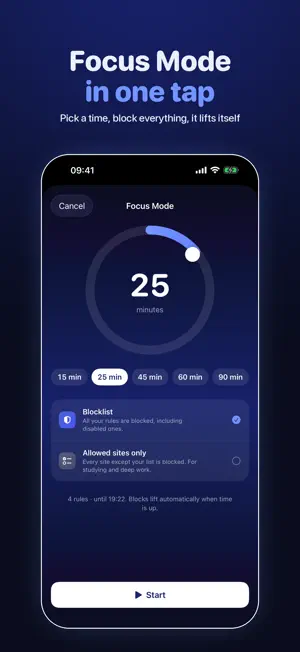
FocusWall blocks distracting websites and apps across your whole device, in every browser, including Chrome. KEY FEATURES • System-wide blocking Websites and apps are blocked everywhere on your device, not just in one browser. • Ready-made lists One tap adds whole categories: social media, video & streaming, gambling, shopping, news, crypto and more. • Smart domain matching Type "youtube" and get all country variants, so redirects can't sneak past your block. • Focus Mode Drag the dial to pick 5 to 180 minutes and every rule locks in. The countdown follows you on the Lock Screen, in the Dynamic Island and on your widgets, and blocks lift by themselves when time is up. • Allowed sites only For studying and deep work: during Focus Mode, keep only the sites on your list open and block the rest of the web. • Schedules Automate your blocks: work hours on weekdays, evenings off, whatever fits your routine. • Daily limits Set a per-app daily usage limit. When you go over, the app is blocked until midnight. • Mindful pause Turn it on and the 10-minute allow button no longer opens anything instantly: you get a 10-second breathing pause first, then decide. • Protection you can't sneak past Strict Mode removes the allow button entirely, a puzzle and an optional PIN stand between you and the off switch, Locked Hours freeze your rules at night, and app deletion can be blocked so uninstalling isn't an escape. • Shortcuts and Control Center Start Focus Mode from Shortcuts automations, for example when you arrive at work, or from a Control Center button. • Insights Blocked attempts, attempts by hour and day, focus streaks, weekly trends, your weakest hours and a weekly summary notification. PRIVACY FIRST All your data stays on your device. No accounts, no analytics, no tracking. FOCUSWALL PRO Unlimited rules and domains, Focus Mode, allowed sites only, schedules and app deletion blocking are available with FocusWall Pro, monthly, yearly or lifetime. Terms of Use (standard Apple EULA): https://www.apple.com/legal/internet-services/itunes/dev/stdeula/
What’s new
Version 1.1.0 · Updated October 6, 2026
• Focus Mode, redesigned: drag the dial to set your time, and follow the countdown on your Lock Screen and in the Dynamic Island. • New "Allowed sites only" mode: keep just the sites you need open while you study or work. • Mindful pause: an optional 10-second breath before any 10-minute allow. • Block app deletion, so uninstalling isn't a way out. • Start Focus Mode from Shortcuts or a Control Center button. • Weekly summary notification with your blocked attempts and focus streak. • A fresh home screen with today's blocked attempts and your focus streak, plus a new Pro screen. • Fixed: the 10-minute allow now works for every blocked item, even with very large block lists.
App privacy
The developer, Erkan OZSOY, reported these privacy practices to Apple.
Data Not Collected
The developer does not collect any data from this app.
Alternatives to FocusWall: Site Blocker
Looking for apps like FocusWall: Site Blocker? Here are 6 similar apps on the App Store. The highest rated is PiP Screen Translate (4.6/5), and all 6 are free to download.
-
 Entrepreneur Quotes
4.1
-
 My Contacts Backup + Transfer
4.2
-
 Swahili Translator Offline
4.1
-
 RDC-DLD
-
 PiP Screen Translate
4.6
-
 Minimal Launcher – on point
1.0
| App | Rating | Price | Last updated | Compare |
|---|---|---|---|---|
| FocusWall: Site Blocker | – | Free | October 6, 2026 | |
| Entrepreneur Quotes | 4.1 / 5 (64) | Free | Mar 24, 2025 | Compare |
| My Contacts Backup + Transfer | 4.3 / 5 (16) | Free | Jul 29, 2024 | Compare |
| Swahili Translator Offline | 4.1 / 5 (16) | Free | Jun 16, 2026 | Compare |
| RDC-DLD | – | Free | Nov 2, 2026 | Compare |
| PiP Screen Translate | 4.6 / 5 (41) | Free | Nov 3, 2026 | Compare |
| Minimal Launcher – on point | 1.0 / 5 (1) | Free | Nov 4, 2026 | Compare |