

CoFo: Knitting & Crochet
Dahee Jeong Lifestyle iPhoneiPadiPod touch
CoFo: Knitting & Crochet is a free Lifestyle app for iPhone and iPad by Dahee Jeong. Requires iOS 15.0. Updated November 23, 2026.
- Price
- Free
- on the App Store
- Size
- 314 MB
- Age 4+
- Updated
- Nov 23
- 2026 · v1.0.11
Screenshots
Save to Pinterest


About CoFo: Knitting & Crochet
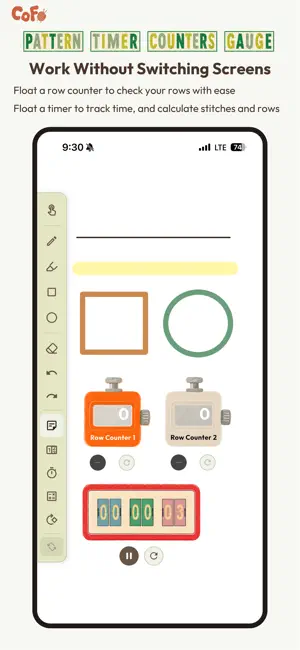
CoFo is a knitting diary app that goes with you "From Cast on to Finished object." [Project Management] - Keep all your knitting projects in one place and sort them into in-progress and finished. - Count stitches and rows with the row counter, and set a target row count. - Upload your patterns (PDF or images) and mark them up with drawing tools in the viewer. Float a row counter and timer over your pattern to knit comfortably. - Register your yarns and let CoFo calculate how much you have and how much you need. - Use the gauge calculator to quickly work out stitch and row counts. - Record your progress with photos and notes in the album and memo. - Create monthly report cards to save and share your finished projects beautifully. [Pattern Studio] - Build your own charts with the knitting and crochet chart editor. - Draw pixel art by hand, or convert a photo into pixel art. - Design freely on the pattern builder canvas. - Shape a garment from your measurements with the Draft feature. - Move patterns made in Pattern Studio into Project Management and start knitting right away. [Privacy] CoFo is a local-first app: most of your data stays on your device. No sign-up needed. Just tap "Get started for free" and begin. [Extras] - Korean / English support - Two themes: Sage and Serene From the moment you pick up your needles to the moment you hold up your finished piece, knit with CoFo.
What’s new
Version 1.0.11 · Updated November 23, 2026
[Pattern Studio · Draft] • Send lines drawn in a Draft to a knitting chart. They become stair-step outline lines based on your gauge (stitches and rows per 10 cm). • Use "Import from Draft" in the chart list or "Send to chart" in the Draft screen. You can pick several parts and place them in one chart. • After editing the Draft, "Reload from Draft" updates only the lines; symbols already placed in the chart stay put. • Move the imported lines, and dim the cells outside the outline. • When copying a chart, choose whether to copy its Draft too. • Chart cards show the linked Draft name, and Draft cards show the linked chart names. • Flip all lines or selected lines horizontally or vertically. • Diagonal lines can now be turned into stair-step lines. • Dashed lines stay dashed when other lines connect to them. • The stair-step stitch and row spacing now follows the Draft's gauge automatically. • After drawing, a line stays selected: drag it or its nodes to move it or change its length. Tap outside to deselect. • Line length updates live while you drag a node. • Long-press a node for 1 second to split it, or long-press a free node placed on another line or node for 1 second to reconnect it. • Long press now takes 1 second instead of 0.5. • Pinch zoom now zooms in on the spot you touch. • Lines now snap to the finest grid visible at your zoom level. [Pattern Studio · Pixel Art] • Drag a selected area to move it. To select a new area, tap once to deselect first. • Fixed zooming out not working after zooming in while in selection mode. [Other] • Fixed a gap appearing between project cards on the Pattern Studio home screen.
App privacy
The developer, Dahee Jeong, reported these privacy practices to Apple.
Data Not Collected
The developer does not collect any data from this app.
Alternatives to CoFo: Knitting & Crochet
Looking for apps like CoFo: Knitting & Crochet? Here are 6 similar apps on the App Store. The highest rated is YarnFit: Knit & Crochet Charts (5.0/5), and all 6 are free to download.
-
 Knitogether: Knit Row Counter
-
 KnitTally
-
 Hankko Friends
-
 KnitMemo
-
 KnitPad: Knitting Charts
-
 YarnFit: Knit & Crochet Charts
5.0
| App | Rating | Price | Last updated | Compare |
|---|---|---|---|---|
| CoFo: Knitting & Crochet | – | Free | November 23, 2026 | |
| Knitogether: Knit Row Counter | – | Free | Oct 11, 2026 | Compare |
| KnitTally | – | Free | Nov 6, 2026 | Compare |
| Hankko Friends | – | Free | Nov 23, 2026 | Compare |
| KnitMemo | – | Free | Nov 10, 2026 | Compare |
| KnitPad: Knitting Charts | – | Free | Nov 18, 2026 | Compare |
| YarnFit: Knit & Crochet Charts | 5.0 / 5 (3) | Free | Nov 9, 2026 | Compare |