

Onefast: Fasting Timer
Nguyen Dinh Chung Health & Fitness iPhone
Onefast: Fasting Timer is a free Health & Fitness app for iPhone by Nguyen Dinh Chung. Requires iOS 17.0. Updated September 17, 2026.
- Price
- Free
- on the App Store
- Size
- 4 MB
- Age 4+
- Updated
- Sep 17
- 2026 · v1.0.1
Screenshots
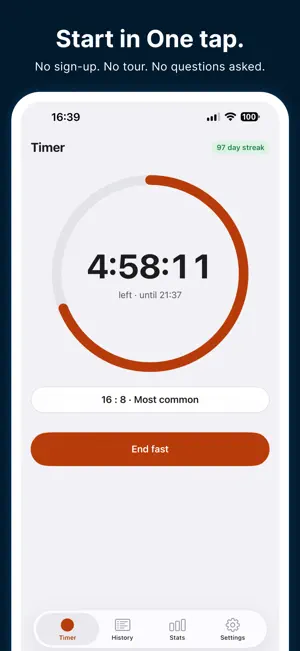

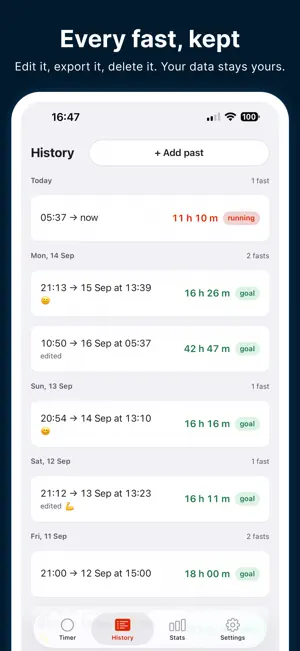

About Onefast: Fasting Timer
A fasting timer that does one thing well. Pick a plan, tap Start, and Onefast counts. The time left is on your lock screen and in the Dynamic Island, so you never open the app just to look. When the goal is reached it tells you once, then keeps counting, up to seven days. ONE TAP No sign-up, no questions, no tour. The first screen is the plan picker with 16:8 already selected; the second is the timer. That is the whole setup. ALWAYS RIGHT The timer is a clock, not a counter. Force-quit the app, restart the phone, change time zone — it comes back showing the true elapsed time, to the second. The widget, the Live Activity and the app all read the same moment. YOURS TO EDIT Forgot to tap End? Fix the time afterwards. Add a fast you did last week. Overlaps are named in words, not blocked silently. Fasts longer than 24 hours are allowed — Onefast asks once whether you meant it, then never again. QUIET WHEN YOU WANT Three switches: Live Activity with Dynamic Island, the lock screen widget, and the home screen widget. Notifications turn on and off one kind at a time, and the mid-fast ones start off. PLANS 12:12, 14:10, 16:8, 18:6, 20:4 and one meal a day are built in. Up to five named custom plans and a weekly schedule with Pro. NO ADS. EVER. Not on the free tier, not after you buy. Onefast has no server, no account and no analytics. Your history lives on your iPhone and, if you turn it on, in your own private iCloud. ONEFAST PRO Unlimited history (free keeps the last 30 days), 30-day and all-time stats with charts, month and year summaries, insights from your own record, milestones you can share, a weekly schedule with rest days, up to five named custom plans, two-way weight sync with Apple Health, a weight goal line on your chart, ten ring colours and app icons or a colour of your own, a medium calendar widget, and CSV export. Two prices, one name: a yearly subscription that auto-renews until cancelled, or a single lifetime purchase. No trial. The price is on screen before you tap anything. Everything that makes the timer usable — lock screen, notifications, backup, editing — stays free with or without Pro. Onefast is a timer. It gives no medical or dietary advice; talk to a professional before changing how you eat. Available in English, 日本語, 한국어, 繁體中文, Italiano, Nederlands, Deutsch, Français, Español, Português (Brasil), العربية, Türkçe and Tiếng Việt. Terms of Use: https://www.apple.com/legal/internet-services/itunes/dev/stdeula/ Privacy Policy: https://primetruthteam.github.io/onefast/privacy/
What’s new
Version 1.0.1 · Updated September 17, 2026
One icon, one app. Onefast now keeps a single app icon. Choosing a ring colour still changes the timer and the widget, but it no longer swaps the icon on your Home Screen — and if you had picked a different one, it goes back to the original.
App privacy
The developer, Nguyen Dinh Chung, reported these privacy practices to Apple.
Data Not Collected
The developer does not collect any data from this app.
Alternatives to Onefast: Fasting Timer
Looking for apps like Onefast: Fasting Timer? Here are 6 similar apps on the App Store. The highest rated is Next Set - A Workout Tracker (5.0/5), and all 6 are free to download.
-
 Lockscreen Fasting Timer
-
 Next Set - A Workout Tracker
5.0
Next Set - A Workout Tracker
5.0
-
 Fasting & Health Tracker
-
 FastJoy: Fasting Tracker
-
 FastTrack Fasting Tracker
5.0
FastTrack Fasting Tracker
5.0
-
 Super Fasting Tracker
| App | Rating | Price | Last updated | Compare |
|---|---|---|---|---|
| Onefast: Fasting Timer | – | Free | September 17, 2026 | |
| Lockscreen Fasting Timer | – | Free | Aug 26, 2026 | Compare |
| Next Set - A Workout Tracker | 5.0 / 5 (2) | Free | May 28, 2025 | Compare |
| Fasting & Health Tracker | – | Free | Oct 17, 2026 | Compare |
| FastJoy: Fasting Tracker | – | Free | Jun 17, 2026 | Compare |
| FastTrack Fasting Tracker | 5.0 / 5 (1) | Free | Oct 4, 2026 | Compare |
| Super Fasting Tracker | – | Free | Aug 13, 2026 | Compare |