

Business Card Scanner - AI OCR
Mikail Yurt Business iPhoneiPadiPod touch
Business Card Scanner - AI OCR is a free Business app for iPhone and iPad by Mikail Yurt. Requires iOS 17.0. Updated October 15, 2026.
- Price
- Free
- on the App Store
- Size
- 4 MB
- Age 4+
- Updated
- Oct 15
- 2026 · v2026.10
Screenshots



About Business Card Scanner - AI OCR
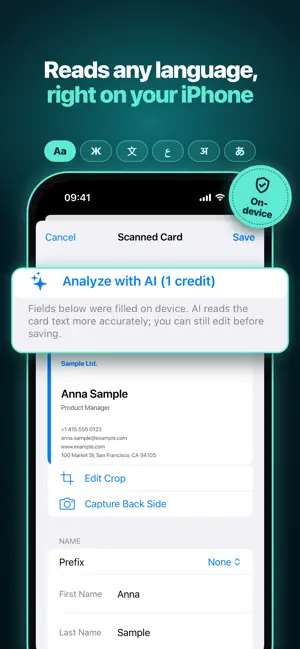
Point your iPhone at a business card. The text is read on your device, sorted into name, company, phone and email, and saved to your own card archive. Add it to Contacts with one tap. HOW IT WORKS • Scan a card with the camera, or pick a photo from your library. Text recognition runs on your iPhone, in whatever language the card is written in. • Check the fields, fix anything, add a note or the event where you met. • Save. The card goes into your archive on your device and in your iCloud. • Add it to Contacts when you want to. Cards go into their own contact group, one card at a time, so your address book stays clean. WHAT YOU GET • Unlimited archive. No card count limits, ever. • Front and back of every card, received date, event tag, location and notes. • Search by name, company, keyword, date or place. Sort by name, company, date or distance. • Export vCard and CSV, always free and unlimited. • Your own card as a QR code. Enter your details once and share a vCard QR or a .vcf file. • Batch mode for a stack of cards after a conference. • Dictate notes instead of typing them. • Reads vCard QR codes printed on cards directly, no credits needed. AI PARSING, ONE CREDIT AT A TIME Scanning, saving, searching and exporting work without an account and without credits. When a card is tricky, tap "Analyze with AI". The recognized text is sent through our server to an AI model, which sorts it into the right fields, including titles and honorifics. One credit per card. You decide card by card; nothing is sent automatically. • Sign in with Apple and get 20 free credits. • Credit packs: 50, 250 or 1000 credits. One-time purchase. • Credits never expire. No subscription. No ads. PRIVACY • Text recognition happens on your iPhone. • Your cards are stored on your device and in your own iCloud. Your card data is never permanently stored on our servers. • Before the first AI parse, the app tells you that the recognized text is sent to an AI provider and is not stored. You can decline and keep working on device. • No analytics, no ad tracking, no third-party SDKs. • No username or password. Sign in with Apple only when you buy credits. LANGUAGES The app is available in 20 languages. Cards can be in any language; recognition does not depend on the app language. REQUIREMENTS iPhone with iOS 17 or later. An account is only needed for AI parsing and purchases.
What’s new
Version 2026.10 · Updated October 15, 2026
• New Support section in Settings: Rate the App, Help & Support and Privacy Policy • Anonymous usage statistics help us improve the app: only counts, such as how many cards were scanned, never card contents. You can turn them off in Settings → Privacy
App privacy
The developer, Mikail Yurt, reported these privacy practices to Apple.
Data Linked to You
The following data, which may be collected and linked to your identity, may be used for the following purposes:
- Purchases: Purchase History
- Identifiers: User ID
Used for: App Functionality
Data Not Linked to You
The following data, which may be collected but is not linked to your identity, may be used for the following purposes:
- Usage Data: Product Interaction
Used for: Analytics
Alternatives to Business Card Scanner - AI OCR
Looking for apps like Business Card Scanner - AI OCR? Here are 6 similar apps on the App Store. The highest rated is Cardr: Business Card Scanner (4.9/5), and all 6 are free to download.
-
 Private Card Case & Contacts
-
 CardLens - Scan to Contacts
-
 Business Card Scanner CardScan
-
 Hager Win
-
 Cardr: Business Card Scanner
4.9
Cardr: Business Card Scanner
4.9
-
 GLICO General - Smart Insure
| App | Rating | Price | Last updated | Compare |
|---|---|---|---|---|
| Business Card Scanner - AI OCR | – | Free | October 15, 2026 | |
| Private Card Case & Contacts | – | Free | Sep 27, 2026 | Compare |
| CardLens - Scan to Contacts | – | Free | Oct 8, 2026 | Compare |
| Business Card Scanner CardScan | – | Free | Sep 9, 2026 | Compare |
| Hager Win | – | Free | Oct 9, 2026 | Compare |
| Cardr: Business Card Scanner | 4.9 / 5 (12) | Free | Oct 10, 2026 | Compare |
| GLICO General - Smart Insure | – | Free | Oct 12, 2026 | Compare |