

Dragonfly: Mac Trackpad & Dock
Khizar Alam Productivity iPhoneiPadiPod touch
Dragonfly: Mac Trackpad & Dock is a free Productivity app for iPhone and iPad by Khizar Alam. Rated 5.0/5 from 1 ratings. Requires iOS 26.2.
- Rating
- 5.0
- 1 ratings
- Price
- Free
- on the App Store
- Size
- 11 MB
- Age 12+
- Updated
- Oct 21
- 2026 · v1.7
Screenshots

About Dragonfly: Mac Trackpad & Dock
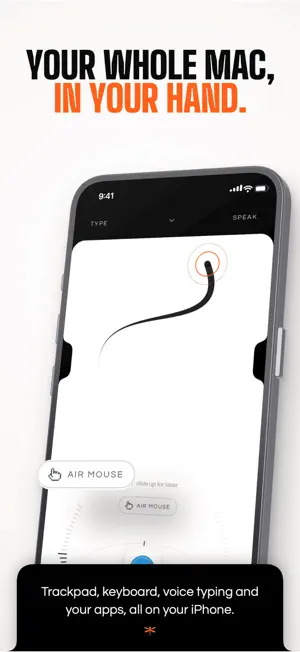
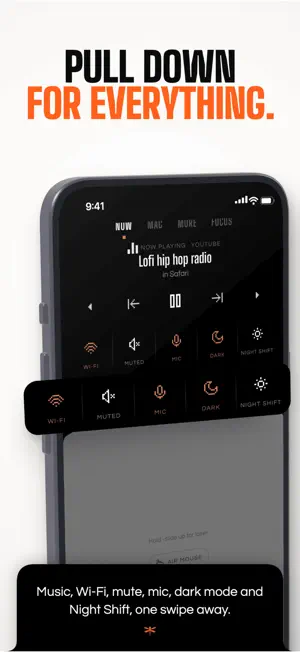
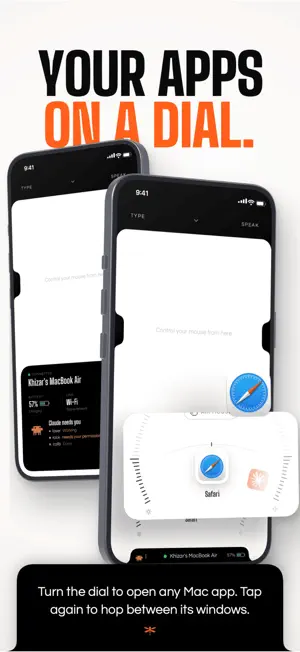
Use your iPhone as a trackpad and keyboard for your Mac. Control your MacBook or Mac mini from the couch, the bed or across the room: point, click, scroll, type, present slides and play music. It finds your Mac by itself. No ads, no codes, no dongles. Install the free Dragonfly Server app on your Mac once. After that, open Dragonfly on your iPhone and it connects on its own, over Wi-Fi with Bluetooth as a backup. MADE FOR • Watching movies and YouTube on your MacBook from bed • A Mac mini or MacBook plugged into your TV • Presenting Keynote and PowerPoint without a clicker • Typing on your Mac from across the room • Keeping your Mac awake while you step away • A desk setup where your Mac sits out of reach A TRACKPAD IN YOUR HAND • Your whole iPhone screen becomes a wireless trackpad for your Mac • Tap to click, two-finger tap to right-click, hold to drag • Two-finger scroll with inertia and pinch to zoom • 3- and 4-finger gestures, just like a MacBook trackpad • Haptics you can feel as you glide, with a trail and tap rings • Lost the pointer? A ring shows you where it is • Set your own pointer speed, scroll speed and scroll direction PRESENT WITHOUT A CLICKER • Next and previous slide keys for Keynote and PowerPoint • Hold the button and move your iPhone to steer the pointer • Slide up for a laser pointer on your slides • Walk the room while you talk, with nothing extra to carry or charge A KEYBOARD THAT TYPES AS YOU DO • Type on your iPhone and the words appear on your Mac live • Autocorrect, predictions, emoji and every language your iPhone knows • Voice typing: speak into any Mac app and watch your words appear • Search, reply to messages and fill in forms without getting up MEDIA CONTROLS FOR MOVIE NIGHT • Now playing from Spotify, Apple Music and YouTube • Play, pause, skip and seek from your phone • Volume and brightness on curved scales you can feel click KEEP YOUR MAC AWAKE • Jiggle keeps your Mac awake for as long as you set • Downloads, renders, uploads and long calls keep going while you're away YOUR MAC IN ONE TAP • Mission Control, Screenshot, Wi-Fi, Mute, Sleep and Lock • Switch dark mode, Night Shift, mic, sound output, Dock size and keyboard light • Your six favourite apps on a dial: turn to open, tap again for the next window • Force quit or hide a frozen app from your phone • Quit, sleep and log out ask before they go SEE YOUR SCREEN, SHARE YOUR CLIPBOARD • A live view of your Mac's screen on your iPhone, multiple displays included • Copy on your Mac, tap to paste on your iPhone, and back again ALSO INSIDE • Focus timer with 15, 25 or 50 minute sessions in the notch • Claude Code companion: see your sessions and get a note when one needs you • A heat map of where your pointer travels, ready to share • Control several Macs and switch between them in a tap FAST, STEADY AND PRIVATE • Finds your Mac on Wi-Fi by itself: no codes, no IP addresses • Bluetooth backup keeps the pointer and keys working if Wi-Fi drops • Everything goes straight from your iPhone to your Mac over your own network • No ads, ever • Permissions are asked one at a time, only when you tap them REQUIRES The free Dragonfly Server app on your Mac, running macOS 14 or later (Apple silicon or Intel). Download it from getthedragonfly.com, open it and allow Accessibility when asked. Keep your iPhone and Mac on the same Wi-Fi. Questions or ideas? Write to us from getthedragonfly.com/support. We read everything. About: https://www.getthedragonfly.com/about Support: https://www.getthedragonfly.com/support Privacy Policy: https://www.getthedragonfly.com/privacy Terms of Use: https://www.getthedragonfly.com/terms
What’s new
Version 1.7 · Updated October 21, 2026
What's New in This Version: Try it free • Weekly, Monthly and Yearly now start with a free trial: 3 days on Weekly, 7 days on Monthly and Yearly. Cancel before the trial ends and you pay nothing. A new Weekly plan • $3.99 a week, with everything in Dragonfly. Good for a trip, a project or a busy week. Voice typing in your language • Voice typing now listens in the language Dragonfly is set to. Pick German and speak German; pick Japanese and speak Japanese. It even matches your region, like British English or Brazilian Portuguese. A clearer plans screen • Before you subscribe, Dragonfly shows what Weekly, Monthly or Yearly adds up to next to Lifetime, with two clear buttons: get Lifetime, or carry on with your plan. Plus small fixes and polish.
App privacy
The developer, Khizar Alam, reported these privacy practices to Apple.
Data Not Collected
The developer does not collect any data from this app.
Alternatives to Dragonfly: Mac Trackpad & Dock
Looking for apps like Dragonfly: Mac Trackpad & Dock? Here are 6 similar apps on the App Store. The highest rated is Mirra: Meet, Build, Ship (5.0/5), and all 6 are free to download.
-
 Brainlist Calendar
-
 Mirra: Meet, Build, Ship
5.0
Mirra: Meet, Build, Ship
5.0
-
 Fast Paste Keyboard+ Auto Copy
-
 StarCy - Dynamic Island AI
3.7
StarCy - Dynamic Island AI
3.7
-
 PastePal - Clipboard Assistant
5.0
PastePal - Clipboard Assistant
5.0
-
 Norrsken House Barcelona
| App | Rating | Price | Last updated | Compare |
|---|---|---|---|---|
| Dragonfly: Mac Trackpad & Dock | 5.0 / 5 (1 rating) | Free | October 21, 2026 | |
| Brainlist Calendar | – | Free | Sep 17, 2026 | Compare |
| Mirra: Meet, Build, Ship | 5.0 / 5 (10) | Free | Oct 24, 2026 | Compare |
| Fast Paste Keyboard+ Auto Copy | – | Free | May 31, 2024 | Compare |
| StarCy - Dynamic Island AI | 3.7 / 5 (3) | Free | Mar 24, 2026 | Compare |
| PastePal - Clipboard Assistant | 5.0 / 5 (1) | Free | Jan 21, 2026 | Compare |
| Norrsken House Barcelona | – | Free | Aug 14, 2026 | Compare |