

Cacha Sign
LUIS ANTONIO HERNANDEZ VERA Productivity iPhoneiPadiPod touch
Cacha Sign is a paid Productivity app for iPhone and iPad by LUIS ANTONIO HERNANDEZ VERA. Requires iOS 17.0. Updated October 7, 2026.
- Price
- 4.99 USD
- on the App Store
- Size
- 5 MB
- Age 4+
- Updated
- Oct 7
- 2026 · v1.0
Screenshots



About Cacha Sign
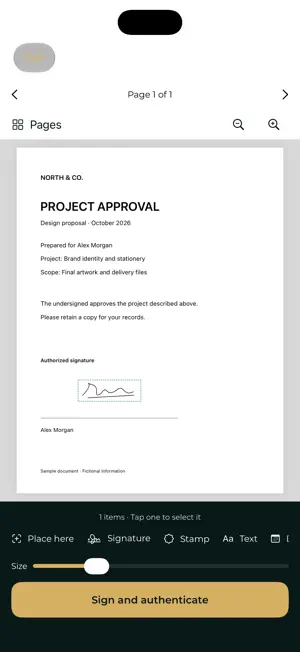
Your signature. Always with you. Cacha Sign lets you add your personal signature, stamps, text, and dates to PDFs on iPhone and iPad. Switch between English and Spanish in Settings, or follow your device language. Keep your signatures ready for the next document, save a signed copy, and share it through the iOS share sheet. MAKE YOUR MARK • Draw a signature with your finger or Apple Pencil, or import a signature image from Files. • Save multiple signatures and choose a default. • Add built-in APPROVED, RECEIVED, CONFIDENTIAL, and REVIEWED stamps, or create your own text and image stamps. • Add text and dates to your documents. PLACE IT YOUR WAY • Move and resize signatures and stamps. • Rotate elements and place them across PDF pages. • Use page thumbnails, zoom controls, and page fitting to find the right spot. SAVE AND SHARE • Keep signed PDFs in your on-device document library. • Search documents, sort by name, or filter to the last seven days. • Share a PDF, send it through an available email app, or save it to Files. LOCAL DIGITAL PROOF Authorize signing with Face ID, Touch ID, or your device passcode. Cacha Sign creates a local, self-signed certificate and a separate digital proof file. Share the PDF together with its .cachasign.json proof so the recipient can verify them in Cacha Sign. Verification checks whether the PDF matches its digital proof. The self-signed certificate does not establish your identity through an external certificate authority. To attribute a proof to a signer, compare the certificate fingerprint through a trusted channel. Signing dates come from the device; there is no external timestamp service. This version does not embed PAdES signatures or import .p12/.pfx certificates. ON YOUR DEVICE No account is required. Cacha Sign uses no servers or network services for document signing. Signature images and documents are stored locally. Signing keys are protected by device security and do not sync or transfer to another device. Requires iOS 17 or later. A device passcode must be configured for digital signing.
App privacy
The developer, LUIS ANTONIO HERNANDEZ VERA, reported these privacy practices to Apple.
Data Not Collected
The developer does not collect any data from this app.
Alternatives to Cacha Sign
Looking for apps like Cacha Sign? Here are 6 similar apps on the App Store. The highest rated is FleetLocate Periscope (4.8/5), and 5 of the 6 are free to download.
-
 Speaker Aid
4.0
Speaker Aid
4.0
-
 FleetLocate Periscope
4.8
FleetLocate Periscope
4.8
-
 Redex
2.3
Redex
2.3
-
 PureFlow
4.7
PureFlow
4.7
-
 Actions: To Do List Organizer
4.6
Actions: To Do List Organizer
4.6
-
 Timepage: Calendar Planner
4.6
Timepage: Calendar Planner
4.6
| App | Rating | Price | Last updated | Compare |
|---|---|---|---|---|
| Cacha Sign | – | 4.99 USD | October 7, 2026 | |
| Speaker Aid | 4.0 / 5 (2) | 0.99 USD | Jul 17, 2026 | Compare |
| FleetLocate Periscope | 4.8 / 5 (2,269) | Free | May 25, 2026 | Compare |
| Redex | 2.3 / 5 (3) | Free | May 8, 2024 | Compare |
| PureFlow | 4.7 / 5 (162) | Free | Jan 8, 2024 | Compare |
| Actions: To Do List Organizer | 4.6 / 5 (9,761) | Free | Oct 20, 2026 | Compare |
| Timepage: Calendar Planner | 4.6 / 5 (15,388) | Free | Oct 19, 2026 | Compare |
Compare Cacha Sign with the top alternatives: ratings, updates, ASO score and keyword gaps →