

BeanThere Coffee Log
Guy Merin Lifestyle iPhoneiPadiPod touch
BeanThere Coffee Log is a free Lifestyle app for iPhone and iPad by Guy Merin. Rated 5.0/5 from 1 ratings. Requires iOS 26.0. Updated September 24, 2026.
- Rating
- 5.0
- 1 ratings
- Price
- Free
- on the App Store
- Size
- 6 MB
- Age 4+
- Updated
- Sep 24
- 2026 · v1.3
Screenshots


About BeanThere Coffee Log
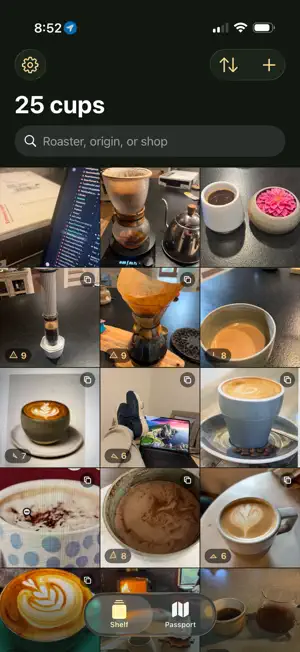
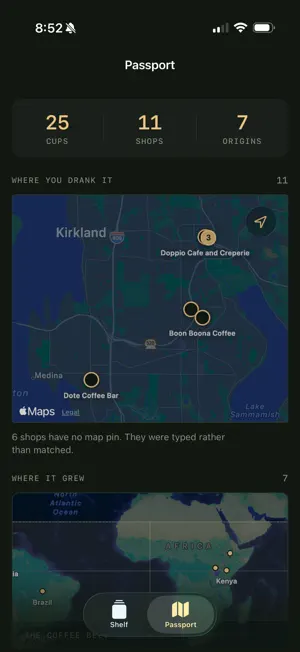
BeanThere is a log of every coffee you drink. Open an entry and fill in as much or as little as you like. The app works out where you are, reads the bag if you show it one, and files the entry on your shelf. Nothing is mandatory — including the photograph. WHAT IT DOES FOR YOU Point the camera at the bag and the roaster, the blend, the origin, the process and the roast level are read off it. Point it at a shop sign and the shop is found by name. Stand still for a moment and the coffeeshop you are sitting in is already filled in. Every value the app fills in is marked as a guess until you touch it, so you always know what has been checked and what has not. THREE SCORES, NOT ONE A brilliant espresso pulled by someone who resented making it, in a room with no chairs, is not an eight. So a cup is scored on the coffee, the barista and the room, kept separately and drawn as a single three-axis mark. A great cup from a surly barista makes a shape you will recognise a month later. READ IT BACK The shelf is your log as a grid of cups, newest first. The passport is the same entries read by place: a map of every shop you have been to, and under it the coffee belt with a dot on every origin you have drunk. SHARING IS A HANDOFF Neither Instagram nor Google Maps lets an app post on your behalf, and BeanThere does not pretend otherwise. It writes a caption, stages your photos, puts the words on the clipboard and opens the other app. You tap Post. The rating is burned into the corner of the photo on the way, so the score survives a repost. IT STAYS ON YOUR PHONE There is no account, no sign-up and no server of ours. Your log, your photographs and your scores are files on your device. Nothing is uploaded, nothing is analysed, and nothing is sold. The one thing that leaves is a coordinate, sent to Google to answer "which coffeeshop is this" — and only while you are logging a cup. APPLE INTELLIGENCE On a device that supports it, the bag reading and the caption writing run on Apple's on-device models. Your bags and your words are not sent anywhere to be processed. Without it, the app falls back to a keyword parser and plainer prose — everything still works, the fields just need more editing. BeanThere is for people who already know what they like and would rather have the record than the recommendation.
What’s new
Version 1.3 · Updated September 24, 2026
You can sign in now - with Apple, Google or an email address - and nothing about your log changes if you do. Your entries, photographs and scores stay on this phone either way: signing in does not upload them, and signing out does not remove them. Nothing in the app is behind an account, so if that is not what you came for, ignore it and everything works exactly as it did.
App privacy
The developer, Guy Merin, reported these privacy practices to Apple.
Data Not Linked to You
The following data, which may be collected but is not linked to your identity, may be used for the following purposes:
- Contact Info: Email Address, Name
- Identifiers: User ID
Used for: App Functionality
Alternatives to BeanThere Coffee Log
Looking for apps like BeanThere Coffee Log? Here are 6 similar apps on the App Store. The highest rated is Lydiana: AI Outfit Planner (5.0/5), and all 6 are free to download.
-
 Lydiana: AI Outfit Planner
5.0
Lydiana: AI Outfit Planner
5.0
-
 COO - Exclusive Local Savings
5.0
COO - Exclusive Local Savings
5.0
-
 ACIM Remind
4.9
ACIM Remind
4.9
-
 Boise Juice Co
3.2
Boise Juice Co
3.2
-
 RV+
2.0
RV+
2.0
-
 Mushroom Finder & Identifier
4.8
Mushroom Finder & Identifier
4.8
| App | Rating | Price | Last updated | Compare |
|---|---|---|---|---|
| BeanThere Coffee Log | 5.0 / 5 (1 rating) | Free | September 24, 2026 | |
| Lydiana: AI Outfit Planner | 5.0 / 5 (1) | Free | Oct 22, 2026 | Compare |
| COO - Exclusive Local Savings | 5.0 / 5 (9) | Free | Jan 6, 2026 | Compare |
| ACIM Remind | 4.9 / 5 (3,171) | Free | Oct 8, 2026 | Compare |
| Boise Juice Co | 3.2 / 5 (31) | Free | Jun 3, 2026 | Compare |
| RV+ | 2.0 / 5 (17) | Free | Oct 10, 2026 | Compare |
| Mushroom Finder & Identifier | 4.8 / 5 (52) | Free | Jul 7, 2026 | Compare |