

Kai: Stop Scrolling
ALEKSEY STEFANOV RUSENOV Health & Fitness iPhone
Kai: Stop Scrolling is a free Health & Fitness app for iPhone by ALEKSEY STEFANOV RUSENOV. Requires iOS 18.0. Updated September 30, 2026.
- Price
- Free
- on the App Store
- Size
- 3 MB
- Age 12+
- Updated
- Sep 30
- 2026 · v1.0
Screenshots



About Kai: Stop Scrolling
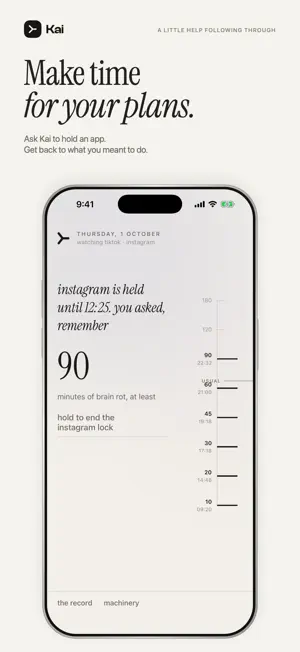
Meet Kai, the AI friend who texts you mid-scroll. You meant to check one thing. Now you've been scrolling for an hour. Kai helps you catch that moment and get back to what you wanted to do—with humor, a little teasing, and accountability that feels personal. A personality worth replying to Kai lives in iMessage. Expect short conversations, quick wit, and a nudge about the things you said mattered. Tell him what you're working toward, whether it's studying, finishing a project, or getting to bed. Text first. Block when needed. When you've agreed on a focus plan, Kai can temporarily block a selected app if you keep scrolling past his check-ins. You can also ask for a lock when you need help getting started, or end one in the app. Your phone. Your rules. Choose which apps Kai watches with Apple's Screen Time permission. Change your selection whenever you want. See your screen-time milestones in the app and manage your connection, permissions, and locks in one place. How your data is used Kai receives the messages you send to Kai—not your other conversations or content you view or type in other apps. With your permission, OpenAI processes your messages, relevant history, shared details and selected app usage-threshold data to generate replies and check-ins. SendBlue delivers your messages. You can decline or withdraw AI sharing in Machinery > ai privacy. Delete your active Kai account data in the app or by texting "delete everything" and confirming; retention exceptions are explained in the Privacy Policy. Getting started 1. Install Kai and tap "text kai" to start a conversation in iMessage. 2. Enter the code Kai sends you and subscribe through Apple. 3. Allow Screen Time access and choose the apps you want help with. Born in a Stanford dorm. Built for life outside your feed. Subscription A paid monthly subscription is required for app blocking and ongoing accountability. The price is shown before you purchase. Payment is charged to your Apple Account. Your subscription renews automatically unless canceled at least 24 hours before the current period ends. Manage or cancel it in your App Store account settings. Terms of Use: https://kai-production-cba6.up.railway.app/terms Privacy Policy: https://kai-production-cba6.up.railway.app/privacy
App privacy
The developer, ALEKSEY STEFANOV RUSENOV, reported these privacy practices to Apple.
Data Linked to You
The following data, which may be collected and linked to your identity, may be used for the following purposes:
- Purchases: Purchase History
- Contact Info: Name, Phone Number
- User Content: Emails or Text Messages, Other User Content
- Identifiers: User ID, Device ID
- Usage Data: Other Usage Data
- Other Data: Other Data Types
Used for: App Functionality
Alternatives to Kai: Stop Scrolling
Looking for apps like Kai: Stop Scrolling? Here are 6 similar apps on the App Store. The highest rated is Yoked - AI Fitness Coach (5.0/5), and all 6 are free to download.
-
 Ork
-
 Force Fitness TG
-
 Yoked - AI Fitness Coach
5.0
-
 SureGo
-
 Crampy - Period pain relief
3.7
-
 Elite Rugby App
3.2
| App | Rating | Price | Last updated | Compare |
|---|---|---|---|---|
| Kai: Stop Scrolling | – | Free | September 30, 2026 | |
| Ork | – | Free | Oct 5, 2026 | Compare |
| Force Fitness TG | – | Free | May 26, 2025 | Compare |
| Yoked - AI Fitness Coach | 5.0 / 5 (9) | Free | Aug 19, 2026 | Compare |
| SureGo | – | Free | Oct 20, 2026 | Compare |
| Crampy - Period pain relief | 3.7 / 5 (3) | Free | Sep 10, 2026 | Compare |
| Elite Rugby App | 3.3 / 5 (4) | Free | Sep 15, 2026 | Compare |