

UglyPDF: AI Invoice & CV Maker
Amon Chowdhury Graphics & Design iPhoneiPadiPod touch
UglyPDF: AI Invoice & CV Maker is a free Graphics & Design app for iPhone and iPad by Amon Chowdhury. Requires iOS 17.0. Updated October 26, 2026.
- Price
- Free
- on the App Store
- Size
- 9 MB
- Age 4+
- Updated
- Oct 26
- 2026 · v1.1.2
Screenshots


About UglyPDF: AI Invoice & CV Maker
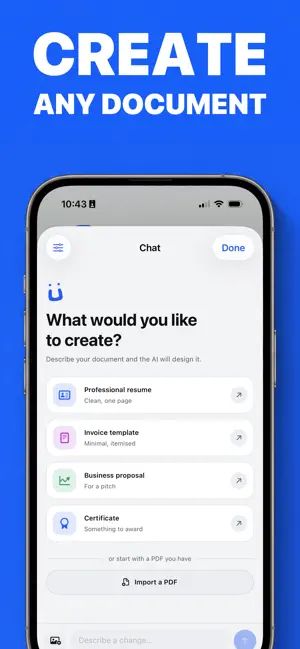
Tell UglyPDF what you need and watch a finished document appear. Then change anything by hand: the text, the images, the colors, the layout. Invoices, resumes, reports, proposals, certificates, letters, contracts, flyers and more, signed and ready to send as a PDF. No templates to fight. No design skills needed. CREATE BY CHATTING • Describe the document in plain words: "a clean invoice for my design studio", "a two-page resume for a software engineer". • Watch the pages build in front of you while the AI works. • Ask for changes the same way: "make it more modern", "add my logo to the header", "shorten the summary". • Pick how hard it thinks. Base is fastest and spends the fewest credits, Thinking reasons before it writes, Pro goes deepest. EDIT EVERY DETAIL • Tap any text and rewrite it in a native editor. • Move, resize, rotate, duplicate and delete elements with your fingers. • Change fonts, colors, spacing, backgrounds, gradients and borders. • Add photos from your library and crop them in place. • Add and reorder pages. Switch the whole theme in one tap. • Undo and redo everything. Every version is kept. SIGN YOUR DOCUMENTS • Draw your signature with a finger or Apple Pencil. Or type your name and pick a style. • Drag it into place on the page. • Save it once and use it on your next document. YOUR BRAND ON EVERY PAGE • Make a brand kit from your logo or your website. • New documents come out with your logo, colors and fonts. START FROM A PDF YOU ALREADY HAVE • Import a PDF under 20 MB and make it editable. • Fix the wording, restyle it or rebuild it in a new look. EXPORT • PDF, rendered server-side for print-ready, pixel-perfect output. • PNG or JPEG, one image per page, for sharing anywhere. YOUR PROJECTS, EVERYWHERE Documents save to your account automatically. Start on your iPhone and pick up on your iPad or at uglypdf.com. IN YOUR LANGUAGE English, Spanish, Chinese, Hindi, Arabic, French, Portuguese, Japanese, German, Korean and Bengali. FREE TO START Your account starts with free credits. Each document or edit spends a few. Exports are free and unlimited, with no watermark. Privacy Policy: https://uglypdf.com/privacy Terms of Use: https://uglypdf.com/terms Questions? Something still looks ugly? [email protected]
What’s new
Version 1.1.2 · Updated October 26, 2026
UglyPDF is ready for iPhone Duo. • Open it up and turn it sideways. Your document and the chat sit side by side. • Edit, sign and export on the big screen, just like on your phone. Something ugly? Tell us at [email protected].
App privacy
The developer, Amon Chowdhury, reported these privacy practices to Apple.
Data Not Collected
The developer does not collect any data from this app.
Alternatives to UglyPDF: AI Invoice & CV Maker
Looking for apps like UglyPDF: AI Invoice & CV Maker? Here are 6 similar apps on the App Store. The highest rated is Ritn3D: Floor Plan to 3D Home (5.0/5), and all 6 are free to download.
-
 Tiang: Home Plan & Room Design
-
 ThemeCloud: Widget Icons Theme
4.7
ThemeCloud: Widget Icons Theme
4.7
-
 Renosnap - AI Home Design
4.8
Renosnap - AI Home Design
4.8
-
 Ritn3D: Floor Plan to 3D Home
5.0
Ritn3D: Floor Plan to 3D Home
5.0
-
 Funart: AI Effects & Filters
-
 Criativei
| App | Rating | Price | Last updated | Compare |
|---|---|---|---|---|
| UglyPDF: AI Invoice & CV Maker | – | Free | October 26, 2026 | |
| Tiang: Home Plan & Room Design | – | Free | Oct 24, 2026 | Compare |
| ThemeCloud: Widget Icons Theme | 4.7 / 5 (19) | Free | Aug 3, 2025 | Compare |
| Renosnap - AI Home Design | 4.8 / 5 (11) | Free | Jul 7, 2026 | Compare |
| Ritn3D: Floor Plan to 3D Home | 5.0 / 5 (1) | Free | Oct 23, 2026 | Compare |
| Funart: AI Effects & Filters | – | Free | Sep 17, 2026 | Compare |
| Criativei | – | Free | Aug 11, 2026 | Compare |