

Voice Recorder+ Speech to Text
Rexora Innovations LLP Business iPhoneiPadiPod touch
Voice Recorder+ Speech to Text is a free Business app for iPhone and iPad by Rexora Innovations LLP. Requires iOS 17.6. Updated September 17, 2026.
- Price
- Free
- on the App Store
- Size
- 14 MB
- Age 4+
- Updated
- Sep 17
- 2026 · v1.0
Screenshots



About Voice Recorder+ Speech to Text
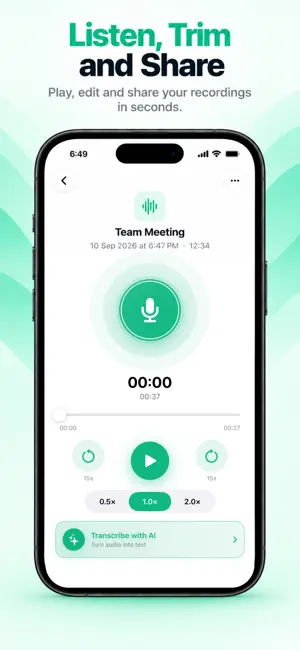
Voice Recorder & AI Transcription Record conversations, meetings, lectures, interviews, ideas, and notes with a simple, professional voice recorder. Turn your recordings into searchable text with AI-powered transcription, timestamps, summaries, and easy sharing. Whether you're recording a meeting on your Mac, capturing a lecture on iPad, or making a quick voice note on iPhone, keep everything organized in one place. Professional Voice Recording Capture high-quality audio for meetings, interviews, lectures, presentations, personal notes, and everyday ideas. High-quality audio recording M4A audio format Stereo recording Import existing audio files Long recording sessions Simple and intuitive recording controls Organize All Your Recordings Keep your recordings easy to find and manage. Search recordings quickly Organize recordings by category Work, Personal, Ideas, and Meetings View recording duration and details Rename and manage recordings Keep your recordings organized in one place Listen, Trim & Edit Manage your recordings with convenient playback tools. Play recordings instantly Trim unwanted sections 15-second forward and rewind controls Adjust playback speed 0.5×, 1× and 2× playback Share recordings easily AI-Powered Transcription Turn voice recordings into text with AI-powered transcription. Convert meetings, interviews, lectures, conversations, and voice notes into readable text with timestamps. AI voice transcription Timestamped transcript lines Searchable text Clean, editable transcripts Copy transcript text Export transcripts Share transcripts Generate AI summaries AI Meeting & Recording Summaries Save time by turning long recordings into useful summaries. AI can help identify the important information from your recorded conversations and make your notes easier to review. Perfect for: Business meetings Interviews Lectures and classes Research Presentations Voice notes Brainstorming sessions Personal recordings A Voice Recorder for Every Moment Use Voice Recorder & AI Transcription whenever you need to capture and revisit important information. Record → Listen → Trim → Transcribe → Summarize → Share Your recordings stay organized while powerful transcription tools help turn spoken words into useful text. Designed for Apple Devices Enjoy a clean and consistent recording experience across iPhone, iPad, and Mac. Whether you need a voice recorder for work, study, interviews, meetings, or personal notes, Voice Recorder & AI Transcription gives you the tools to record, manage, and transform your audio. Privacy Policy: https://sites.google.com/view/voicerecorderapp-privacypolicy/home Terms of Use: https://sites.google.com/view/voicerecorderapp-termsofuse/home
App privacy
The developer, Rexora Innovations LLP, reported these privacy practices to Apple.
Data Not Collected
The developer does not collect any data from this app.
Alternatives to Voice Recorder+ Speech to Text
Looking for apps like Voice Recorder+ Speech to Text? Here are 6 similar apps on the App Store. The highest rated is Authenticator & Passwords App (5.0/5), and all 6 are free to download.
-
 CV Maker & Resume Builder
-
 Authenticator & Passwords App
5.0
-
 AI Checker: Grammar & Spell
2.0
-
 File Manager and Documents App
-
 Fax App: Send Fax & PDF
4.5
-
 AI Email Assistant: Writer
5.0
| App | Rating | Price | Last updated | Compare |
|---|---|---|---|---|
| Voice Recorder+ Speech to Text | – | Free | September 17, 2026 | |
| CV Maker & Resume Builder | – | Free | Oct 23, 2026 | Compare |
| Authenticator & Passwords App | 5.0 / 5 (1) | Free | Oct 5, 2026 | Compare |
| AI Checker: Grammar & Spell | 2.0 / 5 (1) | Free | Oct 23, 2026 | Compare |
| File Manager and Documents App | – | Free | Sep 10, 2026 | Compare |
| Fax App: Send Fax & PDF | 4.5 / 5 (28) | Free | Oct 19, 2026 | Compare |
| AI Email Assistant: Writer | 5.0 / 5 (2) | Free | Oct 24, 2026 | Compare |