

Pixwand: Photo & Video Editor
Hai Chau Photo & Video iPhoneiPadiPod touch
Pixwand: Photo & Video Editor is a free Photo & Video app for iPhone and iPad by Hai Chau. Requires iOS 16.0. Updated October 23, 2026.
- Price
- Free
- on the App Store
- Size
- 28 MB
- Age 4+
- Updated
- Oct 23
- 2026 · v1.3.0
Screenshots


About Pixwand: Photo & Video Editor
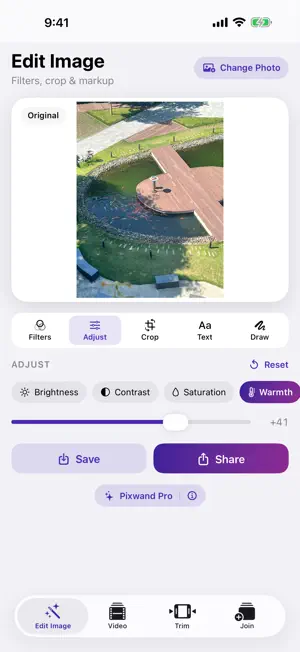
Pixwand is a clean, fast photo and video editor with five tools in one app. Pick a tool from the bar under the preview and see every change right away. EDIT IMAGE • 26 colour filters, from one-tap looks to graded presets such as Cinematic, Golden Hour, Matte, Airy and 35mm Film, plus your own .cube LUTs. • Adjust light and colour, shape Curves and fine-tune each colour with HSL, or let Auto do it. • Crop & Markup: draw, add arrows and type text right on the photo, rotate and flip. • Pro: Beauty for faces, a new background behind the subject, and the same edit on more photos at once. COLLAGE • Many layouts; drag to swap photos, then pick the spacing, corners and background. PHOTOS TO VIDEO • Turn up to 42 photos into a video, or start from a template. • A transition for the whole slideshow or a different one after each photo; Ken Burns motion on every photo. • Add music from a file or another video, or record a voice-over. TRIM VIDEO • Cut on a filmstrip that zooms in when you hold a handle still; cut out the middle too. • Crop to 9:16, 1:1, 4:5 or 16:9, rotate and flip; speed from 0.25× to 3×. • Text, stickers and place tags on the video, with animations. • Music with volume and fades that dips under speech. • Pro: Reverse and Boomerang, a speed curve you shape, Auto Reframe, background swap and Clean Up Sound for hum and hiss. JOIN VIDEOS • Combine up to 10 clips; touch and hold to reorder. • A different transition after each clip; tap ⓘ to preview any of them on your own clips. • Captions, stickers, music and the sound of each clip, on or off. EXPORT AND SHARE • MP4 or MOV, 480p to 1080p, and 2K or 4K with Pro; 24, 30 or 60 fps. • Ready-made settings for TikTok, Reels, Shorts and YouTube. • Save to Photos or share to Facebook, Instagram, Messages and more. MORE • Undo and redo, drafts and Projects to pick up later. • Shortcuts actions, home and lock screen widgets, "Open in Pixwand" from other apps, and editing from the Photos app. • Works on iPhone and iPad. BUILT RIGHT • Your photos and videos are edited on your device. Nothing is uploaded unless you share it. • No account, no sign-in. No Pixwand watermark on your exports. • Free: a short ad may appear after you save or share, never while you're editing. Pixwand Pro, a one-time purchase, removes the ads and unlocks 2K/4K and 60 fps export, HDR, many extra transitions, animated overlays and the Pro tools, including My Watermark for your own text or logo. • Available in 13 languages.
What’s new
Version 1.3.0 · Updated October 23, 2026
• New: Pixwand Pro — one purchase removes the ads and unlocks 4K and 60 fps export, HDR, many extra transitions and Pro tools. Restore it on your iPhone and iPad. • New look: every tab keeps its preview in sight — pick a tool from the bar below it and see each change right away. • New in Edit Image: Beauty for faces, Curves, HSL color, your own .cube looks, Auto fix and a new background behind the subject. • New: Collage tab — many layouts, drag to swap photos, borders and backgrounds. • New in Trim: crop and rotate, speed from 0.25× to 3× with a shapeable speed curve, Cut Out, Reverse, Boomerang, Auto Reframe and background swap. • New: Clean Up Sound removes hum and hiss; music gets volume, fades and lowers itself under speech. • New: text, stickers and place tags on the video, with animations; animated overlays such as hearts, confetti, petals and rain. • New in Photos to Video: templates, Ken Burns motion per photo, cut to the beat and up to 42 photos. • New in Join: a different transition after each clip; tap ⓘ to preview any transition on your own clips. • New: My Watermark — your text or logo on every export. • New: export presets for TikTok, Reels, Shorts and YouTube; 24, 30 or 60 fps; keep HDR. • New: undo and redo, drafts and Projects to pick up where you left off. • New: Shortcuts actions, home and lock screen widgets, "Open in Pixwand" from other apps and editing from the Photos app. • New: share to Facebook and Instagram, and use the camera from any tab. • iPad support. Now in Indonesian and German. • Stability improvements.
App privacy
The developer, Hai Chau, reported these privacy practices to Apple.
Data Used to Track You
The following data may be used to track you across apps and websites owned by other companies:
- Identifiers: Device ID
Data Linked to You
The following data, which may be collected and linked to your identity, may be used for the following purposes:
- Identifiers: Device ID
- Location: Coarse Location
- Usage Data: Product Interaction, Advertising Data
Used for: Third-Party Advertising, Developer’s Advertising or Marketing, Analytics
Data Not Linked to You
The following data, which may be collected but is not linked to your identity, may be used for the following purposes:
- Location: Coarse Location
- Usage Data: Product Interaction, Advertising Data
- Diagnostics: Performance Data, Other Diagnostic Data, Crash Data
- Other Data: Other Data Types
- Identifiers: Device ID
Used for: Third-Party Advertising, Developer’s Advertising or Marketing, Analytics, App Functionality