

Chorus Signage|Video Wall
kentaro hirahara Utilities iPhoneiPadiPod touch
Chorus Signage|Video Wall is a free Utilities app for iPhone and iPad by kentaro hirahara. Requires iOS 17.0. Updated October 6, 2026.
- Price
- Free
- on the App Store
- Size
- 64 MB
- Age 4+
- Updated
- Oct 6
- 2026 · v1.0.1
Screenshots


About Chorus Signage|Video Wall
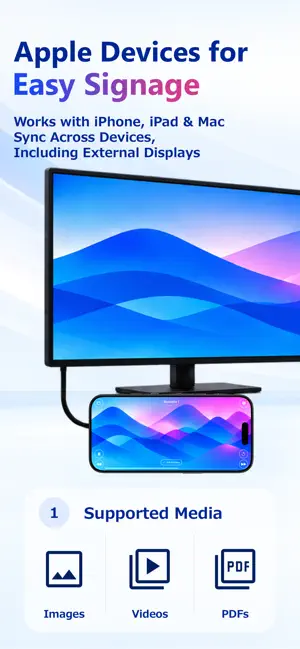
Turn an iPhone or iPad into digital signage, then expand to multiple screens when you need more. Loop photos, videos, PDFs, and more on one device. Connect nearby devices over Bluetooth with minimal timing drift, combine screens into one large display, or offset scenes for a relay effect. From store menus, reception, wayfinding, and trade shows to video walls, events, and art installations, Chorus Signage fits a wide range of uses. No dedicated hardware, cloud service, account, always-on internet connection, or Wi-Fi/LAN environment is required for local playback and Bluetooth sync. Build the setup you need with the Apple devices you already have. —— ■ Combine photos, videos, PDFs, and colors Add media and solid colors as scenes, arrange them freely, and play them in a loop. Import a PDF from Files to add each page as a scene. Set each scene’s duration, video speed, Auto Advance or Manual Advance, and transition. Adjust content fitting and background color in Display Settings; these settings are shared with connected devices during Bluetooth sync. Preview while you edit, and play or customize the included samples. —— ■ Precise multi-device Bluetooth sync Connect nearby iPhones and iPads to sync Scenario data, playback state, and playback timing with low latency—no Wi-Fi or local network required. Custom sync control aligns devices to a shared playback reference instead of merely sending the same commands. This minimizes drift in scene changes and video playback for a cohesive multi-screen display. Small missing media files can transfer automatically over Bluetooth. Share larger files in advance with AirDrop or file sharing. Share group join settings by QR code. Once each device has the required media, synchronized playback works without internet access. —— ■ Turn multiple screens into one display Mosaic mode shows one photo, video, PDF, or other item across multiple iPhones and iPads. Match the display area to each device’s position and screen size while minimizing playback drift, creating one large display. Create video exhibitions, digital art, and event visuals that go beyond a single screen. —— ■ Relay content from screen to screen Relay mode starts each display on a different scene by position and aligns transitions to shared timing, making content appear to pass from screen to screen. Base transitions on the current scene’s duration or a Fixed Interval. If there are more displays than scenes, assignment repeats from the first scene. —— ■ Start with one device A single iPhone or iPad can provide simple signage combining photos, videos, PDFs, and solid colors. —— ■ External display and Mac support Show content on an external display connected to your iPhone or iPad. Enable “Optimize for External Display” to use it as an independent display instead of mirroring the device screen. Treat the built-in and external displays as separate surfaces and include both in Mosaic or Relay mode. On a Mac with Apple silicon, run Chorus Signage as a “Designed for iPad” app. On iPhone and iPad, the app can prevent Auto-Lock, hold brightness at a fixed level, and automatically hide controls during playback. * External display optimization is available with the Remove Ads purchase or during an eligible reward period. —— ■ Share Scenarios with other devices Export a Scenario and its media as a Chorus Signage file, then send it by AirDrop or file sharing and import it on another device. Large photos and videos can be compressed in the app. —— ■ Ways to use Chorus Signage • Store menus, ads, reception, and waiting areas • Trade shows, exhibitions, and events • Classrooms, presentations, and workshops • Slideshows, video loops, and digital art • Multi-screen visuals, video walls, and notices —— Terms of Use (Apple Standard EULA): https://www.apple.com/legal/internet-services/itunes/dev/stdeula/
What’s new
Version 1.0.1 · Updated October 6, 2026
• Made minor fixes and improvements to usability and stability.
App privacy
The developer, kentaro hirahara, reported these privacy practices to Apple.
Data Used to Track You
The following data may be used to track you across apps and websites owned by other companies:
- Purchases: Purchase History
- Location: Coarse Location
- Identifiers: Device ID
- Usage Data: Product Interaction, Advertising Data
- Diagnostics: Crash Data, Performance Data
Data Linked to You
The following data, which may be collected and linked to your identity, may be used for the following purposes:
- Location: Coarse Location
- Identifiers: Device ID
- Usage Data: Product Interaction, Advertising Data
- Diagnostics: Crash Data, Performance Data
- Purchases: Purchase History
Used for: Third-Party Advertising, Analytics, Other Purposes
Data Not Linked to You
The following data, which may be collected but is not linked to your identity, may be used for the following purposes:
- Location: Coarse Location
Used for: Analytics
Alternatives to Chorus Signage|Video Wall
Looking for apps like Chorus Signage|Video Wall? Here are 6 similar apps on the App Store. The highest rated is PocketAdmin – IT Toolkit (5.0/5), and all 6 are free to download.
-
 APP-O F.WIS
-
 ISC NIRScan
-
 PocketAdmin – IT Toolkit
5.0
-
 WristChat: Work Chat for Watch
-
 VISUAMALL Smart Catalogue
4.0
-
 BT Keys: Keyboard & Trackpad
4.2
| App | Rating | Price | Last updated | Compare |
|---|---|---|---|---|
| Chorus Signage|Video Wall | – | Free | October 6, 2026 | |
| APP-O F.WIS | – | Free | May 25, 2026 | Compare |
| ISC NIRScan | – | Free | Jan 10, 2024 | Compare |
| PocketAdmin – IT Toolkit | 5.0 / 5 (1) | Free | Oct 21, 2026 | Compare |
| WristChat: Work Chat for Watch | – | Free | Apr 18, 2026 | Compare |
| VISUAMALL Smart Catalogue | 4.0 / 5 (1) | Free | Sep 7, 2026 | Compare |
| BT Keys: Keyboard & Trackpad | 4.3 / 5 (12) | Free | Oct 24, 2026 | Compare |