

Grid: Feed Planner & Preview
Faba Development LLC Photo & Video iPhoneiPadiPod touch
Grid: Feed Planner & Preview is a free Photo & Video app for iPhone and iPad by Faba Development LLC. Requires iOS 16.4. Updated September 15, 2026.
- Price
- Free
- on the App Store
- Size
- 64 MB
- Age 4+
- Updated
- Sep 15
- 2026 · v1.0
Screenshots
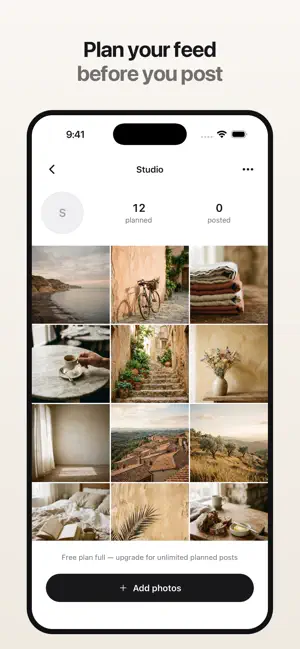
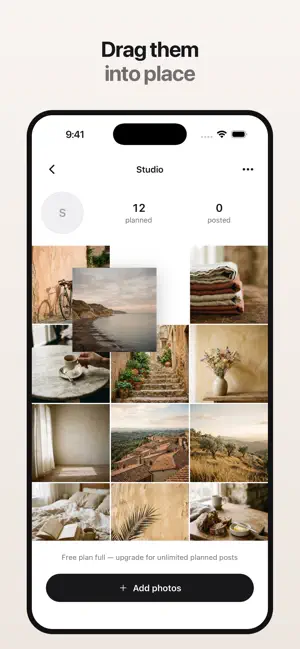


About Grid: Feed Planner & Preview
See your feed before you post. Grid is a planner for the three-column grid on your profile. Add the photos you are thinking of posting, drag them into place, and see exactly what your profile will look like once they are published — before you commit to any of it. PLAN THE WHOLE GRID Your planned posts sit above the ones you have already published, which is where a new post actually lands. Rearrange them until the grid looks right. The tile sitting closest to your existing posts is the one that goes out next, and Grid labels it so you never have to guess. DRAG AND DROP Touch and hold a photo, then drag it anywhere in your plan. Everything else slides out of the way. Try an order, try another, and put it back — none of it is published until you decide. TRY REMOVING A POST Hide any post to see what your profile would look like without it. It is not deleted, and bringing it back is one tap. SPLIT A PHOTO ACROSS YOUR GRID Cut one image into 3x1, 3x2 or 3x3 tiles that line up perfectly across your profile once they are all posted. Grid numbers them in the order to publish, because the last tile you post is the one that ends up top left — the part that is easy to get backwards. CAPTIONS AND NOTES Draft a caption while the photo is in front of you. Add private notes and a planned date for yourself. Grid never posts anything for you. MORE THAN ONE ACCOUNT Keep a separate plan for each profile you look after — personal, business, a client, or a look you are still deciding about. YOUR PHOTOS STAY ON YOUR PHONE Grid copies the photos you choose into its own storage on this device. Nothing is uploaded, there is no account to create, and there is no sign-in. It works with no connection at all. FREE AND PRO The free plan gives you one feed and twelve planned posts, with the full drag-and-drop planner, the preview, hiding, captions and notes. Grid Pro adds unlimited feeds, unlimited planned posts, the grid splitter and exports. Grid Pro is available monthly or yearly. Subscriptions renew automatically unless canceled at least 24 hours before the period ends; manage or cancel in your Apple ID settings. Privacy policy: https://luke-fairbanks.github.io/privacy-policy/grid/ Terms of use: https://www.apple.com/legal/internet-services/itunes/dev/stdeula/ Grid is not affiliated with, endorsed by, or connected to Instagram or Meta.
App privacy
The developer, Faba Development LLC, reported these privacy practices to Apple.
Data Not Linked to You
The following data, which may be collected but is not linked to your identity, may be used for the following purposes:
- Purchases: Purchase History
Used for: App Functionality
Alternatives to Grid: Feed Planner & Preview
Looking for apps like Grid: Feed Planner & Preview? Here are 6 similar apps on the App Store. The highest rated is Vervox AI: Viral Video Studio (5.0/5), and all 6 are free to download.
-
 Aftone : Film Photo Editor
-
 FeedPeek: Feed Planner
-
 Vervox AI: Viral Video Studio
5.0
Vervox AI: Viral Video Studio
5.0
-
 InstaGrid - Preview de Grid
-
 Grid: Feed Planner Photos
-
 Sky Changer AI : Sky Editor
| App | Rating | Price | Last updated | Compare |
|---|---|---|---|---|
| Grid: Feed Planner & Preview | – | Free | September 15, 2026 | |
| Aftone : Film Photo Editor | – | Free | Aug 6, 2026 | Compare |
| FeedPeek: Feed Planner | – | Free | Jun 25, 2026 | Compare |
| Vervox AI: Viral Video Studio | 5.0 / 5 (1) | Free | Sep 28, 2026 | Compare |
| InstaGrid - Preview de Grid | – | Free | Aug 4, 2026 | Compare |
| Grid: Feed Planner Photos | – | Free | Feb 26, 2025 | Compare |
| Sky Changer AI : Sky Editor | – | Free | Jul 8, 2026 | Compare |