

HLS Stream Player
Futoshi Ebata Utilities iPhoneiPadiPod touch
HLS Stream Player is a free Utilities app for iPhone and iPad by Futoshi Ebata. Requires iOS 27.0. Updated September 28, 2026.
- Price
- Free
- on the App Store
- Size
- 1 MB
- Age 4+
- Updated
- Sep 28
- 2026 · v1.6.0
Screenshots
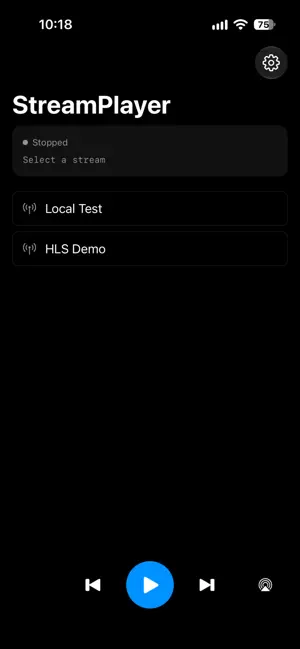
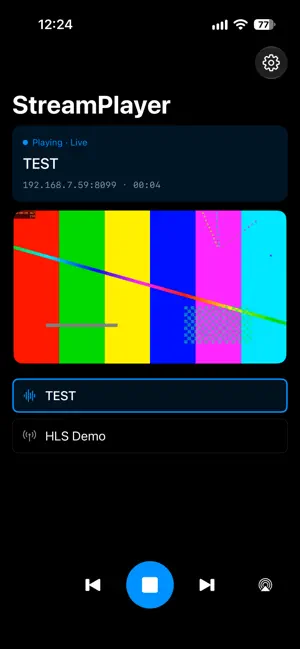

About HLS Stream Player
This app plays HLS (.m3u8) streams that are protected with HTTP Basic authentication -- the kind of stream a private or office server provides. You register the URL of your own server. The app ships with no stations and no stream list of its own. FEATURES - Register several streams and switch between them with one tap. - Works with streams that require a user name and password, over http or https. - Background playback. Audio keeps playing while you use other apps or with the screen off, and you can control it from the Lock Screen and Control Center. - The track forward and back controls on headphones and car audio switch to the next and previous stream. - Connection Test verifies the URL and the credentials before you try playback. - Import and export a settings file, so one person can configure the streams and everyone else imports them instead of typing URLs. - Automatic reconnection when the network drops, with a backoff of 1, 2, 4, 8 and 16 seconds. - Send the audio to an AirPlay speaker or a Bluetooth device from the output button on the main screen. - Give each stream its own artwork for the Lock Screen with an image URL, in the stream editor or the settings file. The app icon is used when none is set. - Streams with video show the picture on the main screen, and fill the screen when you turn the iPhone sideways. With a display connected by an HDMI cable, the picture appears on that display only. Streams without authentication can also show the picture on an Apple TV chosen from the output button; streams with authentication send only the audio. - Start and stop a stream from the Shortcuts app, from an automation such as connecting to your car over Bluetooth, or by asking Siri. Include the app name, for example "Play Office Radio with StreamPlayer". WHAT IT DOES NOT DO - In the background or with the screen locked, only the audio plays. - No offline playback and no recording. - One stream at a time. On http streams the user name and password are sent in near-plain text, so use them only on a private network. The app shows a warning when you do.
What’s new
Version 1.6.0 · Updated September 28, 2026
Apple TV - With an Apple TV chosen from the output button, streams without authentication now show their picture on the Apple TV as well. The iPhone shows "Playing on the external display" and stays upright. - Streams that need a user name and password still send only the audio to the Apple TV, and the picture stays on the iPhone.
App privacy
The developer, Futoshi Ebata, reported these privacy practices to Apple.
Data Not Collected
The developer does not collect any data from this app.
Alternatives to HLS Stream Player
Looking for apps like HLS Stream Player? Here are 6 similar apps on the App Store. The highest rated is Volume Units Converter (5.0/5), and 2 of the 6 are free to download.
-
 GPS Data with Speed & Altitude
-
 Speed Units Converter
1.0
Speed Units Converter
1.0
-
 Volume Units Converter
5.0
Volume Units Converter
5.0
-
 TriCalc:
-
 WearWithAll
5.0
WearWithAll
5.0
-
 Torque Unit Converter
4.6
Torque Unit Converter
4.6
| App | Rating | Price | Last updated | Compare |
|---|---|---|---|---|
| HLS Stream Player | – | Free | September 28, 2026 | |
| GPS Data with Speed & Altitude | – | 1.99 USD | Mar 27, 2026 | Compare |
| Speed Units Converter | 1.0 / 5 (1) | 1.99 USD | Oct 10, 2026 | Compare |
| Volume Units Converter | 5.0 / 5 (1) | 1.99 USD | Sep 24, 2026 | Compare |
| TriCalc: | – | Free | Jan 21, 2026 | Compare |
| WearWithAll | 5.0 / 5 (1) | Free | Jul 24, 2026 | Compare |
| Torque Unit Converter | 4.6 / 5 (12) | 1.99 USD | Sep 24, 2026 | Compare |
Compare HLS Stream Player with the top alternatives: ratings, updates, ASO score and keyword gaps →