

Compare Video & Photo—Sidefold
SEMIH YAMAC Photo & Video iPhoneiPadiPod touch
Compare Video & Photo—Sidefold is a free Photo & Video app for iPhone and iPad by SEMIH YAMAC. Requires iOS 17.0. Updated October 22, 2026.
- Price
- Free
- on the App Store
- Size
- 2 MB
- Age 4+
- Updated
- Oct 22
- 2026 · v1.2
Screenshots


About Compare Video & Photo—Sidefold
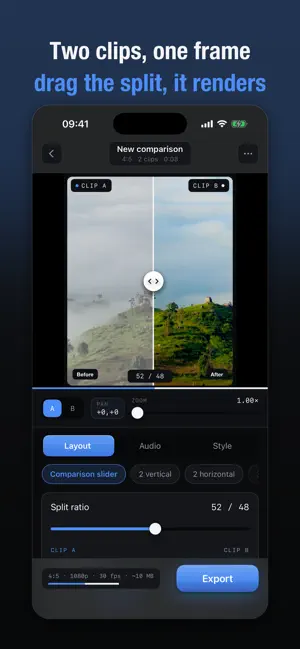
Sidefold puts two to four clips into a single frame and renders the result as one video on your device. Choose a layout, set how the frame splits, trim each clip, and the split you set is rendered into the exported file — not drawn over it afterwards. Nothing is uploaded. • A comparison slider whose divider is part of the exported video, with four motions: static, an opening sweep, a full wipe, or back and forth • Five layouts: the slider, two stacked, two side by side, one over two, and a 2×2 grid • Video and photo in the same frame, so a still can be compared against a clip • Automatic alignment by sound, which finds where two recordings share audio and sets the offset for you • Trimming, framing and audio level for each clip separately • A freeze frame at the end, so the comparison holds for a second or two after the clips finish • Your own logo in a corner, rendered into the exported video • No account, no servers, no analytics, no advertising FREE Three exports a day, every layout, every style preset, trimming, per-clip framing and audio. No watermark on any export, at any resolution. PRO Removes the daily limit and unlocks 4K, 60 fps, ProRes 422 output, automatic alignment by sound, and your own logo in the frame. Available as a yearly subscription or a one-time lifetime purchase. LAYOUTS The comparison slider is the signature: one clip over another, divided by a line you place anywhere between 15% and 85%. The divider can hold still, open once at the start, wipe all the way across, or sweep back and forth on a loop you set. The other four are fixed splits — two stacked, two side by side, one over two, and a 2×2 grid — for two, three or four clips. Labels sit in the corner you choose and are rendered into the video, so "Before" and "After" survive the export. STYLE Twelve presets, from a bare edge to a bordered card. Each one sets line thickness and colour, corner radius, margin, edge softness, shadow depth, border and background in one tap, and every value stays adjustable afterwards. Backgrounds can be a solid colour, a gradient or a blur of the footage itself. AUDIO Each clip keeps its own level and mute. Alignment by sound compares the two waveforms and reports how confident it is; the offset can also be stepped by hand, one frame at a time. TRIMMING Set an in-point and a length for each clip. Trimming is separate from sync offset: sync is a fine adjustment in frames, trimming is choosing which seconds to compare. FRAMING Pan and zoom each clip inside its own cell, up to 3×. What you see in the preview is what the encoder writes — the preview runs through the same engine as the export. EXPORT 9:16, 1:1, 4:5 or 16:9. Up to 4K, at 24, 30 or 60 frames per second, in H.264 or ProRes 422. Finished videos are saved to your photo library and can be shared straight from the app. SUBSCRIPTION Subscriptions renew automatically unless cancelled at least 24 hours before the end of the period. Payment is charged to your Apple Account. Manage or cancel in Settings. PRIVACY Your clips are not uploaded. The app does not read your photo library; it receives only the items you select in the system picker, and asks for photo permission only to save finished videos back. It makes no network requests of its own. Terms of Use (EULA): https://www.apple.com/legal/internet-services/itunes/dev/stdeula/ Privacy Policy: https://common-tuna-240.notion.site/Sidefold-Privacy-Policy-3d6e3b91ac0080cabb5fdd64537e0f72
What’s new
Version 1.2 · Updated October 22, 2026
New languages added.
App privacy
The developer, SEMIH YAMAC, reported these privacy practices to Apple.
Data Not Collected
The developer does not collect any data from this app.
Alternatives to Compare Video & Photo—Sidefold
Looking for apps like Compare Video & Photo—Sidefold? Here are 6 similar apps on the App Store. The highest rated is BitLens: Video Metadata Viewer (5.0/5), and all 6 are free to download.
-
 Daystack: Video Collage
-
 BitLens: Video Metadata Viewer
5.0
-
 Layerov : Photo Video Collage
-
 Videotify: Video editor
-
 Video Collage: Grid Maker
-
 Vidonna: AI Photo to Video
| App | Rating | Price | Last updated | Compare |
|---|---|---|---|---|
| Compare Video & Photo—Sidefold | – | Free | October 22, 2026 | |
| Daystack: Video Collage | – | Free | Oct 6, 2026 | Compare |
| BitLens: Video Metadata Viewer | 5.0 / 5 (2) | Free | Oct 22, 2026 | Compare |
| Layerov : Photo Video Collage | – | Free | Oct 21, 2026 | Compare |
| Videotify: Video editor | – | Free | Aug 24, 2026 | Compare |
| Video Collage: Grid Maker | – | Free | Aug 18, 2026 | Compare |
| Vidonna: AI Photo to Video | – | Free | Oct 27, 2026 | Compare |