

Quiet Meter
Ian Lehrer Utilities iPhoneiPadiPod touch
Quiet Meter is a free Utilities app for iPhone and iPad by Ian Lehrer. Requires iOS 16.4. Updated September 21, 2026.
- Price
- Free
- on the App Store
- Size
- 41 MB
- Age 4+
- Updated
- Sep 21
- 2026 · v1.0
Screenshots


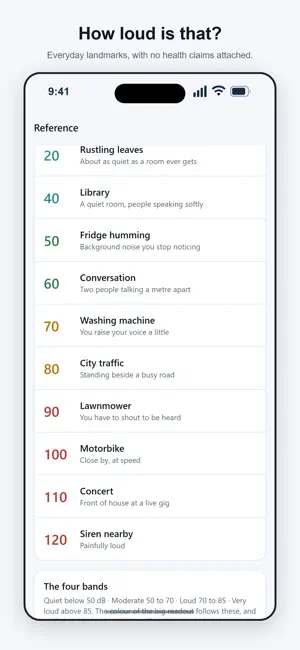

About Quiet Meter
Quiet Meter shows you how loud it is. You buy it once, for $4.99, and that is the end of the transaction. There is no subscription, no account and no analytics. The app is free to use, with an occasional full-screen ad that never appears while the meter is running, and one $4.99 payment removes the ads for good. HONEST ABOUT ACCURACY An iPhone microphone is designed for speech, not measurement. It applies automatic gain, compresses very loud sounds and rolls off deep bass. Quiet Meter converts the microphone level into an estimated dB SPL. It is an estimate, not a measurement. Nothing in this app is suitable for an official, workplace or legal purpose, and it makes no claims about hearing or health. CALIBRATION THAT STICKS A common complaint about decibel apps is that they read 28 dB in a silent room. Quiet Meter lets you fix that: set a calibration offset from -20 to +20 dB against a meter you trust, in half-decibel steps, and it stays set. The whole session (minimum, average and maximum) is corrected together. WHAT YOU GET FOR FREE, FOREVER • A live reading in large numerals you can read across a room • Minimum, average and maximum for the session • A rolling 45-second chart, colored by level • The full calibration screen, with a live reading to calibrate against • A reference table: library 40 dB, conversation 60, traffic 80, concert 110 • Your three most recent saved sessions, with notes and plain-text sharing • Dark mode, large tap targets, and full VoiceOver labeling QUIET METER PRO, $4.99 ONCE • No ads, permanently • Your complete session history, however many you save • Sessions you saved before buying reappear. Nothing was ever deleted • Share a session with the full reading-by-reading data, for a spreadsheet The microphone is requested only when you tap Start, and only ever used to read the level as the sound arrives. No audio is recorded for playback, saved, or sent anywhere. ABOUT THE ADS The free app shows a full-screen ad from Google AdMob at natural moments only: after you save a measurement, or after you share one. Never while the meter is running, never while the microphone is on, and never in your first sessions. The ads are non-personalized. Quiet Meter does not ask to track you and never sends your measurements, notes or audio anywhere. WHAT QUIET METER DOES NOT DO No analytics. No tracking. No account. No cloud sync. No subscription. No health advice. It will ask you to rate it once, after your fifth saved session, and never again. Your sessions live only on this iPhone, so deleting the app deletes them. Share one as text first if you want to keep a copy.
App privacy
The developer, Ian Lehrer, reported these privacy practices to Apple.
Data Not Linked to You
The following data, which may be collected but is not linked to your identity, may be used for the following purposes:
- Identifiers: Device ID
- Usage Data: Advertising Data
Used for: Third-Party Advertising
Alternatives to Quiet Meter
Looking for apps like Quiet Meter? Here are 6 similar apps on the App Store. The highest rated is Am I Too Loud? (5.0/5), and all 6 are free to download.
-
 Ripple Sound Meter
1.0
-
 Am I Too Loud?
5.0
-
 Phone Doctor Pro - Cleaner
-
 JiuKong Recorder
1.0
-
 ReSafe: Mobile Security
5.0
-
 Primacy Mobile
| App | Rating | Price | Last updated | Compare |
|---|---|---|---|---|
| Quiet Meter | – | Free | September 21, 2026 | |
| Ripple Sound Meter | 1.0 / 5 (1) | Free | Jun 18, 2026 | Compare |
| Am I Too Loud? | 5.0 / 5 (2) | Free | Sep 2, 2026 | Compare |
| Phone Doctor Pro - Cleaner | – | Free | Apr 4, 2026 | Compare |
| JiuKong Recorder | 1.0 / 5 (1) | Free | Nov 2, 2026 | Compare |
| ReSafe: Mobile Security | 5.0 / 5 (2) | Free | Oct 23, 2026 | Compare |
| Primacy Mobile | – | Free | May 5, 2026 | Compare |
Compare Quiet Meter with the top alternatives: ratings, updates, ASO score and keyword gaps →