

Opus to MP3 Converter
Vilva Athiban P B Utilities iPhoneiPadiPod touch
Opus to MP3 Converter is a free Utilities app for iPhone and iPad by Vilva Athiban P B. Requires iOS 15.1. Updated September 28, 2026.
- Price
- Free
- on the App Store
- Size
- 35 MB
- Age 4+
- Updated
- Sep 28
- 2026 · v1.0.3
Screenshots



About Opus to MP3 Converter
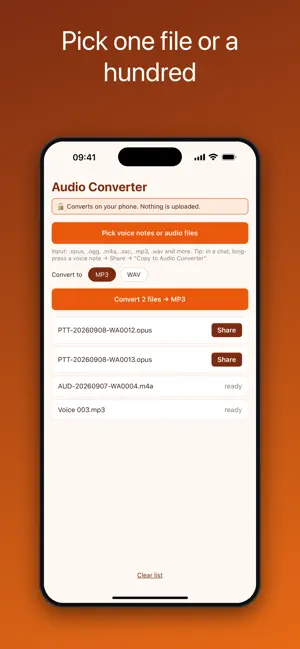
Turn .opus voice notes into MP3 or WAV files that play everywhere. Pick one file or a hundred, tap Convert, and share the results to Files, Mail, AirDrop or any app. Everything happens on your iPhone. No upload, no account, no waiting for a server, and it works in airplane mode. WHY YOU NEED IT Voice messages from chat apps arrive as .opus files (names like PTT-20260908-WA0012.opus). Most music players, editors, transcription tools, car stereos and older devices cannot open them. This app converts them to MP3 or WAV in seconds. HOW IT WORKS 1. Long-press a voice note in your chat app, tap Share, then "Copy to Opus to MP3 Converter", or save it to Files and pick it in the app 2. Choose MP3 or WAV 3. Tap Convert, then Share each file BATCH CONVERSION • Pick many files at once from Files, iCloud Drive or any file provider • Convert them all with one tap • Each result gets its own Share button INPUT FORMATS .opus, .ogg, .oga, .m4a, .aac, .mp3, .wav, .caf, .aiff, .flac, .amr, .3gp and more OUTPUT FORMATS • MP3 (128 kbps): plays on everything, stays small • WAV (16-bit PCM): lossless, ideal for editing and transcription PRIVATE BY DESIGN • 100% on-device processing • No internet connection required • No account, no sign-up • Your recordings never leave your phone Free, with no watermarks and no limits. A small banner ad keeps it free; a one-time Remove Ads purchase hides it forever. Opus to MP3 Converter is an independent utility. It is not affiliated with, endorsed by, sponsored by, or in any way officially connected with WhatsApp LLC or Meta Platforms, Inc. WhatsApp is a registered trademark of Meta Platforms, Inc.
What’s new
Version 1.0.3 · Updated September 28, 2026
New: a one-time Remove Ads purchase. A small banner now keeps the app free; buy Remove Ads once and it is gone for good. Also includes stability fixes.
App privacy
The developer, Vilva Athiban P B, reported these privacy practices to Apple.
Data Linked to You
The following data, which may be collected and linked to your identity, may be used for the following purposes:
- Location: Coarse Location
- Identifiers: Device ID
- Usage Data: Product Interaction, Advertising Data
Used for: Third-Party Advertising, Developer’s Advertising or Marketing, Analytics
Data Not Linked to You
The following data, which may be collected but is not linked to your identity, may be used for the following purposes:
- Diagnostics: Performance Data, Other Diagnostic Data, Crash Data
Used for: Third-Party Advertising, Analytics, App Functionality
Alternatives to Opus to MP3 Converter
Looking for apps like Opus to MP3 Converter? Here are 6 similar apps on the App Store. The highest rated is OPUS Converter: MP3, FLAC, WAV (5.0/5), and all 6 are free to download.
-
 SubKill
-
 Dewy Pro
-
 ContractShield
-
 OPUS Converter: MP3, FLAC, WAV
5.0
OPUS Converter: MP3, FLAC, WAV
5.0
-
 QuorumPony: Key Backup
-
 MP3 to AAC – Audio Converter
5.0
MP3 to AAC – Audio Converter
5.0
| App | Rating | Price | Last updated | Compare |
|---|---|---|---|---|
| Opus to MP3 Converter | – | Free | September 28, 2026 | |
| SubKill | – | Free | Jun 25, 2026 | Compare |
| Dewy Pro | – | Free | Jul 2, 2026 | Compare |
| ContractShield | – | Free | Apr 23, 2026 | Compare |
| OPUS Converter: MP3, FLAC, WAV | 5.0 / 5 (1) | Free | Oct 20, 2026 | Compare |
| QuorumPony: Key Backup | – | Free | Jul 7, 2026 | Compare |
| MP3 to AAC – Audio Converter | 5.0 / 5 (1) | Free | Oct 19, 2026 | Compare |