

TOT Bible
Cade Muhlig Book iPhoneiPadiPod touchMac
TOT Bible is a free Book app for iPhone and iPad by Cade Muhlig. Rated 5.0/5 from 12 ratings. Requires iOS 17.0. Updated October 19, 2026.
- Rating
- 5.0
- 12 ratings
- Price
- Free
- on the App Store
- Size
- 375 MB
- Age 4+
- Updated
- Oct 19
- 2026 · v1.1.3
Screenshots


About TOT Bible
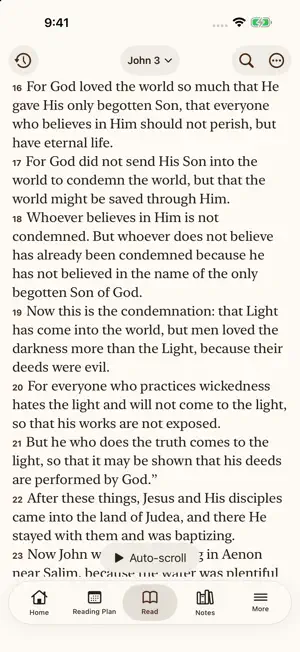
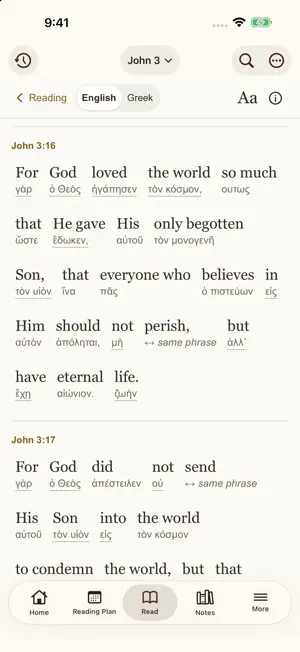
Discover the Translation in the Oldest Tradition. The Translation in the Oldest Tradition (TOT), by Dr. Mark Spitsbergen, brings Scripture into clear, readable English through a word-for-word approach rooted in the conviction that God has faithfully preserved His Word. Begun in 2003, TOT draws on the Byzantine textual tradition, the Textus Receptus, and the Aramaic Peshitta for its New Testament rather than the Alexandrian tradition. Scrivener’s 1894 Textus Receptus normally controls the Greek reading; Dr. Spitsbergen’s Old Testament translations follow the Hebrew Masoretic text in Biblia Hebraica Stuttgartensia (BHS). The TOT Bible app puts this translation at the center of a complete reading and study experience. READ YOUR WAY Compare translations side by side, search by passage or phrase, and personalize your reading with adjustable text, themes, and auto-scroll. Highlights, bookmarks, and a daily reading marker help you keep your place and remember what matters. EXPLORE THE WORDS Explore the New Testament with Interlinear (Beta), integrated into Read and Word Study. See Scripture alongside linked Greek words and open meanings and pronunciation from your passage. Open Word Study from a verse to explore Hebrew and Greek words, pronunciation, and definitions from Strong’s, Brown–Driver–Briggs, Abbott-Smith, and Thayer’s where available. Find the same word in other verses, compare dictionary explanations, and copy or save your discoveries. READ DR. SPITSBERGEN’S COMMENTARY Explore available commentary alongside Scripture. Follow references and select meaningful excerpts to copy or add directly to a notebook. BUILD YOUR PERSONAL STUDY LIBRARY Bring passages, word studies, notes, and photos together in notebooks. Add handwriting and sketches with Apple Pencil on supported iPads. Organize notebooks into folders, pin favorites, search your study material, and share text or PDF copies. Presentation mode provides a focused view for teaching and preaching. MAKE A PLAN—OR READ AT YOUR OWN PACE Choose a ready-made reading plan or create your own. Set a finish date or daily target, select books, or use an unscheduled checklist. Keep independent progress for multiple named plans, see today’s reading, and check off chapters, books, or entire testaments. LISTEN AS YOU READ Listen to TOT recordings narrated by Dr. Stuart Graham. Download individual chapters, whole books, or the full New Testament for offline listening. Follow the text or begin playback from a selected verse when matching timing data is available. KEEP YOUR STUDY WITH YOU Create an optional TOT Account to sync your notes and study progress across iPhone, iPad, Mac, and TOTBible.org. You can keep using iCloud instead and switch later in Settings. Export backups and explore the visual Help guide whenever you need it. Available on iPhone and iPad. Bundled Bible texts, study resources, and downloaded audio work offline. Internet access is needed for streaming, downloads, and content updates. No ads or required app account. Read. Study. Grow.
Ratings & reviews
5.0
12 ratings
What’s new
Version 1.1.3 · Updated October 19, 2026
What's new in 1.1.3 EXPLORE OLD TESTAMENT WORD CONNECTIONS Explore reviewed Hebrew and Aramaic connections for 500 New Testament Greek terms through the Greek Old Testament. Read connected passages in English, explore original words and dictionary entries, and discover other passages using a selected Hebrew or Aramaic word. CLEARER, RICHER WORD STUDY See three TOT verse previews under “Same Greek word elsewhere,” then open the full list. “How this word is used here” brings the word's grammar and contextual explanation together. Related passages show more verse context, with clearer distinctions between cross-references and original-word occurrences. FASTER OPENING, READING FIRST Faster repeat openings after downloaded content has been fully validated. The opening screen now shows the TOT Bible icon and library-loading progress. Background sync and content downloads give priority to reading, scrolling, listening, and typing. SMOOTHER READING AND SHARING Read opens at your saved passage without showing the scroll into position. Improved reading-position stability prevents unexpected chapter jumps when opening Read or scrolling, including side-by-side translations. KJV supplied words display in italics instead of asterisks. Copied passages omit intermediate verse numbers by default while keeping the opening reference; this remains adjustable in Settings. Listen is easy to reach when selecting a verse. Reading markers now toggle on and off, with Mark beside Listen on iPad. Copied and shared selections start a new labeled paragraph wherever verses are skipped. Verse selection toggles consistently while Study is open. The verse-number copying preference lives in Settings > Copy & Share. More forgiving highlighting: missed taps in blank reading space keep your selection, and selecting whole verses after individual words behaves consistently. If a selected reading voice is unavailable, listening automatically uses another installed voice in the same language. If no voice is available, Listen opens voice setup instead of leaving you with a disabled button. SIMPLER ACCOUNT & DATA Account, sync, and saved-data tools now live together. Backups and recovery are easier to find, with clearer options and less repeated explanation. Routine sync and content-update notices stay out of your reading. FIXES AND REFINEMENTS Improved account-sync recovery, corrected Daily Bread text clipping on Mac, and the latest approved Scripture and commentary corrections.
App privacy
The developer, Cade Muhlig, reported these privacy practices to Apple.
Data Linked to You
The following data, which may be collected and linked to your identity, may be used for the following purposes:
- Contact Info: Email Address, Name
- User Content: Photos or Videos, Other User Content
- Identifiers: User ID
- Usage Data: Product Interaction
Used for: App Functionality
Alternatives to TOT Bible
Looking for apps like TOT Bible? Here are 6 similar apps on the App Store.


| App | Rating | Price | Last updated | Compare |
|---|---|---|---|---|
| TOT Bible | 5.0 / 5 (12 ratings) | Free | October 19, 2026 | |
| Tap Bible | – | Free | Oct 17, 2026 | Compare |
| HolyBooks.App | – | Free | Oct 9, 2026 | Compare |
| Hebrew Testament App | – | Free | Jul 21, 2026 | Compare |
| Scripture Roots | – | Free | Jul 22, 2026 | Compare |
| MiniScriptures | – | Free | Sep 7, 2026 | Compare |
| Unrolled Scrolls | – | Free | Oct 12, 2026 | Compare |
Compare TOT Bible with the top alternatives: ratings, updates, ASO score and keyword gaps →