

Inkstone Notes Markdown
bo chen Productivity iPhoneiPadiPod touchMac
Inkstone Notes Markdown is a free Productivity app for iPhone and iPad by bo chen. Rated 5.0/5 from 1 ratings. Requires iOS 18.0. Updated October 23, 2026.
- Rating
- 5.0
- 1 ratings
- Price
- Free
- on the App Store
- Size
- 10 MB
- Age 4+
- Updated
- Oct 23
- 2026 · v1.2.0
Screenshots



About Inkstone Notes Markdown
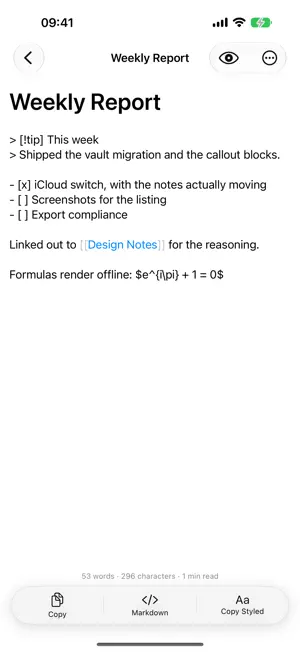
Inkstone is a Markdown writing app that keeps your notes as ordinary .md files in a folder you can open from anywhere. Your notes are files Every note is a plain Markdown file in iCloud Drive. Open the same folder from a Mac, edit it in another app, or move it somewhere else entirely — nothing is locked in a database, and nothing needs exporting. Writing, not formatting A native editor with syntax highlighting and live preview that hides the markup outside the paragraph you are working in. Formulas render with KaTeX and diagrams with Mermaid, both bundled, so neither needs a network. Notes that link to each other Write [[a note's title]] to link to it. Backlinks show what points at the note you are reading, unwritten links can be created in a tap, and renaming a note carries its links with it. Publishing Eight typesetting styles, each with its own heading treatment, for pasting into a publishing composer as rich text with the formatting intact. Export to PDF or HTML, with images carried inside the document. Also Callouts, task lists you can tick from the preview, a note for each day, outlines, inline tags, full-text search, and image attachments. Subscription: the free version keeps one note. Inkstone Pro (monthly or yearly, renewing automatically) lets you create as many as you like, on iPhone, iPad and Mac. Terms of Use (EULA): https://www.apple.com/legal/internet-services/itunes/dev/stdeula/
What’s new
Version 1.2.0 · Updated October 23, 2026
Keep one note for free, or subscribe for unlimited notes on iPhone, iPad and Mac. Your existing notes stay readable and editable. · A note that opens with front matter takes its title from the heading after it, not "---", and the front matter no longer shows in the preview, copies or exports. · Formulas show as written, \% included. · A task's checkbox sits on the same line as its text. · In Dark Mode, the System style's callouts and Mermaid diagrams are easy to read. · A note that couldn't be read is read again, and one whose save failed stays open until it saves.
App privacy
The developer, bo chen, reported these privacy practices to Apple.
Data Not Collected
The developer does not collect any data from this app.
Alternatives to Inkstone Notes Markdown
Looking for apps like Inkstone Notes Markdown? Here are 6 similar apps on the App Store. The highest rated is VoiceDay - AI Watch Recorder (5.0/5), and all 6 are free to download.
-
 Folio - 归册
-
 仲裁证据-工时记录·加班台账·职场取证
-
 VoiceDay - AI Watch Recorder
5.0
VoiceDay - AI Watch Recorder
5.0
-
 TreeletHub -Efficiency Console
-
 AppTime: Screen Time Control
3.3
AppTime: Screen Time Control
3.3
-
 Cola Mobile: Keep Work Moving
5.0
Cola Mobile: Keep Work Moving
5.0
| App | Rating | Price | Last updated | Compare |
|---|---|---|---|---|
| Inkstone Notes Markdown | 5.0 / 5 (1 rating) | Free | October 23, 2026 | |
| Folio - 归册 | – | Free | Aug 22, 2026 | Compare |
| 仲裁证据-工时记录·加班台账·职场取证 | – | Free | Sep 12, 2026 | Compare |
| VoiceDay - AI Watch Recorder | 5.0 / 5 (5) | Free | Oct 30, 2026 | Compare |
| TreeletHub -Efficiency Console | – | Free | Sep 29, 2026 | Compare |
| AppTime: Screen Time Control | 3.3 / 5 (3) | Free | Sep 8, 2026 | Compare |
| Cola Mobile: Keep Work Moving | 5.0 / 5 (1) | Free | Oct 30, 2026 | Compare |