

Moa - Screenshot Notes
Jeongyun Hur Productivity iPhoneiPadiPod touch
Moa - Screenshot Notes is a free Productivity app for iPhone and iPad by Jeongyun Hur. Requires iOS 17.0. Updated October 5, 2026.
- Price
- Free
- on the App Store
- Size
- 4 MB
- Age 4+
- Updated
- Oct 5
- 2026 · v1.0.4
Screenshots


About Moa - Screenshot Notes
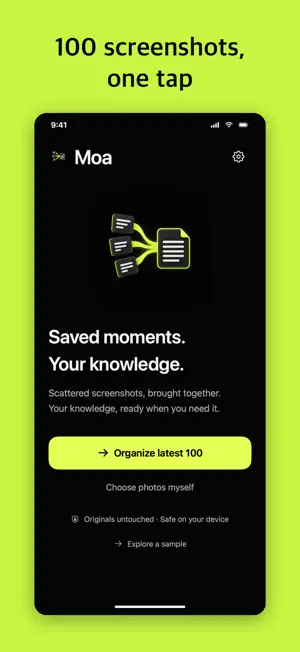
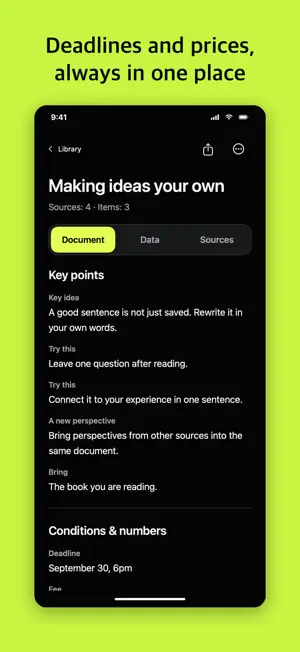
You screenshot things. Do you ever find them again? Moa reads the screenshots piling up in your album and groups them into topic documents. No more swiping through Photos to find that one thing. ■ 100 screenshots, organized in one tap One button reads your latest 100 screenshots. [ Saved posts, chat threads, job listings, product pages, recipes ] If there is text on it, it becomes a document. ■ Every document reads the same way [ Key points · Conditions & numbers · How to · Cautions · Reference ] Five headings, always in that order. Open any document and the thing you want is in the same place. Deadlines and prices land under Conditions. Ordered steps stay together under How to. ■ New screenshots organize themselves Just capture. Next time you open Moa, it is already filed. Same subject, same document. ■ The original is always one tap away Tap any sentence to see the screenshot it came from. When two sources disagree, Moa keeps both and flags them instead of picking one. ■ Clean up after, not before Delete only the photos whose contents you have checked. Moa never deletes anything first. ■ Your material stays on your iPhone Screenshots, recognized text and the documents live on your device. Nothing is sent to an external AI server. -- ▶ Made for you if - You save things and never find them again - Your album is mostly screenshots - You collect job posts, grants or application deadlines - You capture things to buy, places to go, things to try - You keep study notes and ideas as screenshots -- ■ Export and backup Export as Markdown, CSV or JSON, or take a full backup including the image copies Moa holds. ■ Free to start, cancel anytime Your first 10 screenshots are free. If you like it, a monthly subscription or a lifetime pass removes the limit. Even after cancelling, reading, searching and exporting what you saved stays free, and text notes keep working. Payment is charged to your Apple Account at confirmation of purchase. The subscription renews automatically unless cancelled at least 24 hours before the end of the current period. Manage it in Subscriptions in iPhone Settings. Terms of Use: https://www.apple.com/legal/internet-services/itunes/dev/stdeula/ Privacy Policy: https://my-emo-company.vercel.app/moa-privacy.html ■ Requirements Text recognition and basic organizing work on iOS 17 and later. On-device AI organizing requires iOS 26 and an iPhone that supports and has Apple Intelligence enabled. Without AI, Moa falls back to source-preserving basic organizing. Please check important details against the original.
What’s new
Version 1.0.4 · Updated October 5, 2026
Improved recognition of screenshots with readable content, keeping images with insufficient text as source images. Available purchase options remain visible if another product cannot be loaded. Saved content and free viewing, search and export remain available.
App privacy
The developer, Jeongyun Hur, reported these privacy practices to Apple.
Data Not Linked to You
The following data, which may be collected but is not linked to your identity, may be used for the following purposes:
- Identifiers: Device ID
- Usage Data: Product Interaction
Used for: Analytics, Product Personalization
Alternatives to Moa - Screenshot Notes
Looking for apps like Moa - Screenshot Notes? Here are 6 similar apps on the App Store. The highest rated is HomeTrail App (4.8/5), and all 6 are free to download.
-
 오픈한글 - HWP 뷰어+편집+변환기
-
 Dayble - Habits & Routines
4.5
-
 Daycrush: Remind Planner To-do
1.5
-
 HomeTrail App
4.8
-
 Reto -
4.6
-
 PTERS - 레슨 일정 및 회원 관리 올인원 서비스
| App | Rating | Price | Last updated | Compare |
|---|---|---|---|---|
| Moa - Screenshot Notes | – | Free | October 5, 2026 | |
| 오픈한글 - HWP 뷰어+편집+변환기 | – | Free | Oct 22, 2026 | Compare |
| Dayble - Habits & Routines | 4.5 / 5 (6) | Free | Nov 1, 2026 | Compare |
| Daycrush: Remind Planner To-do | 1.5 / 5 (2) | Free | Jan 21, 2025 | Compare |
| HomeTrail App | 4.8 / 5 (118) | Free | Oct 27, 2026 | Compare |
| Reto - | 4.6 / 5 (5) | Free | Sep 25, 2024 | Compare |
| PTERS - 레슨 일정 및 회원 관리 올인원 서비스 | – | Free | Dec 27, 2024 | Compare |