

SubLater — Hear It First
Hyun jun Yang Education iPhoneiPadiPod touchMac
SubLater — Hear It First is a free Education app for iPhone and iPad by Hyun jun Yang. Requires iOS 18.0. Updated October 20, 2026.
- Price
- Free
- on the App Store
- Size
- 11 MB
- Age 4+
- Updated
- Oct 20
- 2026 · v1.0.5
Screenshots

About SubLater — Hear It First
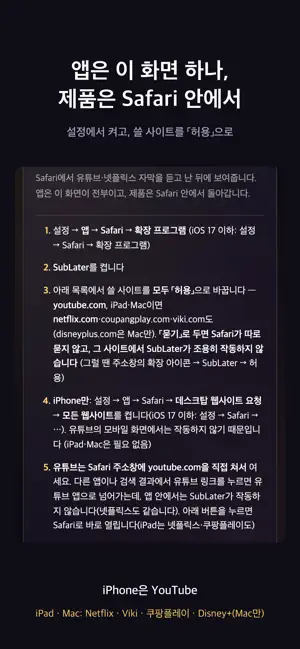
When the subtitle appears with the sound, your eyes read it first and your ears never get a turn. SubLater shows subtitles in Safari only after you've had a chance to listen. The sound goes by, then the line arrives. [How to use] · Settings → Apps → Safari → Extensions: turn on SubLater and set every site you use to Allow (SubLater won't run on a site left on Ask). If Safari shows a banner saying SubLater needs more permissions, open it and choose Always Allow… (Allow for One Day stops again the next day). If asked next, all websites is fine — it allows just the sites SubLater uses, in one go; it can't reach any other site. · Open YouTube by typing youtube.com into Safari's address bar (or use "Open YouTube in Safari" in the SubLater app). Tapping a YouTube link in another app or in search results opens the YouTube app, where SubLater can't run. · Press play. The subtitle arrives a beat late. That's it. · Tap a word in the subtitle for its meaning. Tap the small dot at the right edge of the video to open the controls. [Which languages?] SubLater is built first for Korean speakers learning English. · Any subtitle language: subtitle delay (adjustable in Pro), Reveal mode (Pro), jump / replay / loop, auto-pause. · English subtitles: word meanings, linking marks and the Pro sound line are written in Korean (Hangul). · Korean subtitles: tap a Korean word for its English meaning and how it actually sounds, with romanization. · Dictation scoring: English and Korean only. [What it does] · Subtitle delay — listen first, confirm with the text · Dual subtitles — the translation appears under the original (when the site carries both) · Jump, replay, loop — stay on one line until you hear it · Auto-pause — stops after each line so you can say it back · Dictation — type what you heard and get it scored on the spot · Word meanings — tap an English word for its Korean meaning, or a Korean word for its English meaning · Linking marks — shows where two words blend into a sound you didn't expect [Where it works] · iPhone: YouTube — turn on Settings → Apps → Safari → Request Desktop Website → All Websites (it does not run on YouTube's mobile layout) · iPad · Mac: YouTube · Netflix · Viki · Coupang Play · Disney+ (Mac only) Netflix does not play in the iPhone browser (Netflix's policy). It works in Safari on iPad and Mac. [What we don't do] · No account, no sign-in. · Nothing you watch, read or type leaves your device. · No ads. SubLater is an independent product, not affiliated with Netflix, YouTube, Disney+, Viki or Coupang Play. Each service needs its own account. [Free and Pro] · Everything in Pro is open for 14 days after install. The app doesn't lock when the trial ends. · Free after the trial: subtitle delay (2.0 s, on or off), dual subtitles, jump / replay / loop, auto-pause, word meanings, linking marks (dictation 10 lines a day, up to 50 saved lines) · Pro: adjustable delay (0–5 s), Reveal mode, the sound line, unlimited dictation, 5,000 saved lines, phrasal-verb & idiom notes, ladder replay [Subscription] SubLater Pro is an auto-renewing subscription, monthly or yearly. · Payment is charged to your Apple Account at confirmation of purchase. · It renews automatically unless cancelled at least 24 hours before the end of the current period. · Manage or cancel it in your device's App Store account settings. · Terms of Use: https://www.apple.com/legal/internet-services/itunes/dev/stdeula/ · Privacy Policy: https://sublater.netlify.app/privacy.html
What’s new
Version 1.0.5 · Updated October 20, 2026
· On the free plan you can now switch the 2.0 s subtitle delay off and back on — the "Off" and "On" buttons in the popup, or the delay - (off) and + (on) in the ⋯ menu (tap the dot on the video) · Fine-tuning the delay in 0.5 s steps stays a Pro feature — the delay you used with Pro is kept and comes back when you subscribe again
App privacy
The developer, Hyun jun Yang, reported these privacy practices to Apple.
Data Not Collected
The developer does not collect any data from this app.
Alternatives to SubLater — Hear It First
Looking for apps like SubLater — Hear It First? Here are 6 similar apps on the App Store. The highest rated is Submate: Dual Subtitles for YT (5.0/5), and all 6 are free to download.
-
 SkillStack Guided Learning
-
 리슨90 - 30초체험, 영어가 들려요 영어듣기 리스닝
-
 Submate: Dual Subtitles for YT
5.0
Submate: Dual Subtitles for YT
5.0
-
 Körkort Hero
-
 Mog - AI Journal & Grammar
5.0
Mog - AI Journal & Grammar
5.0
-
 Vocabulary Book-Words in Table
5.0
Vocabulary Book-Words in Table
5.0
| App | Rating | Price | Last updated | Compare |
|---|---|---|---|---|
| SubLater — Hear It First | – | Free | October 20, 2026 | |
| SkillStack Guided Learning | – | Free | Jun 23, 2026 | Compare |
| 리슨90 - 30초체험, 영어가 들려요 영어듣기 리스닝 | – | Free | Oct 20, 2026 | Compare |
| Submate: Dual Subtitles for YT | 5.0 / 5 (1) | Free | Aug 22, 2026 | Compare |
| Körkort Hero | – | Free | Oct 15, 2026 | Compare |
| Mog - AI Journal & Grammar | 5.0 / 5 (1) | Free | Oct 13, 2026 | Compare |
| Vocabulary Book-Words in Table | 5.0 / 5 (3) | Free | May 22, 2026 | Compare |