

Selkie Hum: AUv3 Audio to Midi
Jamie van Dyke Music iPhoneiPadiPod touch
Selkie Hum: AUv3 Audio to Midi is a paid Music app for iPhone and iPad by Jamie van Dyke. Requires iOS 17.0. Updated September 25, 2026.
- Price
- 2.99 USD
- on the App Store
- Size
- 12 MB
- Age 4+
- Updated
- Sep 25
- 2026 · v1.0
Screenshots

About Selkie Hum: AUv3 Audio to Midi
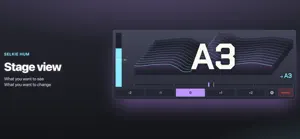
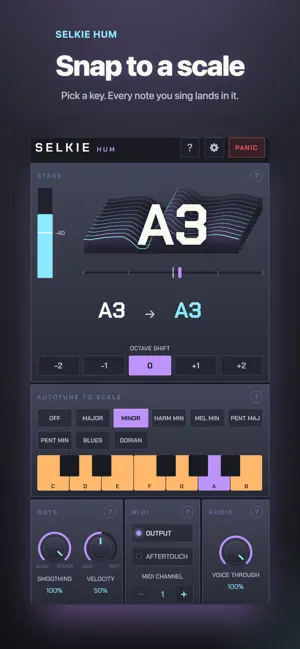
Sing a note and out comes MIDI. Selkie Hum listens to your voice and sends the note to any instrument you own, with low enough latency to feel like playing it. Play synths with your mouth. Hum a bass line, whistle a lead, sing a pad in. It's an AUv3 plugin for your host, and an app that runs on its own. AS A PLUGIN Put Hum on a vocal channel in Loopy Pro, AUM or any other AUv3 host that routes MIDI between plugins, and point its MIDI at an instrument. That instrument plays what you sing. Your voice can carry on down the channel or stop at the plugin, your choice. ON ITS OWN Open the app, then open a synth app and choose Selkie Hum as its MIDI input. Hum keeps listening in the background while the synth is in front. Plug the iPad into a Mac and the notes arrive there too. Pair a Bluetooth MIDI keyboard or sound module from a button at the top. The app makes no sound of its own, so there's nothing to feed back into the microphone. WHAT IT DOES • One clean note at a time, from E2 to C6: the range of a singing voice • Snap to a scale: pick a key and every note you sing lands in it, or leave it off and sing anything • Eight scales: major, minor, harmonic and melodic minor, both pentatonics, blues and dorian, from any root • Octave shift, so you can play a bass or a piccolo • Velocity from how loud you start a note, or fixed if you'd rather every note came out the same • Aftertouch, for swelling a pad with volume • A gate you drag on the meter, to reduce breath and room noise becoming notes • Smoothing, so a wobble in your voice doesn't flit around • A panic button that ends the note and silences the channel • Twenty-five presets, one for each key in major and minor • Any MIDI channel • Dark and light looks that follow the system, or whichever you prefer • Sharps or flats, and middle C as C4 or C3, to match whatever you're used to • Help built in, including how I use it on stage WHAT IT DOESN'T DO One note at a time; play a chord on a guitar and it picks a note. No pitch bend; a slide between notes is a step. No sound of its own; it needs a synth on the other end. No Mac version yet. WHO MADE IT One person, who wanted to play synths with his mouth at gigs and found nothing fast enough to feel like an instrument. Hum is what came out of that. There's no account, no network, no analytics and nothing stored. What you sing stays in the room. Terms of use: https://www.apple.com/legal/internet-services/itunes/dev/stdeula/
App privacy
The developer, Jamie van Dyke, reported these privacy practices to Apple.
Data Not Collected
The developer does not collect any data from this app.
Alternatives to Selkie Hum: AUv3 Audio to Midi
Looking for apps like Selkie Hum: AUv3 Audio to Midi? Here are 6 similar apps on the App Store. The highest rated is Gaussian Blur - AUv3 Reverb (5.0/5).
-
 MIDIHuman Drums
-
 Piano Studio Mobile
-
 Gaussian Blur - AUv3 Reverb
5.0
Gaussian Blur - AUv3 Reverb
5.0
-
 bismark swipestrings
5.0
bismark swipestrings
5.0
-
 MES Arpeggiator
5.0
MES Arpeggiator
5.0
-
 Pixound
4.1
Pixound
4.1
| App | Rating | Price | Last updated | Compare |
|---|---|---|---|---|
| Selkie Hum: AUv3 Audio to Midi | – | 2.99 USD | September 25, 2026 | |
| MIDIHuman Drums | – | 3.99 USD | Oct 2, 2026 | Compare |
| Piano Studio Mobile | – | 2.99 USD | Aug 18, 2025 | Compare |
| Gaussian Blur - AUv3 Reverb | 5.0 / 5 (1) | 3.99 USD | Oct 5, 2026 | Compare |
| bismark swipestrings | 5.0 / 5 (2) | 5.99 USD | Oct 11, 2026 | Compare |
| MES Arpeggiator | 5.0 / 5 (1) | 14.99 USD | Apr 6, 2026 | Compare |
| Pixound | 4.1 / 5 (8) | 0.99 USD | Nov 25, 2025 | Compare |