

Walk & Weigh: Weight Tracker
MOTTO Health & Fitness iPhoneiPadiPod touch
Walk & Weigh: Weight Tracker is a free Health & Fitness app for iPhone and iPad by MOTTO. Requires iOS 16.4. Updated October 4, 2026.
- Price
- Free
- on the App Store
- Size
- 37 MB
- Age 4+
- Updated
- Oct 4
- 2026 · v1.0.2
Screenshots


About Walk & Weigh: Weight Tracker
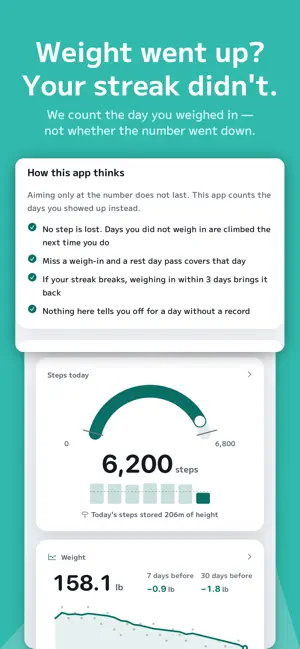
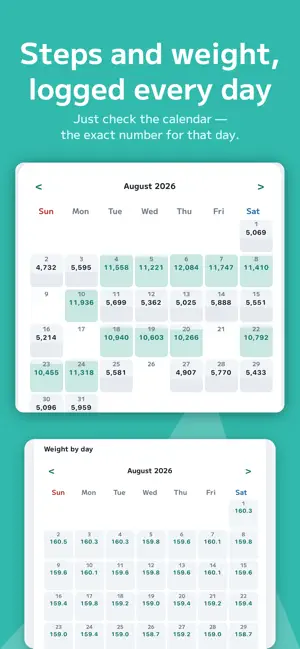
Step on the scale. Go for a walk. That is the whole app. If it never stuck before, the method may have been the problem. This app was built around one thing: keeping you going. ■ Nothing to type but your weight Steps come from Apple Health automatically. All you do is step on the scale once a day. It takes three seconds. If your scale syncs to Health, you do not type anything at all. No meals. No calories. "I gave up because logging every seasoning was too much" is the most common reason people quit. ■ The days you gained still count Weigh in and your day count grows. We never judge the number. A day you went up counts the same as a day you went down. Stopping on the days you gained is how most people quit. ■ Missing one day does not end it Tap "Take today off" in the evening and your count stays as it is. Miss that too, and a rest day pass covers the day on its own. Even if the streak breaks, weighing in within three days brings it back. ■ No nagging We never send "you have not logged yet." There is no screen that counts what you did not do. No ads. No purchases. ■ Every day you keep going, you climb Your steps turn into height, and you climb that height on the days you weigh in. 30 steps make 1m. Steps from days you did not weigh in are never lost — you climb them all next time. You start at Tempozan (4.5m), the lowest mountain in Japan with a survey marker. That is 135 steps of height, so most people reach the top on day one. Then Mt. Takao, Mt. Fuji, and out into the world. Matterhorn, Kilimanjaro, and finally Everest (8,849m). Twenty-eight summits in all. ■ You can see whether walking is working Weeks you walked more, weeks you walked less, and how your weight moved in each. From your own records. Daily weight swings by about a kilo on water alone, so we compare week by week. When the difference is not clear, we say so. ■ Your records never leave this iPhone Nothing is sent to a server. There is no account. You can export a backup yourself when you change phones. Weight shows in kg or lb — your choice, and switching does not change anything you already recorded.
What’s new
Version 1.0.2 · Updated October 4, 2026
- You can now fix or delete a weight entry (tap it on the Weight screen). - New app icon.
App privacy
The developer, MOTTO, reported these privacy practices to Apple.
Data Not Collected
The developer does not collect any data from this app.
Alternatives to Walk & Weigh: Weight Tracker
Looking for apps like Walk & Weigh: Weight Tracker? Here are 6 similar apps on the App Store. The highest rated is Solid Fight Step Counter (1.0/5), and all 6 are free to download.
-
 ForestWalk - Every Step Counts
-
 逆歩数計 - サボると借金がたまる歩数計
-
 Runly: Run & Health Tracker
-
 Noboribito: Stairs to Summits
-
 Solid Fight Step Counter
1.0
Solid Fight Step Counter
1.0
-
 Weight Loss & Diet Fitness
| App | Rating | Price | Last updated | Compare |
|---|---|---|---|---|
| Walk & Weigh: Weight Tracker | – | Free | October 4, 2026 | |
| ForestWalk - Every Step Counts | – | Free | Aug 25, 2026 | Compare |
| 逆歩数計 - サボると借金がたまる歩数計 | – | Free | Aug 9, 2026 | Compare |
| Runly: Run & Health Tracker | – | Free | Aug 15, 2026 | Compare |
| Noboribito: Stairs to Summits | – | Free | Sep 20, 2026 | Compare |
| Solid Fight Step Counter | 1.0 / 5 (1) | Free | Aug 30, 2026 | Compare |
| Weight Loss & Diet Fitness | – | Free | Sep 8, 2026 | Compare |