

OneKit: Your AI Clone
AI Squads LLC Productivity iPhoneiPadiPod touch
OneKit: Your AI Clone is a free Productivity app for iPhone and iPad by AI Squads LLC. Rated 5.0/5 from 1 ratings. Requires iOS 16.4.
- Rating
- 5.0
- 1 ratings
- Price
- Free
- on the App Store
- Size
- 89 MB
- Age 17+
- Updated
- Nov 2
- 2026 · v1.0.2
Screenshots


About OneKit: Your AI Clone
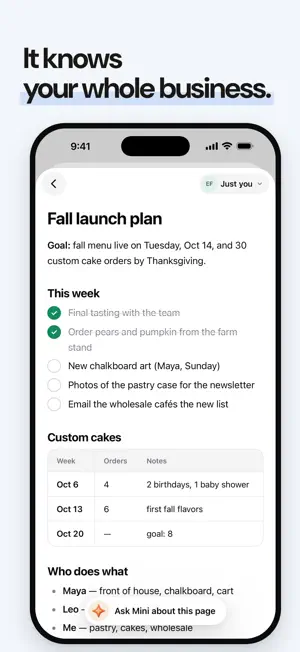
OneKit is an AI clone of you. It knows your work, answers the way you would, and asks before anything goes out. Talk to it, call it, or @ it in your team's chat. Call your clone Tap call and talk. It talks back, and you can cut in mid-sentence like on any call. Lock your phone and the call keeps going. When you hang up, what you both said is in the chat. Ask anything It answers from your notes, your past chats, and what your team shares with you. It searches the web when it needs to and shows you the pages it read. Ask your team's mini mes Everyone on your team gets a mini me. @ one in a channel and it answers about that person's work, right there for everyone to see. Groups with channels and threads, plus direct messages and group chats. It knows your whole business Your notes, pages, and past chats live in one Brain you can open and read on your phone. Your passwords, in any app Keep your logins in OneKit, encrypted end to end, and fill them in any app or website with AutoFill and Face ID. On your Mac too OneKit on your Mac adds mail, calendar, meeting notes, and a computer your clone can use for you. Pair it, and approve that work from your phone. Your privacy Before your first message or call, OneKit shows which AI companies get what, and waits for your OK. Report or block anyone. Delete your account from Settings at any time. Getting in Sign in with Apple, Google, or your email. OneKit is letting people in from a waitlist, and you'll get an email when you're in. Terms of Use: https://onekit.co/terms Privacy Policy: https://onekit.co/privacy
What’s new
Version 1.0.2 · Updated November 2, 2026
A new home with four tabs: People, Mini Chat, Apps, and Notifications. Swipe between them. Record a meeting. Open Apps, then Meeting Notes, and tap the red button. You can lock your phone while it records, and OneKit writes your notes when you stop. A call with Mini or a meeting you're recording shows as a bar at the bottom of every screen. Tap it to go back. On a call with Mini, the words show up as they're said. Hold Meeting Notes or Calendar for shortcuts. A chat keeps what you typed if you leave before you send it. The app opens on white, with no black flash.
App privacy
The developer, AI Squads LLC, reported these privacy practices to Apple.
Data Linked to You
The following data, which may be collected and linked to your identity, may be used for the following purposes:
- Identifiers: User ID, Device ID
- Usage Data: Product Interaction
- Contact Info: Name, Email Address
- User Content: Emails or Text Messages, Photos or Videos, Audio Data, Other User Content
- Diagnostics: Crash Data, Other Diagnostic Data
Used for: Analytics, Product Personalization, App Functionality
Alternatives to OneKit: Your AI Clone
Looking for apps like OneKit: Your AI Clone? Here are 6 similar apps on the App Store. The highest rated is Famous AI - Idea to app (5.0/5), and all 6 are free to download.
-
 ZUX APP
-
 Genie: AI Chat & Coach
-
 Famous AI - Idea to app
5.0
-
 Clever AI — Ultimate Toolbox
1.0
-
 Magic OS
3.7
-
 LifeGrid - Smart Life Tracker
| App | Rating | Price | Last updated | Compare |
|---|---|---|---|---|
| OneKit: Your AI Clone | 5.0 / 5 (1 rating) | Free | November 2, 2026 | |
| ZUX APP | – | Free | Oct 7, 2026 | Compare |
| Genie: AI Chat & Coach | – | Free | Aug 18, 2026 | Compare |
| Famous AI - Idea to app | 5.0 / 5 (3) | Free | Oct 11, 2026 | Compare |
| Clever AI — Ultimate Toolbox | 1.0 / 5 (1) | Free | Feb 28, 2025 | Compare |
| Magic OS | 3.7 / 5 (3) | Free | Oct 21, 2026 | Compare |
| LifeGrid - Smart Life Tracker | – | Free | May 27, 2026 | Compare |