

WMail: Email for Fastmail
WOW Media UK Ltd Productivity iPhoneiPadiPod touch
WMail: Email for Fastmail is a free Productivity app for iPhone and iPad by WOW Media UK Ltd. Rated 4.0/5 from 1 ratings. Requires iOS 26.5.
- Rating
- 4.0
- 1 ratings
- Price
- Free
- on the App Store
- Size
- 9 MB
- Age 4+
- Updated
- Oct 23
- 2026 · v1.1.0
Screenshots



About WMail: Email for Fastmail
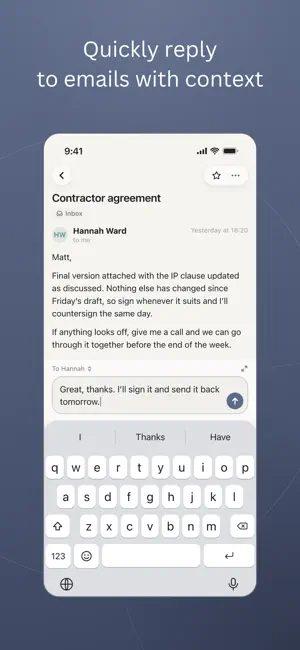
WMail is the most beautiful email app for Fastmail. Built natively with JMAP support so you get Masked Emails, Send Later, and more. Exactly as Fastmail intended. It’s designed to make managing your inbox more enjoyable whilst also helping you practice healthy email habits. Along with unique features to power up your email experience! SAVE HOURS USING WMAIL - Setup Templates to stop repeating yourself. Easily insert them with custom shortcuts. - Easily unsubscribe to emails in 1-click for supported mailing lists - Block senders you don’t want to hear from again - Integrations with Reminders and Things so you can quickly turn an email into a task - Use Quick Reply to reply to a thread quickly and see the thread context without opening a full compose window. FASTMAIL MASKED EMAIL SUPPORT - Quickly create new masked email addresses (add to control centre to create even faster) - Reply to emails using your masked email addresses - View and quickly copy masked emails CUSTOMISE TO HOW YOU USE EMAIL - Setup custom swipe actions - Configure custom quick actions when viewing an email - Enable undo send and configure how long you have to undo - Disable images loading for privacy (helps prevent open tracking) PRACTICE GOOD EMAIL HABITS - Pause your inbox between certain days and hours - No push notifications; only snooze reminders MORE NATIVE FASTMAIL FEATURES - Add notes to emails (syncs natively with Fastmail) - Schedule emails to send at the perfect time (syncs natively with Fastmail) - Snooze an email to deal with it later (partial Fastmail sync) - Dark mode support WMail includes core functionality at no cost. Optional Pro features unlock advanced tools including Templates and Customisation options. --- Fastmail is a trademark and service mark of Fastmail Pty Ltd. WMail is an independent third-party application and is not affiliated with or endorsed by Fastmail. Terms of Use: https://wmail.download/terms/ Privacy policy: https://wmail.download/privacy/
What’s new
Version 1.1.0 · Updated October 23, 2026
Now available on iPad! We've updated WMail to offer a great experience on iPad. WMail has a classic two-pane interface so you can see your thread as well as your list of emails. You can toggle the sidebar on/off if you want to focus on the thread you are replying to. Plus as part of this release we've added loads of keyboard shortcuts. Please reach out to us if there is a keyboard shortcut you would like to see. New: - Send to Claude: Turn on Claude in Integrations, then send any email thread to Claude with a pre-filled prompt to get help with your reply. Nothing is shared unless you choose to send it. - Vacation Response: You can now set and manage your Fastmail vacation response in the app. To use it, update your Fastmail API key to include the Vacation Response permission. - Drag and drop: The app now supports dragging and dropping of files when the full reply screen is open. - Copy the subject line: Long press on a subject line to quickly copy it. - Search mail from sender: Tap Search mail from sender in an email's more menu to see every email from that address. Improved: - Auto advance: Multiple updates to auto advance to improve this. It's now available to all users for free. - Attachments: Attachment previews are now easier to close and share. - Reply-to: More improvements to reply-to handling. - Snooze: If someone replies to an email that is already snoozed it now moves back to the inbox. - Forwarding Emails: Now when forwarding emails it will use the HTML version when relevant (instead of always sending the text version). - Newsletter Bundle: All newsletter bundle settings now sync with iCloud if iCloud sync is enabled. - Conversations: Large conversations now open much faster. - Templates: Icon changed for Templates to be distinct from the Drafts icon. - Integrations: Some integrations now have the official icons after we got permission to use them. This release also includes lots of bug fixes. Because the iPad version brings big changes under the hood, please let us know if anything doesn't look right: [email protected]
App privacy
The developer, WOW Media UK Ltd, reported these privacy practices to Apple.
Data Not Collected
The developer does not collect any data from this app.
Alternatives to WMail: Email for Fastmail
Looking for apps like WMail: Email for Fastmail? Here are 6 similar apps on the App Store. The highest rated is Markdown Note Widgets (4.6/5), and all 6 are free to download.
-
 Envoy Mail
-
 TPsign digital signature
-
 AI Email - Smart Email Writer
-
 DataCow Email
-
 Boogie Mail
2.0
Boogie Mail
2.0
-
 Markdown Note Widgets
4.6
Markdown Note Widgets
4.6
| App | Rating | Price | Last updated | Compare |
|---|---|---|---|---|
| WMail: Email for Fastmail | 4.0 / 5 (1 rating) | Free | October 23, 2026 | |
| Envoy Mail | – | Free | Oct 8, 2026 | Compare |
| TPsign digital signature | – | Free | Jun 12, 2026 | Compare |
| AI Email - Smart Email Writer | – | Free | Feb 7, 2026 | Compare |
| DataCow Email | – | Free | Jul 28, 2025 | Compare |
| Boogie Mail | 2.0 / 5 (1) | Free | Oct 14, 2026 | Compare |
| Markdown Note Widgets | 4.6 / 5 (5) | Free | Oct 22, 2026 | Compare |