

TwinPost Cam: Dual Camera Vid
norstride, inc Photo & Video iPhoneiPadiPod touch
TwinPost Cam: Dual Camera Vid is a free Photo & Video app for iPhone and iPad by norstride, inc. Requires iOS 17.0. Updated October 16, 2026.
- Price
- Free
- on the App Store
- Size
- 3 MB
- Age 4+
- Updated
- Oct 16
- 2026 · v1.0.4
Screenshots



About TwinPost Cam: Dual Camera Vid
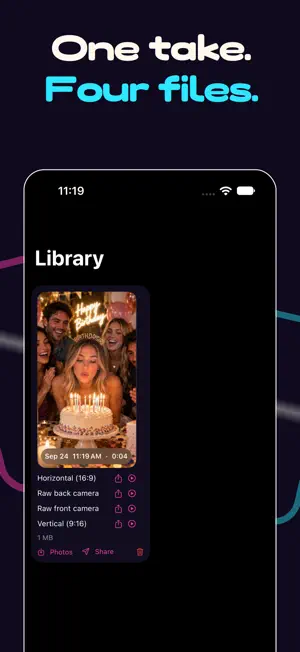
Record yourself and what you're looking at, at the same time. TwinPost Cam runs the front and back cameras together and hands you every version you need to post. One take. No editing. Pay once. Works on iPhone XS, XR and everything newer. WAYS TO USE IT • Vlog while you show the view: the trail, the kitchen, the crowd • React to a screen, a game, a taste test, without splicing two clips • Interviews and podcasts, both people in frame • Tutorials and unboxings: your hands and your commentary in one file • Family moments where the person holding the phone is finally in the shot Post it and tag #TwinPostCam. We repost our favourites. ONE TAKE. FOUR FILES. • Vertical 9:16, ready for TikTok, Reels and Shorts • Horizontal 16:9 for YouTube • Raw front and raw back angles, untouched, for CapCut, Final Cut or Premiere Pick the files you want. They stay in sync because they share one clock. SWITCH LAYOUTS WHILE YOU TALK. Picture-in-picture, split, diagonal or side by side. Make the selfie window a rectangle, a square or a circle, and drop it in any corner. Tap it to swap which camera leads. Pinch either camera to zoom. Every change lands in the finished files on the very next frame. SHARE FROM THE LIBRARY. Instagram opens on your video. TikTok, YouTube, Facebook and X are one tap from the same sheet. Or AirDrop it to your Mac. CAPTIONS AND SCRIPTS, ON YOUR IPHONE. Turn on captions and every take gets a subtitle file, recognized on your iPhone, ready for your editor or the platform's caption upload. On iPhones with Apple Intelligence, the script assistant drafts a script from a topic, shortens it to 30, 45, 60 or 90 seconds, or makes it punchier, all on device. MADE FOR iPHONE DUO. Unfolded, the camera screen turns with you: a full-height preview between the controls, in portrait or landscape, and the teleprompter stays readable either way. READ IT. SAY IT. A teleprompter scrolls your script over the preview and follows your voice, recognized on your iPhone and never uploaded. Or set a steady speed. Mirror mode works with prompter glass. Pause, and it picks up where you left off. YOUR MIC. YOUR CHOICE. Front, back, bottom, stereo, or any USB or Bluetooth microphone, with a live level meter so you know it's working before you start. ONE CAMERA WHEN THAT'S ENOUGH. Back-only or front-only in a tap. Same files, same teleprompter, and it runs on every iPhone. BUILT FOR REAL SHOOTS. • Tells you how many minutes of space you have before you press record • Warns when the phone gets hot, and saves the take if it has to stop • A call or the lock screen mid-take? The files are finished and saved, and the app says what happened • Shows the real quality and frame rate both cameras can run at together, instead of promising 4K it can't deliver • Keyboard and pedal shortcuts for rigs NOTHING LEAVES YOUR PHONE. No account. No sign-in. No servers. No watermark. Captions and the script assistant run on your iPhone too. Your videos stay on your phone unless you share them. PAY ONCE. THAT'S IT. Five full recordings free, nothing held back and no watermark. Then one purchase unlocks TwinPost Cam Pro for good. No subscription, ever. Dual recording needs an iPhone XS, XR or newer. Single camera mode works on any iPhone running iOS 17 or later. Simultaneous 4K on both cameras depends on the model; the app shows what your iPhone can do. The script assistant needs Apple Intelligence (iOS 26). Download TwinPost Cam and stop choosing between the shot and the person taking it.
What’s new
Version 1.0.4 · Updated October 16, 2026
• Made for iPhone Duo: unfolded, the camera screen turns with you, with a full-height preview between the controls. • Captions: turn them on in Settings and every take gets a subtitle file, recognized on your iPhone. • Script assistant on iPhones with Apple Intelligence: draft a script from a topic, shorten it, make it punchier. • Pinch to zoom either camera, even mid-take. • A call, the lock screen or a hot iPhone no longer leaves a take hanging: the files are finished and saved, and the app says what happened. • The selfie window in recorded 4K files is smooth again, and the app reports the real frame rate when four 4K files are more than your iPhone encodes. • Library: a card for your first take, and horizontal-only takes fit the screen. Settings: send feedback, rate the app, privacy policy. • Now runs on iOS 17.
App privacy
The developer, norstride, inc, reported these privacy practices to Apple.
Data Not Collected
The developer does not collect any data from this app.
Alternatives to TwinPost Cam: Dual Camera Vid
Looking for apps like TwinPost Cam: Dual Camera Vid? Here are 6 similar apps on the App Store. The highest rated is Reaction Video Maker: ReactCam (5.0/5), and all 6 are free to download.
-
 ReactionVid
-
 Reaction Video Maker: ReactCam
5.0
-
 NDI Camera Live
5.0
-
 Captions AI for Videos - Dubs
4.4
-
 Video Player - All in One
4.6
-
 Likee - Video, Live, Chat
4.5
| App | Rating | Price | Last updated | Compare |
|---|---|---|---|---|
| TwinPost Cam: Dual Camera Vid | – | Free | October 16, 2026 | |
| ReactionVid | – | Free | Aug 10, 2026 | Compare |
| Reaction Video Maker: ReactCam | 5.0 / 5 (1) | Free | Sep 17, 2026 | Compare |
| NDI Camera Live | 5.0 / 5 (1) | Free | Sep 24, 2026 | Compare |
| Captions AI for Videos - Dubs | 4.4 / 5 (871) | Free | Sep 2, 2026 | Compare |
| Video Player - All in One | 4.6 / 5 (7,429) | Free | Oct 26, 2026 | Compare |
| Likee - Video, Live, Chat | 4.5 / 5 (563,386) | Free | Nov 2, 2026 | Compare |