

Shopping Cat
Alexandro Martinez Utilities iPhoneiPadiPod touch
Shopping Cat is a free Utilities app for iPhone and iPad by Alexandro Martinez. Requires iOS 16.4. Updated October 28, 2026.
- Price
- Free
- on the App Store
- Size
- 40 MB
- Age 4+
- Updated
- Oct 28
- 2026 · v1.12.0
Screenshots


About Shopping Cat
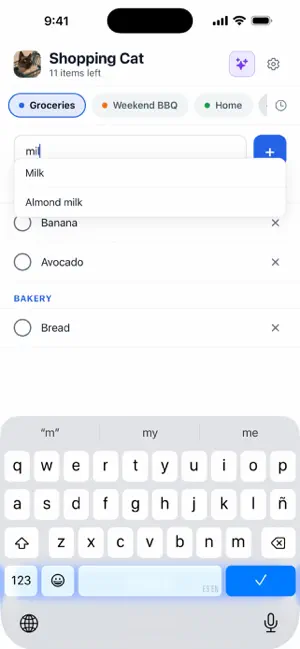
Shopping Cat is a shopping list that doesn't get in your way. Type “milk” and it appears under Dairy & Eggs. Type “bread” and it goes under Bakery. No menus, no selecting categories, no setup required: your list organizes itself in the order you actually walk through the supermarket, so you can stop running back and forth across the store looking for that one thing you forgot. Just start typing, and your list sorts itself by aisle, with suggestions for the things people buy most. Check items off as you shop, and when you’re done, everything you bought disappears, while anything you didn’t find stays for next time. WHY IT’S DIFFERENT Most apps force you to sort everything manually. This one does it for you. Items are automatically sorted by aisle as you type, with suggestions for the most popular items. When you’re done, tap “Finish buying.” Everything you checked off disappears from the list, and what you didn’t find stays for next time—just like you’d do with a paper list, but without a pen. WHAT’S INCLUDED • Automatic sorting by aisle: items are automatically placed in Produce, Bakery, Dairy & Eggs, Frozen, and more • Smart suggestions as you type • Check off items as you shop • “Finish buying” removes purchased items and keeps what’s left • Purchase history: see what you bought on any previous shopping trip • Share the list as text via WhatsApp, messages, or wherever you like • Works offline, so poor cell service at the supermarket isn’t a problem • Light or dark theme, or follow the system • Multiple languages available: Spanish, English, and Russian STRAIGHTFORWARD AND SIMPLE Open it and start writing. No registration and no account to create: your lists are saved on your phone and are ready as soon as you open the app. FREE AND PREMIUM The free version is a full-featured shopping list, not a demo. It includes automatic sorting, suggestions, marking items as purchased, finishing a trip, history, sharing, light or dark theme, and three languages—with three lists (the big grocery run, the corner store, the hardware store), up to 40 items per list, four colors, and a single small ad. Shopping Cat Premium is a one-time payment that adds: • Arrange the aisles in your own store’s order • Retrieve any previous purchase from your list with a single tap • Unlimited lists: beyond three, one for every store you go to • Unlimited items per list • All ten list colors • No ads Made for anyone who jots down “milk, bread, eggs” on the back of an envelope and then leaves it on the kitchen table.
What’s new
Version 1.12.0 · Updated October 28, 2026
• Undo: removing an item, deleting a list or deleting a trip now shows an Undo button. • Settings are grouped into List, General and About, with a link to the privacy policy and the app version. • Share the app is back on iPhone. • The premium screen says plainly what you get, with the price on the button. • Screen readers now announce each color by name, which controls are premium, and which list is open.
App privacy
The developer, Alexandro Martinez, reported these privacy practices to Apple.
Data Used to Track You
The following data may be used to track you across apps and websites owned by other companies:
- Location: Coarse Location
- Usage Data: Advertising Data
Data Not Linked to You
The following data, which may be collected but is not linked to your identity, may be used for the following purposes:
- Location: Coarse Location
- Usage Data: Advertising Data
Used for: Third-Party Advertising
Alternatives to Shopping Cat
Looking for apps like Shopping Cat? Here are 3 similar apps on the App Store. The highest rated is PagerDuty (4.8/5), and all 3 are free to download.


| App | Rating | Price | Last updated | Compare |
|---|---|---|---|---|
| Shopping Cat | – | Free | October 28, 2026 | |
| Gallery Cleaner - Swipe Photo | – | Free | Oct 8, 2026 | Compare |
| Better Stack On-call | – | Free | Oct 21, 2026 | Compare |
| PagerDuty | 4.8 / 5 (5,242) | Free | Oct 19, 2026 | Compare |
Compare Shopping Cat with the top alternatives: ratings, updates, ASO score and keyword gaps →