

Printer AI: Scan & Print
Gowalk - Fzco Productivity iPhoneiPadiPod touch
Printer AI: Scan & Print is a free Productivity app for iPhone and iPad by Gowalk - Fzco. Requires iOS 15.5. Updated September 16, 2026.
- Price
- Free
- on the App Store
- Size
- 43 MB
- Age 17+
- Updated
- Sep 16
- 2026 · v1.0.0
Screenshots



About Printer AI: Scan & Print
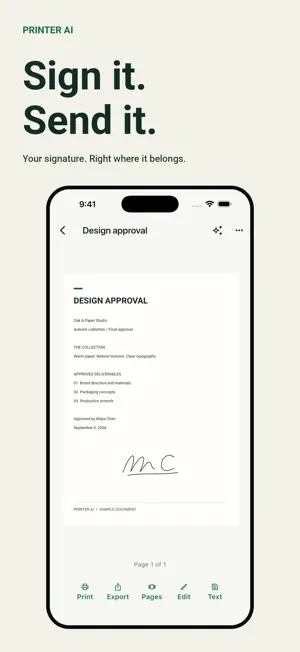
Bring your paperwork together in Printer AI. Import documents and photos, prepare clear pages, and send them to a compatible printer from your phone or tablet. PRINT WITH CONTROL Use AirPrint or connect directly to a PDF-capable IPP/IPPS printer. Preview the result and choose supported options for copies, color, two-sided printing, paper, page ranges, scaling and pages per sheet. Save printers and check direct-print job status. SCAN AND READ Capture documents with your camera, correct page edges and perspective, and collect multiple pages. Rotate, crop and apply document filters. On-device OCR extracts text from images so you can copy it or prepare it for an AI action. SIGN, EDIT AND ORGANIZE Draw and save signatures, place them on a page, add text, ink and highlights, and undo changes before saving. Reorder, duplicate, combine or extract pages. Keep documents in folders and find them with search. IMPORT AND SHARE Bring in PDFs, images, text, Office files and web pages. Receive files through AirDrop or use the system file picker for connected cloud drives, or share attachments into Printer AI from other apps. Export a PDF or JPG images through your device’s share menu. Office imports reflow text, saved spreadsheet values and embedded images; complex formatting and charts may differ. Original files are retained. DOCUMENT AI, WITH YOUR PERMISSION Clean up OCR text, summarize, translate, suggest a name or get print-layout advice. Review the text before sending it to AI and review the answer before using it. AI can make mistakes. Your original document stays available, and ordinary editing and OCR work on the device. COMPATIBILITY Support depends on the printer model and its enabled standards or AirPrint support. A manufacturer name alone does not guarantee compatibility. USB-only and proprietary Bluetooth printers may require the manufacturer’s software. Printer manufacturers do not sponsor or certify Printer AI. SUBSCRIPTION REQUIRED You can complete onboarding, close the offer and browse the app. Printing, scanning, importing, editing, exporting, printer setup and AI require an active Printer Pro subscription. Plans renew automatically unless canceled through your store account. Restore purchases and manage your subscription in Settings. YOUR DATA Documents and signatures are stored on your device. AI sends only the document text you approve. Settings includes optional diagnostics, local document deletion and AI-data deletion. Deleting data does not cancel a subscription. Terms of Use: https://www.apple.com/legal/internet-services/itunes/dev/stdeula/ Privacy Policy: https://printer-ai-0msl.pages.dev/p/printer-ai/privacy
App privacy
The developer, Gowalk - Fzco, reported these privacy practices to Apple.
Data Linked to You
The following data, which may be collected and linked to your identity, may be used for the following purposes:
- Purchases: Purchase History
- Location: Coarse Location
- Identifiers: Device ID, User ID
- Usage Data: Product Interaction
- Contact Info: Email Address
- User Content: Customer Support, Other User Content
- Diagnostics: Crash Data, Other Diagnostic Data
Used for: Analytics, App Functionality
Alternatives to Printer AI: Scan & Print
Looking for apps like Printer AI: Scan & Print? Here are 6 similar apps on the App Store. The highest rated is Parksie (5.0/5), and all 6 are free to download.
-
 Docs: Write & Export PDF
-
 Parksie
5.0
Parksie
5.0
-
 Custom Phonebook + Widget
2.5
Custom Phonebook + Widget
2.5
-
 ESET Password Manager
4.4
ESET Password Manager
4.4
-
 SpanSet Lash-Controller
-
 Authenticator App : 2FA & MFA
4.5
Authenticator App : 2FA & MFA
4.5
| App | Rating | Price | Last updated | Compare |
|---|---|---|---|---|
| Printer AI: Scan & Print | – | Free | September 16, 2026 | |
| Docs: Write & Export PDF | – | Free | Oct 12, 2026 | Compare |
| Parksie | 5.0 / 5 (3) | Free | Oct 22, 2026 | Compare |
| Custom Phonebook + Widget | 2.5 / 5 (2) | Free | Jan 31, 2024 | Compare |
| ESET Password Manager | 4.4 / 5 (53) | Free | Oct 30, 2024 | Compare |
| SpanSet Lash-Controller | – | Free | Oct 19, 2026 | Compare |
| Authenticator App : 2FA & MFA | 4.5 / 5 (655) | Free | Oct 22, 2026 | Compare |