

HEIC to JPG Converter: HeicKit
Abdumukhtor Turgunboev Utilities iPhoneiPadiPod touch
HEIC to JPG Converter: HeicKit is a free Utilities app for iPhone and iPad by Abdumukhtor Turgunboev. Requires iOS 17.0. Updated September 21, 2026.
- Price
- Free
- on the App Store
- Size
- 12 MB
- Age 4+
- Updated
- Sep 21
- 2026 · v1.0.0
Screenshots

About HEIC to JPG Converter: HeicKit
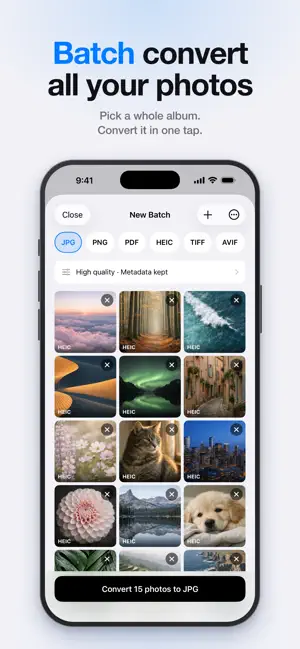
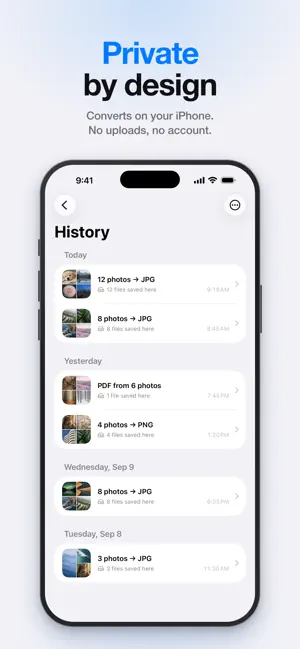
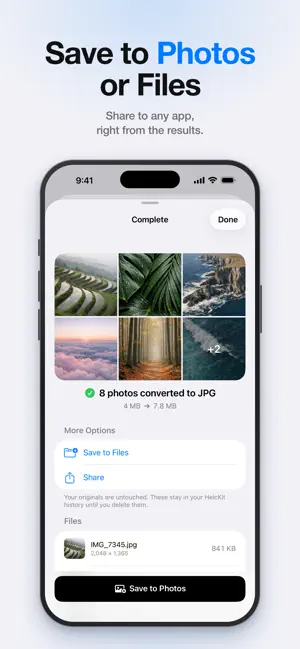
Convert HEIC photos to JPG, PNG or PDF in seconds, entirely on your iPhone. Your iPhone saves photos as HEIC. Many websites, email clients, Windows PCs and older apps still can't open them. HeicKit fixes that: pick your photos, tap Convert, and save or share the results. WHY HEICKIT • Batch conversion: pick a whole album and convert it in one tap (Pro) • 100% on device: your photos are never uploaded • No account, no sign-up, no ads • No subscription: Pro is a single one-time purchase FORMATS • HEIC and HEIF to JPG • PNG, PDF, HEIC, TIFF and AVIF output (Pro) • Combine photos into a single PDF (Pro) • Also converts WebP, PNG, TIFF and RAW photos MAKE FILES SMALLER • Quality presets from Low to Max, or your own (Pro) • Compress to a target file size, like "under 2 MB" (Pro) • Resize to a maximum dimension (Pro) CONTROL WHAT YOU KEEP • Inspect a photo's metadata before converting • Remove location before sharing, or strip all metadata (Pro) • Name files your way: original, numbered, or with a suffix (Pro) • Save presets for email, web or archiving (Pro) SAVE ANYWHERE • Save to your Photos library • Save to Files, iCloud Drive or any storage provider • Share straight to AirDrop, Mail, Messages and any app • Save automatically to Photos or a folder of your choice (Pro) • Keep converted files in HeicKit for 7 days, or until you delete them (Pro) MORE WAYS IN • Choose Photos, Browse Files, or paste a copied photo • "Convert Images" action for Shortcuts BUILT PROPERLY FOR IPHONE • Dark mode, Dynamic Type and VoiceOver • No advertising or tracking FREE AND PRO Free: convert one photo at a time to JPG, forever, and save it anywhere. HeicKit Pro is a single one-time purchase, never a subscription. It unlocks whole batches at once, every output format, quality and size controls, metadata controls, custom filenames, presets, automatic saving and kept history. Need a format we don't support yet? Email us and we'll look at adding it. Privacy Policy: https://muxtor141.github.io/heickit-legal/privacy.html Terms of Use: https://www.apple.com/legal/internet-services/itunes/dev/stdeula/
App privacy
The developer, Abdumukhtor Turgunboev, reported these privacy practices to Apple.
Data Not Collected
The developer does not collect any data from this app.
Alternatives to HEIC to JPG Converter: HeicKit
Looking for apps like HEIC to JPG Converter: HeicKit? Here are 6 similar apps on the App Store. The highest rated is SnapBrowse (5.0/5), and all 6 are free to download.


| App | Rating | Price | Last updated | Compare |
|---|---|---|---|---|
| HEIC to JPG Converter: HeicKit | – | Free | September 21, 2026 | |
| Charge Glance | – | Free | Sep 25, 2026 | Compare |
| SnapBrowse | 5.0 / 5 (5) | Free | Jun 21, 2024 | Compare |
| TOYOO | – | Free | Sep 7, 2026 | Compare |
| ARCADA CONSTRUCTION | – | Free | Dec 4, 2025 | Compare |
| Deflector ◇ | – | Free | Oct 6, 2026 | Compare |
| ShareLah | 5.0 / 5 (1) | Free | Feb 27, 2026 | Compare |