

Carimbo: Loyalty Card
Nolan Loureiro Business iPhoneiPadiPod touch
Carimbo: Loyalty Card is a free Business app for iPhone and iPad by Nolan Loureiro. Requires iOS 26.0. Updated October 28, 2026.
- Price
- Free
- on the App Store
- Size
- 6 MB
- Age 4+
- Updated
- Oct 28
- 2026 · v1.2.2
Screenshots



About Carimbo: Loyalty Card
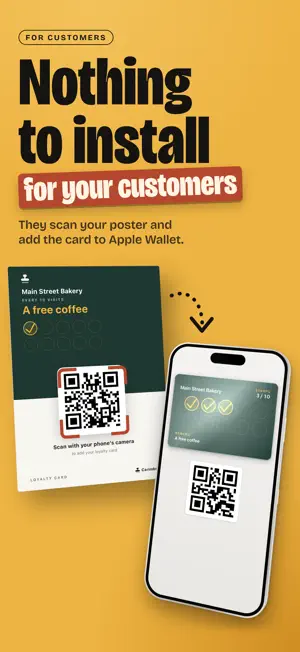
Your shop's loyalty card, on your customers' phones. One scan at the counter and it's stamped; when the card is full, Carimbo tells you which reward to give. Bakery, café, hair salon, florist, butcher: the paper card that gets left at home makes way for a card kept on their phone, in Apple Wallet on iPhone. Your customers point their camera at your poster and add their card to Apple Wallet. There's nothing to install. AT THE COUNTER • Scan the card's QR code: it's stamped, and the stamp count shows up big. • Dark counter? Turn on the phone's flashlight from the scanner. • QR code won't scan? Type the card's code on the keypad. • Card full: the reward appears. Tap "Mark as given" and it's recorded. YOUR CUSTOMERS • All your customers' cards, with their last visit. • Rewards to give, at the top of the list. • Who hasn't come by in two weeks, at a glance. • A stamp to fix? Add or remove one from the customer's card. • Statistics, with Business: today's activity and the last seven days. MESSAGES, WITH PREMIUM • Write to your customers, to everyone or only to those who stopped coming: the message appears on their card. • Automatic reminder: a message goes out on its own to customers who stopped coming, after the delay you choose (2 to 8 weeks), at most once a month each. • Flash offer: double or triple the stamps for a time slot, to fill a quiet hour. YOUR CARD • Your business name, the reward and the number of stamps: you choose. • Every color, your logo at the top of the card, and stamp expiry: never, 3 months, 6 months, 1 year or 2 years. • On iOS 27, your card takes Wallet's large Poster format. • With Business, a link to your reviews page, on the back of the card. • The counter poster, ready to print. Or your QR code on screen, for customers to scan. EVEN WITHOUT A SIGNAL No signal at the back of the shop? The visit is kept on the phone and sent automatically when the network returns. Never counted twice. PLANS • Essentiel, free: the card in your customers' Wallet with all its settings (every color and your logo, the reward, the number of stamps, stamp expiry, iOS 27's large Poster format), unlimited stamps and customers, the counter poster, scanning at the counter and your customer list. • Premium, the recommended plan: everything in Essentiel, plus messages to your customers, the automatic reminder for customers who stopped coming, flash offers (double or triple stamps) and customer export. • Business: everything in Premium, plus statistics (today's activity and the last seven days) and a link to your reviews page on the back of the card. SUBSCRIPTION Essentiel is free: the card in your customers' Wallet, unlimited stamps and customers, your colors and your logo. There's nothing to buy to create your card and use it. Premium and Business are optional monthly subscriptions, purchased in the app. The price is shown in the app before you confirm. If your Apple Account is eligible, the first month is free: the app tells you before you confirm. Payment is charged to your Apple Account at confirmation of purchase, or at the end of the free month. The subscription renews automatically every month unless canceled at least 24 hours before the end of the current period. You can manage and cancel it in iPhone Settings, under Subscriptions. Terms of use: https://tampon.cards/conditions-generales License agreement (EULA): https://www.apple.com/legal/internet-services/itunes/dev/stdeula/ Privacy policy: https://tampon.cards/confidentialite
What’s new
Version 1.2.2 · Updated October 28, 2026
Essentiel is now free: create your card with all its settings, print your poster and give the card to your customers, with no subscription. The iOS 27 Poster style is now in every plan. Messages to your customers move to Premium, and statistics to Business. Both are in Settings › Subscription, with a free month if your account is eligible. Also: • Add a preview of your card to your own Apple Wallet, to see it as your customers do (Settings › Loyalty card). • Your logo keeps the round shape of its crop, on the card and on the poster. • The reward can be longer. • Display fixes, in Settings and elsewhere.
App privacy
The developer, Nolan Loureiro, reported these privacy practices to Apple.
Data Linked to You
The following data, which may be collected and linked to your identity, may be used for the following purposes:
- Purchases: Purchase History
- Contact Info: Email Address
- User Content: Photos or Videos, Other User Content
- Identifiers: User ID, Device ID
Used for: App Functionality
Alternatives to Carimbo: Loyalty Card
Looking for apps like Carimbo: Loyalty Card? Here are 6 similar apps on the App Store.
-
 Meetr : fidélité commerçants
-
 BriizPay: Cardless Payments
-
 Payly — Your pay link
-
 Fidélio - Fidélité Digitale
-
 Paybyrd Dashboard
-
 Synapto Payments
| App | Rating | Price | Last updated | Compare |
|---|---|---|---|---|
| Carimbo: Loyalty Card | – | Free | October 28, 2026 | |
| Meetr : fidélité commerçants | – | Free | Oct 24, 2026 | Compare |
| BriizPay: Cardless Payments | – | Free | Sep 5, 2026 | Compare |
| Payly — Your pay link | – | Free | Sep 21, 2026 | Compare |
| Fidélio - Fidélité Digitale | – | Free | Oct 24, 2026 | Compare |
| Paybyrd Dashboard | – | Free | Jul 31, 2026 | Compare |
| Synapto Payments | – | Free | Sep 18, 2026 | Compare |