

AutoTok: Repost Remover
Undercover Capital LLC Social Networking iPhoneiPadiPod touch
AutoTok: Repost Remover is a free Social Networking app for iPhone and iPad by Undercover Capital LLC. Rated 3.0/5 from 2 ratings. Requires iOS 16.6.
- Rating
- 3.0
- 2 ratings
- Price
- Free
- on the App Store
- Size
- 114 MB
- Age 4+
- Updated
- Sep 28
- 2026 · v1.1.2
Screenshots

About AutoTok: Repost Remover
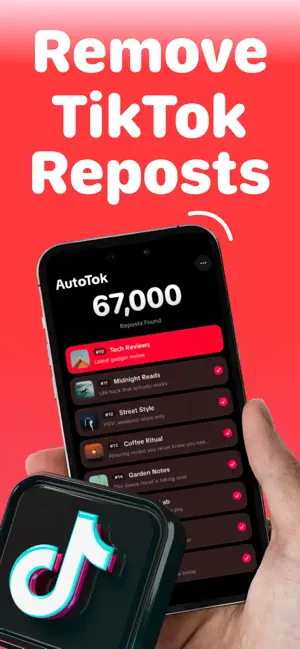
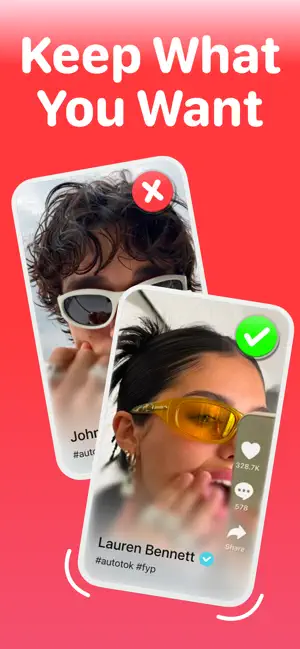
AutoTok lets you find, review and remove TikTok reposts in bulk with no manual scrolling or password required. Are you tired of searching how to remove all reposts? AutoTok is the best way to remove all your reposts fast, simple and stress free. In just a few clicks, you can see how many reposts you have, unselect the reposts you want to keep and delete the rest in one click. How it Works 1. Connect to TikTok without ever having to share your password. 2. Run a scan to see how many reposts you have. 3. Deselect the reposts you want to keep and let AutoTok remove the rest. Key Features • Automatic repost removal without manual scrolling. • See your total number of TikTok reposts. • Delete reposts quickly and automatically. • No password required. • See which reposts you deleted. Ready to start? Download AutoTok today to clear your TikTok reposts and become nonchalant. AutoTok also offers optional subscriptions and in app purchases if you want to delete even more reposts per day. Pricing for each plan is shown in the app before you buy and may vary by region. Payment is charged to your Apple ID at confirmation of purchase. Your account is charged for renewal within 24 hours prior to the end of the current period, at the same price for the same plan length. Subscriptions renew automatically unless auto-renew is turned off at least 24 hours before the end of the current period. You can manage your subscription, or turn off auto-renew, anytime in your Apple ID settings. Privacy Policy: http://autotok.crd.co Terms of Use (EULA): https://www.apple.com/legal/internet-services/itunes/dev/stdeula AutoTok is not affiliated with, endorsed by, or sponsored by TikTok or ByteDance Ltd. "TikTok" is a trademark of ByteDance Ltd.
What’s new
Version 1.1.2 · Updated September 28, 2026
Performance updates.
App privacy
The developer, Undercover Capital LLC, reported these privacy practices to Apple.
Data Used to Track You
The following data may be used to track you across apps and websites owned by other companies:
- Identifiers: User ID, Device ID
Data Linked to You
The following data, which may be collected and linked to your identity, may be used for the following purposes:
- Identifiers: User ID, Device ID
Used for: Analytics, App Functionality
Alternatives to AutoTok: Repost Remover
Looking for apps like AutoTok: Repost Remover? Here are 6 similar apps on the App Store. The highest rated is Repost Remover: EraseTok (5.0/5), and all 6 are free to download.
-
 FixMyTok: Repost Remover
-
 Repost Remover — TikRemover
-
 Repost Remover: EraseTok
5.0
Repost Remover: EraseTok
5.0
-
 Repost Remover — Clear Tok
2.0
Repost Remover — Clear Tok
2.0
-
 Repostless: Repost Remover
5.0
Repostless: Repost Remover
5.0
-
 Tik UnRepost - Repost Remover
| App | Rating | Price | Last updated | Compare |
|---|---|---|---|---|
| AutoTok: Repost Remover | 3.0 / 5 (2 ratings) | Free | September 28, 2026 | |
| FixMyTok: Repost Remover | – | Free | Oct 13, 2026 | Compare |
| Repost Remover — TikRemover | – | Free | Sep 15, 2026 | Compare |
| Repost Remover: EraseTok | 5.0 / 5 (11) | Free | Oct 13, 2026 | Compare |
| Repost Remover — Clear Tok | 2.0 / 5 (1) | Free | Sep 11, 2026 | Compare |
| Repostless: Repost Remover | 5.0 / 5 (1) | Free | Oct 6, 2026 | Compare |
| Tik UnRepost - Repost Remover | – | Free | Sep 11, 2026 | Compare |