

Magic Pocket: Save & Find
Rehaan Rasheed Productivity iPhoneiPadiPod touchMac
Magic Pocket: Save & Find is a free Productivity app for iPhone and iPad by Rehaan Rasheed. Requires iOS 17.0. Updated October 6, 2026.
- Price
- Free
- on the App Store
- Size
- 27 MB
- Age 4+
- Updated
- Oct 6
- 2026 · v1.3.2
Screenshots



About Magic Pocket: Save & Find
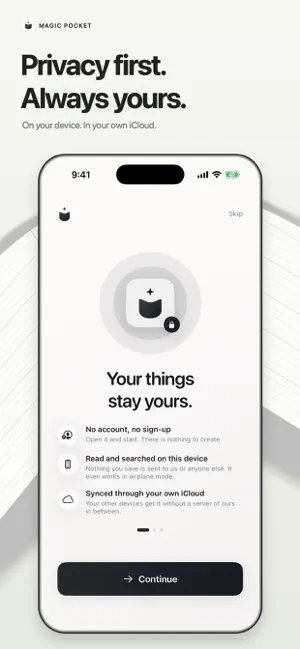
Your second memory. Throw it in. Find it anytime. Magic Pocket keeps the text, screenshots, links and documents you want to use again in one searchable place. Save an address, a booking confirmation, a useful note or a PDF, then find the original or copy the exact detail you need. SAVE IT WHILE IT'S HANDY Add text, links, photos and files, scan a document, paste from your clipboard, or send things to Pocket from the share sheet. Pocket reads the text in images and documents, picks out details like names, dates and numbers, and gives each item a clear title. Pin your everyday essentials so they're always close. FIND IT BY TYPING OR ASKING Type a few words, or tap the microphone and say what you need, like "my passport number" or "the Wi-Fi password". Pocket opens the best saved item for each completed Find request. If a request for a specific detail is ambiguous, Pocket asks you to choose. To save something by voice, say "Remember" followed by what to keep. ORGANIZED FOR YOU Pocket files what you save into categories and collections, laid out as a map you can explore. Edit titles, labels and saved details, restore earlier versions, and recover items from Recently Deleted. READY TO USE AGAIN Copy exact saved text, preview the original, or share a file. Keep useful information ready for the next form, conversation or trip. USE YOUR POCKET IN OTHER APPS Use Pocket Keyboard to insert saved text, addresses, links and reply templates wherever third-party keyboards are supported. Your saved text and useful details are available automatically, including while Pocket’s app lock is on. Type normally, or tap Ask Pocket to search your saved items. Choosing a result inserts it and returns to typing. No Full Access is needed. MADE FOR IPHONE AND IPAD Add widgets to save, search or reach your pinned items in a tap, and ask Siri to "Find in Magic Pocket". Browse your Pocket with more room on iPad. PRIVATE BY DESIGN There's no account to create. What you save is read, organized and searched on your device, and voice requests are recognized on your device too. Nothing you save is ever sent to us. Lock Pocket with Face ID or Touch ID, export your library at any time, or delete everything in one step. AT HOME ON YOUR APPLE DEVICES Use Magic Pocket on iPhone, iPad and Mac. Your Pocket syncs through your own private iCloud, so it's on every device signed in to the same Apple Account. Saving and searching work offline. MAGIC POCKET PRO Magic Pocket is free for your first 10 items, with every feature included, and everything you save stays usable whatever you decide. Magic Pocket Pro lets you save as many items as you like for a single payment. It is not a subscription and never renews. One purchase covers iPhone, iPad and Mac with the same Apple Account, and the price for your country is shown in the app before you buy. Terms of Use: https://magic-pocket-three.vercel.app/terms/ Privacy Policy: https://magic-pocket-three.vercel.app/privacy/
What’s new
Version 1.3.2 · Updated October 6, 2026
Retrieval optimization to find details buried deep in messy text.
App privacy
The developer, Rehaan Rasheed, reported these privacy practices to Apple.
Data Not Linked to You
The following data, which may be collected but is not linked to your identity, may be used for the following purposes:
- Purchases: Purchase History
Used for: Analytics, App Functionality
Alternatives to Magic Pocket: Save & Find
Looking for apps like Magic Pocket: Save & Find? Here are 6 similar apps on the App Store. The highest rated is Stash: Fast Add to Clipboard (4.3/5), and all 6 are free to download.
-
 Fetch — Your Voice Library
-
 SaveCross: Clipboard Library
-
 Link Bucket: Bookmark Manager
-
 ServiceWRK
-
 ServiceWRK Agent
-
 Stash: Fast Add to Clipboard
4.3
| App | Rating | Price | Last updated | Compare |
|---|---|---|---|---|
| Magic Pocket: Save & Find | – | Free | October 6, 2026 | |
| Fetch — Your Voice Library | – | Free | Oct 7, 2026 | Compare |
| SaveCross: Clipboard Library | – | Free | Sep 21, 2026 | Compare |
| Link Bucket: Bookmark Manager | – | Free | Oct 15, 2026 | Compare |
| ServiceWRK | – | Free | Mar 20, 2026 | Compare |
| ServiceWRK Agent | – | Free | Feb 16, 2026 | Compare |
| Stash: Fast Add to Clipboard | 4.3 / 5 (10) | Free | Oct 24, 2026 | Compare |