

Kiboon
AIB Inc. Lifestyle iPhoneiPadiPod touchApple Watch
Kiboon is a free Lifestyle app for iPhone and iPad by AIB Inc. Requires iOS 18.0. Updated October 12, 2026.
- Price
- Free
- on the App Store
- Size
- 144 MB
- Age 4+
- Updated
- Oct 12
- 2026 · v1.64
Screenshots



About Kiboon
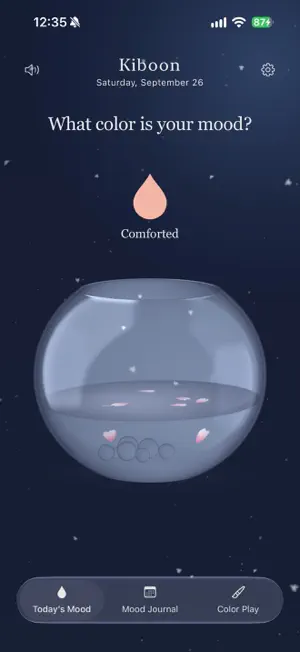
What color matches your mood today? Have you ever decided to keep a daily journal, only to find that looking back on your day and putting it into words feels like too much? Kiboon is a place to record your mood in color and take a quiet break as you watch colors blend. There is no need to write a long entry or wait until the day is over. Whenever a feeling comes along, choose a color and capture it, one drop at a time. Use it to keep a simple daily record, remember how you felt in a particular moment, or simply enjoy mixing colors like paint. There is no single way to use Kiboon. Make it your own. Morning excitement, afternoon fatigue, a calm moment before bed. Your mood can change many times in a day. Even feelings that are hard to put into words can find expression in color. Take a moment to watch ink slowly spread through the water and blend. As the colors gather, they become a small record of your day. ■ Express yourself in color Start with twelve moods, change their names and colors, or add your own moods and descriptions. Keep the moods you use most in your favorites. Record as often as you like throughout the day, whenever there is a moment you want to keep. ■ Add a drop at a time Tap the droplet to choose a mood, then swipe down to add color to your glass bottle. Touch the screen or tilt your iPhone to move the water and watch the ink spread. Take your time and enjoy the colors coming together. ■ Take a moment to reflect Which colors filled your day? Explore mood percentages and entries for today, the last seven days, or this month. Add a note if something comes to mind. On days when the words do not come, a color is enough. ■ Share your moods Add a personal message to a card filled with your moods. Share the colors of today, the last seven days, or this month as an image. ■ Record from your Home Screen Choose a mood in the Home Screen widget and tap the droplet to record how you feel, right away. The Lock Screen widget shows your most recorded mood today and its percentage. ■ See more of the moment You can choose to include location and weather with your entries. Connect to Apple Health to view heart rate, step count, sleep, weight, blood pressure, and body temperature relevant to the time of your mood entry, all on its detail screen. If no readable health value is available, you can enter one manually. Manual values stay on your device and are never written to Apple Health. ■ Music and water sounds Turn background music and water sound effects on or off independently, and enjoy a quiet moment your way. ■ Color Play Choose a color and brush and express yourself freely. The bottle returns to clear water when the local date on your iPhone changes. Your mood records and notes stay in your journal.
What’s new
Version 1.64 · Updated October 12, 2026
Improved ink colors and soft glow in the evening and at night. Light now spreads naturally around the ink, with smoother edges in both the bottle and full-screen water view. Daytime colors remain unchanged.
App privacy
The developer, AIB Inc., reported these privacy practices to Apple.
Data Not Collected
The developer does not collect any data from this app.
Alternatives to Kiboon
Looking for apps like Kiboon? Here are 6 similar apps on the App Store. The highest rated is Floria - Mood Journal (5.0/5), and all 6 are free to download.
-
 Good Things Jar — Shake Memory
-
 Kawaii Diary: Mood Journal
-
 Manifesta — Manifestation
-
 こころぐ - AI日記
-
 毎日の感情日記 - EmotionLog
-
 Floria - Mood Journal
5.0
Floria - Mood Journal
5.0
| App | Rating | Price | Last updated | Compare |
|---|---|---|---|---|
| Kiboon | – | Free | October 12, 2026 | |
| Good Things Jar — Shake Memory | – | Free | Aug 7, 2026 | Compare |
| Kawaii Diary: Mood Journal | – | Free | Sep 3, 2026 | Compare |
| Manifesta — Manifestation | – | Free | Sep 29, 2026 | Compare |
| こころぐ - AI日記 | – | Free | Aug 28, 2026 | Compare |
| 毎日の感情日記 - EmotionLog | – | Free | Oct 12, 2026 | Compare |
| Floria - Mood Journal | 5.0 / 5 (2) | Free | Oct 10, 2026 | Compare |
Compare Kiboon with the top alternatives: ratings, updates, ASO score and keyword gaps →