

Calance - Calendar & Widgets
Jonas Schaude Productivity iPhoneiPadiPod touch
Calance - Calendar & Widgets is a free Productivity app for iPhone and iPad by Jonas Schaude. Rated 5.0/5 from 2 ratings. Requires iOS 18.0.
- Rating
- 5.0
- 2 ratings
- Price
- Free
- on the App Store
- Size
- 10 MB
- Age 4+
- Updated
- Oct 23
- 2026 · v1.19.0
Screenshots
Save to Pinterest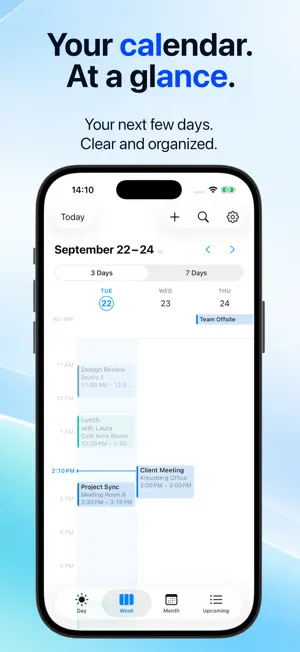


About Calance - Calendar & Widgets
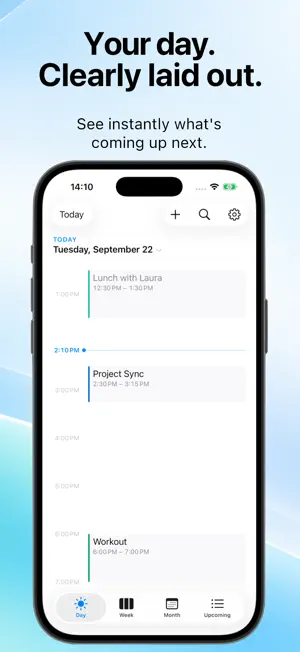
Your calendar. At a glance. Calance brings clarity and calm to your calendar. A clean daily timeline keeps today’s schedule easy to follow, while the flexible week view gives you an overview of the days ahead and the month view shows the bigger picture. Switch seamlessly between 3 and 7 days, keep track of upcoming events, and jump straight to any date. On iPad, Calance makes the most of the extra space with even more room for your schedule — including your day and month side by side. Create and edit events directly in Calance. Move events or adjust their duration right from the Day view. Recurring events, alerts, multiple calendars, and all-day events are easy to manage. Press and hold an open time slot on the timeline to create a new event right where you need it. With event templates, you can save frequently used event details and reuse them whenever you need to. Create similar events faster without entering the same information again and again. With versatile widgets, your calendar is always within reach on your Home Screen and Lock Screen — from upcoming events and daily overviews to month calendars and multi-day timelines. The month widget can display either a full month or the next four weeks. Features: • Today view with a continuous timeline and current time • Move events and adjust their duration directly in the Day view • Flexible 3-day and 7-day week views • Month view with daily details • Overview of your upcoming events • Create events directly from the timeline • Create, edit, and delete events • Create, manage, and reuse event templates • Recurring events with flexible intervals and selected weekdays • Set alerts and manage existing calendar alerts • Search events and jump directly to any date • Home Screen widgets for upcoming events, daily overviews, month calendars, and timelines • Month widget with a full-month or next-four-weeks view • Lock Screen widgets for upcoming events • Direct navigation from supported widgets • Optimized for iPhone and iPad • Day and month side by side on iPad • Choose your default calendar and customize which calendars are visible • Optional week numbers • Works with your existing calendars • No additional account required Your events stay where they belong. Calance works with your existing calendars and makes them clear, calm, and easy to understand — without requiring you to move your events to another service.
What’s new
Version 1.19.0 · Updated October 23, 2026
Calance is now even clearer and easier to use. • New event templates: Save frequently used event details and create similar events faster. • Next 4 Weeks: See the next four weeks at a glance in the month widget. • Refined month widgets with a cleaner, calmer design. • Additional improvements to usability, appearance, and stability.
App privacy
The developer, Jonas Schaude, reported these privacy practices to Apple.
Data Not Collected
The developer does not collect any data from this app.
Alternatives to Calance - Calendar & Widgets
Looking for apps like Calance - Calendar & Widgets? Here are 6 similar apps on the App Store.
-
 Kalendera – Calendar & Events
-
 Awave Controller
-
 Countdown It
-
 WeekPilot: Weekly Calendar
-
 Todixx
-
 FineCal: Calendar & Planner
| App | Rating | Price | Last updated | Compare |
|---|---|---|---|---|
| Calance - Calendar & Widgets | 5.0 / 5 (2 ratings) | Free | October 23, 2026 | |
| Kalendera – Calendar & Events | – | Free | Nov 16, 2026 | Compare |
| Awave Controller | – | Free | Jul 11, 2024 | Compare |
| Countdown It | – | Free | Nov 10, 2026 | Compare |
| WeekPilot: Weekly Calendar | – | Free | Nov 19, 2026 | Compare |
| Todixx | – | Free | Oct 9, 2026 | Compare |
| FineCal: Calendar & Planner | – | Free | Nov 20, 2026 | Compare |