

TimeSync: Easy Schedule
Hyo Eun Lee Productivity iPhoneiPadiPod touch
TimeSync: Easy Schedule is a free Productivity app for iPhone and iPad by Hyo Eun Lee. Requires iOS 15.1. Updated October 8, 2026.
- Price
- Free
- on the App Store
- Size
- 36 MB
- Age 4+
- Updated
- Oct 8
- 2026 · v1.0.3
Screenshots


About TimeSync: Easy Schedule
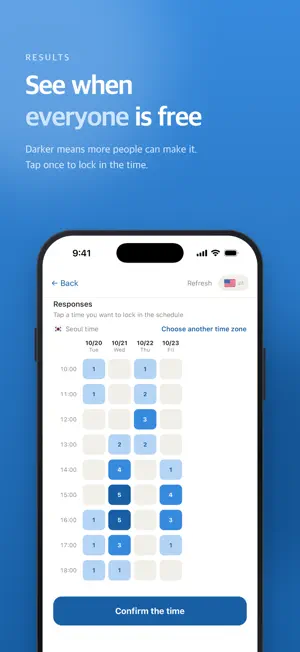
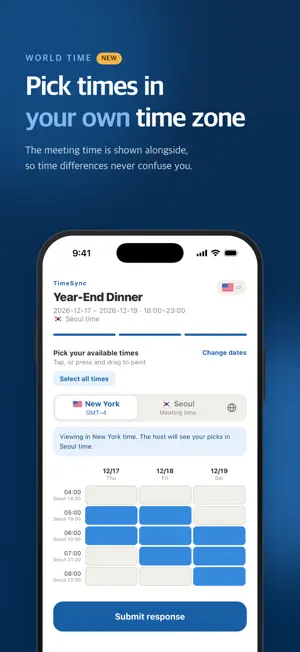
TimeSync is the simplest way to find a time that works for everyone. Planning a get-together with friends or setting up a meeting with coworkers? "When are you free?" "I can't make it that day." "Then when works for you?" Skip the endless back-and-forth. Create a meeting link in TimeSync and share it with your group. Everyone marks when they're available, and you can compare all schedules at a glance. Key Features • Create a meeting in seconds Just set a name, a date range, and a time range, and your scheduling link is ready. • Share with a single link Invite friends, family, and coworkers via KakaoTalk, text message, link, or QR code right after creating a meeting. Anyone with the link can enter their availability right away. • Pick your available times Select the times that work for you on a simple calendar. • Works across time zones Set a time zone when you create a meeting. Friends abroad can switch to their own local time while picking, and their choices are converted to the meeting's time automatically. Once confirmed, the time is shown in each participant's local time — Seoul, New York, London and more. • Paint your availability No need to tap slot by slot. Press and drag to select a whole block of time at once. • Delete meetings easily Swipe a meeting in your list, or delete it right from the meeting screen. • Available in English and Korean • See everyone's availability at a glance Instantly see how many people are free in each time slot. • Find the best time, fast Popular time slots are highlighted on a heatmap, so the best option stands out. • Share the confirmed plan as an image Once you confirm a time, share it as a calendar image or save it to your photos. • Private meetings for friends only Add friends with a friend code and create private meetings that only invited friends can join. • No sign-up required Create and join meetings right away, with no complicated sign-up. From dinner plans and climbing sessions to study groups, team meetings, and trips. Find a time that works for everyone with TimeSync. TimeSync Easy Schedule
What’s new
Version 1.0.3 · Updated October 8, 2026
• Time zone support: set a meeting's time zone, and switch to your own local time when responding. Confirmed times are also shown in each participant's local time. • Delete meetings: swipe a meeting in your list, or delete it from the meeting screen. • The language switch now uses flags. • The keyboard now closes when you tap outside the meeting name field.
App privacy
The developer, Hyo Eun Lee, reported these privacy practices to Apple.
Data Linked to You
The following data, which may be collected and linked to your identity, may be used for the following purposes:
- Contact Info: Name
- User Content: Other User Content
- Identifiers: User ID
Used for: App Functionality
Alternatives to TimeSync: Easy Schedule
Looking for apps like TimeSync: Easy Schedule? Here are 6 similar apps on the App Store.




| App | Rating | Price | Last updated | Compare |
|---|---|---|---|---|
| TimeSync: Easy Schedule | – | Free | October 8, 2026 | |
| Aligndar | – | Free | Oct 15, 2026 | Compare |
| SeeYaWhen: Plan Together | – | Free | Oct 8, 2026 | Compare |
| 모여 | – | Free | Jun 4, 2026 | Compare |
| 언제만나 | – | Free | Jul 10, 2026 | Compare |
| 틈 - 모두가 괜찮은 시간 찾기 | – | Free | Aug 21, 2026 | Compare |
| ShiftStamp - 근무 일정 관리 | – | Free | Jan 8, 2026 | Compare |