

Livery Lab: ACC Skin Editor
Zarifjon Ergashev Graphics & Design iPhoneiPadiPod touch
Livery Lab: ACC Skin Editor is a free Graphics & Design app for iPhone and iPad by Zarifjon Ergashev. Rated 5.0/5 from 1 ratings. Requires iOS 17.0.
- Rating
- 5.0
- 1 ratings
- Price
- Free
- on the App Store
- Size
- 7 MB
- Age 4+
- Updated
- Oct 12
- 2026 · v1.7
Screenshots


About Livery Lab: ACC Skin Editor
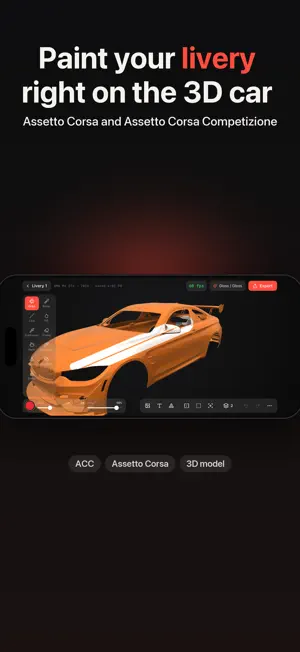
Livery Lab is a livery editor for Assetto Corsa and Assetto Corsa Competizione that runs on your phone and tablet. PAINT ON THE CAR, NOT ON A UV MAP Brush, line and fill put paint straight onto the 3D model. It lands on the UV layout by itself — you never have to see or understand one. Decals and text follow the shape of the bodywork. WHAT IS INSIDE • Brush with stylus pressure, straight line, part fill and whole-body fill • Up to six layers: opacity, visibility, reordering by drag • Blend modes: normal, multiply, screen • Layer masks, mirror symmetry, panel bounds by edge and by lasso • Eyedropper picks colour straight off the car • Parts that refuse paint: glass and mirrors stay clean • Decals from your own images and SVG, text with an outline and along an arc • Decals bent to the bodywork, stamps, gradients, ready-made elements • A placed decal can be picked back up and moved • Undo and redo, with separate history per layer TAKE THE LIVERY INTO THE GAME The app builds an archive with the Cars and Liveries folders: move it to your computer, unpack it and copy it into Documents\Assetto Corsa Competizione\Customs. The archive includes a README with these same steps. THE CAR COMES FROM THE CATALOG Inside the app there is a list of cars: GT3, GT4, GT2 and other classes. Tap Download and the model lands straight in your garage, together with the car number the export needs. No hunting for files, no unpacking archives, nothing to carry onto the phone. Your own model works too: .obj or .glb from Files. Your liveries stay on the device: the app sends nothing anywhere — it goes online only to fetch models from the catalog.
What’s new
Version 1.7 · Updated October 12, 2026
The app no longer closes when you leave the editor. It happened if you tapped the back button twice in quick succession; now you simply return to the garage.
App privacy
The developer, Zarifjon Ergashev, reported these privacy practices to Apple.
Data Linked to You
The following data, which may be collected and linked to your identity, may be used for the following purposes:
- Location: Coarse Location
- Identifiers: User ID, Device ID
- Usage Data: Product Interaction
- Purchases: Purchase History
- Contact Info: Email Address, Name
- User Content: Photos or Videos, Other User Content
Used for: Analytics, App Functionality
Data Not Linked to You
The following data, which may be collected but is not linked to your identity, may be used for the following purposes:
- Diagnostics: Crash Data, Performance Data
Used for: Analytics, App Functionality
Alternatives to Livery Lab: ACC Skin Editor
Looking for apps like Livery Lab: ACC Skin Editor? Here are 6 similar apps on the App Store. The highest rated is Wrap Brush: Custom Car Wraps (5.0/5), and all 6 are free to download.
-
 DecalFit: AI Car Designer
-
 Wrap My Cars: Wrap Design & AI
-
 Stickly: AI Sticker Maker
-
 Wrap Brush: Custom Car Wraps
5.0
Wrap Brush: Custom Car Wraps
5.0
-
 AI Car Design: Car Editor
3.0
AI Car Design: Car Editor
3.0
-
 TopMod 3D: Design Software
5.0
TopMod 3D: Design Software
5.0
| App | Rating | Price | Last updated | Compare |
|---|---|---|---|---|
| Livery Lab: ACC Skin Editor | 5.0 / 5 (1 rating) | Free | October 12, 2026 | |
| DecalFit: AI Car Designer | – | Free | Sep 30, 2026 | Compare |
| Wrap My Cars: Wrap Design & AI | – | Free | Sep 15, 2026 | Compare |
| Stickly: AI Sticker Maker | – | Free | Mar 19, 2026 | Compare |
| Wrap Brush: Custom Car Wraps | 5.0 / 5 (3) | Free | Oct 23, 2026 | Compare |
| AI Car Design: Car Editor | 3.0 / 5 (2) | Free | Jul 31, 2026 | Compare |
| TopMod 3D: Design Software | 5.0 / 5 (3) | Free | Oct 21, 2026 | Compare |