

DahongMemo - Quick Notes
YoungWon Studio Productivity iPhoneiPadiPod touch
DahongMemo - Quick Notes is a free Productivity app for iPhone and iPad by YoungWon Studio. Requires iOS 18.6. Updated October 12, 2026.
- Price
- Free
- on the App Store
- Size
- 8 MB
- Age 4+
- Updated
- Oct 12
- 2026 · v1.1
Screenshots



About DahongMemo - Quick Notes
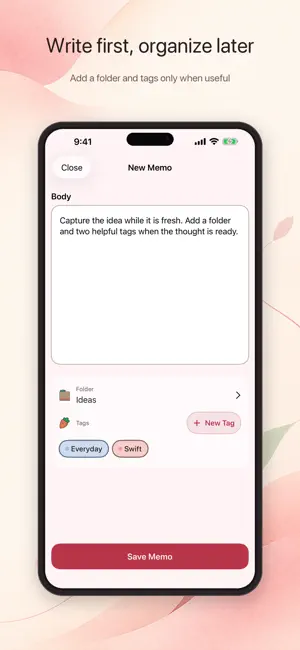
For anyone who wants to save a thought before it slips away, DahongMemo opens straight into a simple writing flow. Write first, then add a folder or tags only when they help you organize. No DahongMemo account, ads, or third-party tracking. Memos stay on your device unless you choose private iCloud sync. WRITE WITHOUT THE SETUP • Start with one flexible memo body—no title required • Keep a draft safe while you choose a folder and multiple tags • Read, edit, favorite, move, or delete a memo with undo support FIND WHAT YOU SAVED • Search memo text, folders, and tags together • Narrow results with folder and tag filters • Return to your search context after opening a result • Revisit favorites and recent memos from Home MAKE THE SPACE YOURS • Organize with a protected default folder and your own folders • Create and manage colored tags • Choose Dahong, Peach, Sky, or Lavender in Light, Dark, or System appearance • Cycle through favorite memos in Medium and Large Home Screen widgets LOCAL FIRST, ICLOUD BY CHOICE DahongMemo starts on this device. If you opt in, your memos, folders, tags, and favorites can sync through your private iCloud account. The developer does not operate a memo server. You can create up to 50 current memos for free. An optional one-time Lifetime Unlock removes the new-memo limit. Existing memos, editing, search, folders, tags, themes, widgets, and iCloud remain available without purchase.
What’s new
Version 1.1 · Updated October 12, 2026
- Lock folders with device authentication to protect your important memos. - Improved privacy for locked memos when the app is in the background and when using widgets. - Improved editing and draft navigation in locked folders, with protection maintained during iCloud syncing. - Improved the memo editor so the text you're typing stays visible above the keyboard on smaller screens. - Added a confirmation before discarding a new memo's draft and fixed an issue where discarded drafts could reappear. - Simplified folder screens and confirmations for locking and unlocking folders.
App privacy
The developer, YoungWon Studio, reported these privacy practices to Apple.
Data Not Collected
The developer does not collect any data from this app.
Alternatives to DahongMemo - Quick Notes
Looking for apps like DahongMemo - Quick Notes? Here are 6 similar apps on the App Store. The highest rated is Time Cottage: AI Day Planner (5.0/5), and all 6 are free to download.
-
 Konspektor
3.0
Konspektor
3.0
-
 Time Cottage: AI Day Planner
5.0
Time Cottage: AI Day Planner
5.0
-
 Daily AI Writer: Email Letter
4.7
Daily AI Writer: Email Letter
4.7
-
 Transcribe Audio・AI Note Taker
4.7
Transcribe Audio・AI Note Taker
4.7
-
 Sticky Notes widget - simple
4.6
Sticky Notes widget - simple
4.6
-
 Knots: Timeline & Journal
4.8
Knots: Timeline & Journal
4.8
| App | Rating | Price | Last updated | Compare |
|---|---|---|---|---|
| DahongMemo - Quick Notes | – | Free | October 12, 2026 | |
| Konspektor | 3.0 / 5 (2) | Free | Sep 20, 2026 | Compare |
| Time Cottage: AI Day Planner | 5.0 / 5 (1) | Free | Sep 20, 2026 | Compare |
| Daily AI Writer: Email Letter | 4.7 / 5 (15) | Free | Sep 15, 2026 | Compare |
| Transcribe Audio・AI Note Taker | 4.7 / 5 (41) | Free | Oct 15, 2026 | Compare |
| Sticky Notes widget - simple | 4.6 / 5 (270) | Free | Oct 18, 2026 | Compare |
| Knots: Timeline & Journal | 4.8 / 5 (162) | Free | Oct 6, 2026 | Compare |