

Cherry Studio - AI Anywhere
上海千彗科技有限公司 Productivity iPhoneiPadiPod touch
Cherry Studio - AI Anywhere is a free Productivity app for iPhone and iPad by 上海千彗科技有限公司. Rated 3.8/5 from 4 ratings. Requires iOS 17.0.
- Rating
- 3.8
- 4 ratings
- Price
- Free
- on the App Store
- Size
- 116 MB
- Age 4+
- Updated
- Oct 18
- 2026 · v0.3.0
Screenshots



About Cherry Studio - AI Anywhere
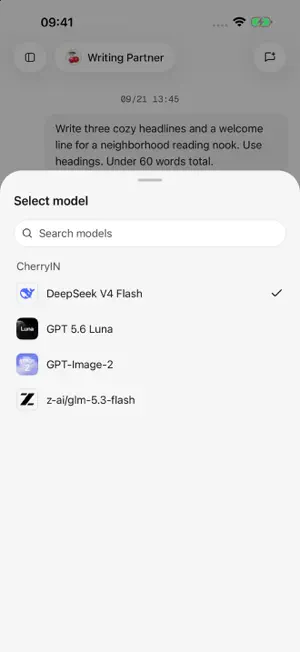
Cherry Studio is an AI workspace for iPhone and iPad, bringing together multi-model conversations, agents, image creation, and tool connections. Connect your chosen models Configure model services and API keys, manage multiple models in one app, and choose the capabilities that fit each task. Model availability and support for text, images, and files depend on the services you configure. Use conversations for work and creativity Chat about writing, learning, organizing information, and everyday questions. Read responses as they are generated, and add images and text attachments to provide context. Create your own agents Set names, instructions, default models, and tools for different purposes, and keep conversations for different projects organized separately. Turn ideas into images Connect a model that supports image generation, start with a text prompt or an existing image, and view and manage your image creation history. Connect tools when you need them Configure search services, plugins, or MCP tool servers to give agents access to web search and external tools. Availability depends on service configuration and permissions. With your permission, agents can also use calendar and reminder tools. Organize and share your results Manage attachments and generated files, preview documents, and export supported conversation content as Markdown, HTML, or images. You can also pair with the Cherry Studio desktop app to import supported model service configurations. Before you start The app is free to download. Model services and third-party tools may require separate accounts or API keys, and their providers may charge for usage. Conversation history is stored on your device. When you use models or online tools, relevant inputs are sent from your device to the services you configure. Each provider's data handling is governed by its own policies. The app also includes error diagnostics and usage statistics; see the privacy policy for details about what is collected. AI-generated content may contain errors. Please verify important information. Apple Health and fitness analysis On a supported iPhone, let an Agent read the Apple Health data you authorize: steps, walking/running distance, active energy, heart rate, resting heart rate, heart-rate variability, sleep and workouts. Before every health tool call, review the requested scope and the receiving AI service, then allow or deny the read and sharing. The app never changes Apple Health records. Results remain in conversation history and can be deleted with the conversation. AI answers are not medical advice, diagnosis or treatment.
What’s new
Version 0.3.0 · Updated October 18, 2026
New in 0.3.0 • Keep image generations and edits together on a drawing board, with overview and focus views, image annotations and press-and-hold comparison. • Organize files with folders, conversation workspaces, sorting and trash. Agents can create and process files with permission. • Save translations in multiple languages, switch quickly and include them when exporting messages. • Apple Health read-only analysis returns on iOS for activity, sleep, heart-rate and workout data. Every health read and sharing with your selected AI service requires confirmation. AI answers are not medical advice. • Optionally enable shake-to-send feedback, with improved tool approvals and MCP Apps interactions. Fixes and improvements • Better interrupted-task recovery, conversation queues, model compatibility and language selection. • Fixes across files, drawing, translation and interface interactions. Model and tool availability depends on the selected service and configuration. Third-party services may charge fees.
App privacy
The developer, 上海千彗科技有限公司, reported these privacy practices to Apple.
Data Linked to You
The following data, which may be collected and linked to your identity, may be used for the following purposes:
- Identifiers: User ID, Device ID
- Usage Data: Product Interaction
- Health & Fitness: Health, Fitness
- Diagnostics: Crash Data, Performance Data, Other Diagnostic Data
Used for: Analytics, App Functionality
Alternatives to Cherry Studio - AI Anywhere
Looking for apps like Cherry Studio - AI Anywhere? Here are 6 similar apps on the App Store. The highest rated is Cindy - AI Assistant (5.0/5), and all 6 are free to download.
-
 Oriveo: Multi-Model AI Chat
4.2
Oriveo: Multi-Model AI Chat
4.2
-
 LobeHub - AI Agent Teammates
4.8
LobeHub - AI Agent Teammates
4.8
-
 Cumbersome: AI LLM API Client
4.9
Cumbersome: AI LLM API Client
4.9
-
 Cindy - AI Assistant
5.0
Cindy - AI Assistant
5.0
-
 RouterChat
4.9
RouterChat
4.9
-
 Open Minis
4.9
Open Minis
4.9
| App | Rating | Price | Last updated | Compare |
|---|---|---|---|---|
| Cherry Studio - AI Anywhere | 3.8 / 5 (4 ratings) | Free | October 18, 2026 | |
| Oriveo: Multi-Model AI Chat | 4.2 / 5 (5) | Free | Oct 15, 2026 | Compare |
| LobeHub - AI Agent Teammates | 4.8 / 5 (15) | Free | Oct 19, 2026 | Compare |
| Cumbersome: AI LLM API Client | 4.9 / 5 (95) | Free | Oct 21, 2026 | Compare |
| Cindy - AI Assistant | 5.0 / 5 (8) | Free | Oct 19, 2026 | Compare |
| RouterChat | 4.9 / 5 (43) | Free | Oct 21, 2026 | Compare |
| Open Minis | 4.9 / 5 (94) | Free | Oct 11, 2026 | Compare |