

Daybook: Money Manager
Foodoor Enterprises LLP Finance iPhoneiPadiPod touch
Daybook: Money Manager is a free Finance app for iPhone and iPad by Foodoor Enterprises LLP. Requires iOS 16.4. Updated November 4, 2026.
- Price
- Free
- on the App Store
- Size
- 68 MB
- Age 4+
- Updated
- Nov 4
- 2026 · v1.0.3
Screenshots
Save to Pinterest
About Daybook: Money Manager
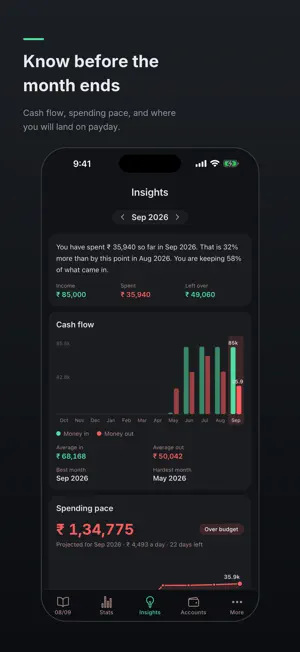
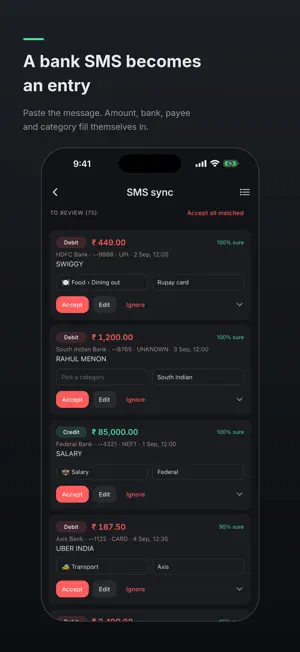
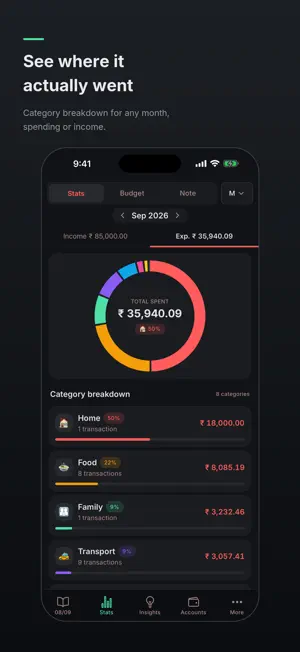
Most expense trackers make you pick between honest numbers and staying sane. Daybook does the tedious part and stays out of the way for the rest. Everything lives on your phone first. Open the app in a basement with no signal and it still works, because your ledger is on the device rather than on someone's server. LOG IT IN SECONDS Amount, category, account, done. Bookmark the ones you repeat and they become two taps. Set up rent and subscriptions once and they post themselves on the day they are due. TURN A BANK MESSAGE INTO AN ENTRY Paste the SMS your bank just sent you. Daybook reads the amount, whether money came in or went out, which bank and which card, who was paid, and a sensible category, then shows you what it worked out before anything is saved. It knows how Indian banks write these messages: UPI, NEFT, IMPS, card swipes, ATM withdrawals and standing instructions from HDFC, ICICI, SBI, Axis, Kotak, Federal, South Indian Bank and more. Nothing is imported behind your back. SEE WHERE IT ACTUALLY WENT A ring for the month and a ranked breakdown by category, with sub-categories folded into their parent so the totals add up. Tap any category to read the transactions behind the number. KNOW BEFORE THE MONTH ENDS Twelve months of cash flow, side by side. Your spending pace measured against your budget, with a projection of where you land on payday. Your heaviest categories, charges that look unusual for you, and an honest comparison with last month. BUDGETS THAT HOLD A cap per category, weekly, monthly or yearly. Daybook tells you a category is running hot while you can still slow down, not after the money is gone. ALL YOUR MONEY IN ONE NUMBER Cash, bank accounts, credit cards, savings and loans, with assets and liabilities netted into a net worth you can actually believe. Moving money between your own accounts is not counted as spending. YOURS, AND PRIVATE No account needed. Passcode or Face ID on open. Export the lot to CSV whenever you feel like it. There are no ads in this app and nothing about your money is sold. Found a bank message we read wrong? Send it to us and we will teach the parser.
What’s new
Version 1.0.3 · Updated November 4, 2026
Add expense and Add income from Siri, the Shortcuts app, the Action Button and Back Tap now open Daybook straight on a new entry, and they work on every supported iOS version. Touching and holding the Daybook icon and picking Add expense now opens a new entry even when Daybook was closed. Your profile now sits at the top of More, with your photo or your initials. Tap it to choose or take a photo. A new Shortcuts section in More shows every quick way to add an entry: Siri, Back Tap, the Action Button, widgets and the app icon menu. The EMI calculator starts empty, and each field has a clear button so you can start over in one tap.
App privacy
The developer, Foodoor Enterprises LLP, reported these privacy practices to Apple.
Data Linked to You
The following data, which may be collected and linked to your identity, may be used for the following purposes:
- Financial Info: Other Financial Info
- Contact Info: Email Address, Name, Phone Number
- Identifiers: User ID
Used for: App Functionality
Alternatives to Daybook: Money Manager
Looking for apps like Daybook: Money Manager? Here are 6 similar apps on the App Store.
-
 Monely - Money Manager
-
 MyDues — Bill Reminders
-
 MoneyAI Expense Management
-
 Daybook - Expense Manager
-
 Finloq - Money Manager
-
 SampattiTrack: Money Tracker
| App | Rating | Price | Last updated | Compare |
|---|---|---|---|---|
| Daybook: Money Manager | – | Free | November 4, 2026 | |
| Monely - Money Manager | – | Free | Oct 1, 2026 | Compare |
| MyDues — Bill Reminders | – | Free | Sep 1, 2026 | Compare |
| MoneyAI Expense Management | – | Free | Aug 24, 2026 | Compare |
| Daybook - Expense Manager | – | Free | Aug 29, 2026 | Compare |
| Finloq - Money Manager | – | Free | Sep 18, 2026 | Compare |
| SampattiTrack: Money Tracker | – | Free | Oct 30, 2026 | Compare |