

Kiggo: Stocks explained
Frisch Group Holding ApS Finance iPhoneiPadiPod touch
Kiggo: Stocks explained is a free Finance app for iPhone and iPad by Frisch Group Holding ApS. Requires iOS 16.0. Updated October 22, 2026.
- Price
- Free
- on the App Store
- Size
- 1 MB
- Age 4+
- Updated
- Oct 22
- 2026 · v1.8
Screenshots



About Kiggo: Stocks explained
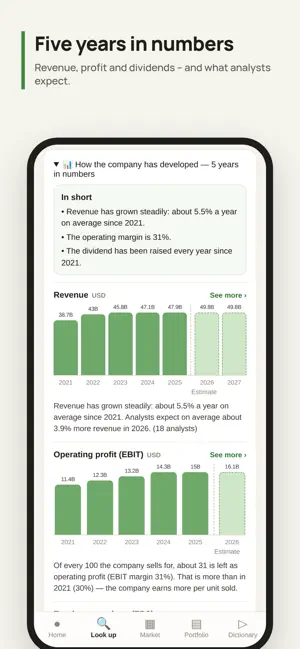
Kiggo is for you if you want to understand stocks – not be told what to buy. Search for a company and Kiggo explains what you're looking at: the price, the key figures and the jargon – in plain language. Think of it as a patient friend, not an analyst. WHO IS KIGGO FOR? • You've never bought a stock and want to understand it first • You own a few stocks and want an overview without spreadsheets • You want to learn to read a chart and a key figure THE WORLD'S MARKETS A world map of 42 markets plus cryptocurrency. The colors show at a glance how each market is doing today. LOOK IT UP AND UNDERSTAND IT Search stocks, ETFs and crypto. Price, chart and key figures – every number explained in everyday words. THE RATING – SHORT, MEDIUM AND LONG TERM Three rings show how a stock looks right now, over the coming weeks and in the long term – with an explanation of why. TECHNICAL ANALYSIS AND PRICE ALERTS Indicators such as RSI and MACD, moving averages, pivot points, support and resistance – across five timeframes from 15 minutes to one month. Every number is explained in everyday words. Set a price alert and Kiggo sends a notification to your iPhone when the price reaches the level – even when the app is closed. GLOSSARY AND TAX Investing terms explained without the jargon – plus the basics of tax in your own country, always showing which year the figures apply to. KIGGO PLUS Everything in Kiggo is included in Kiggo Plus: the world map, search, the rating, technical analysis and price alerts for all stocks, ETFs and crypto. New subscribers get the first week free. After that, Kiggo Plus is available monthly or yearly – the annual subscription gives you two months free. Prices are shown in the app in your local currency. Payment will be charged to your Apple Account at confirmation of purchase, or when the free week ends. The subscription renews automatically unless it is cancelled at least 24 hours before the end of the current period. You can manage or cancel it at any time in your App Store account settings. QUESTIONS AND ANSWERS Can I try Kiggo first? Yes. New subscribers get the first week free. Cancel in your App Store account settings at least 24 hours before the week ends and you pay nothing. Can I buy stocks in Kiggo? No. Kiggo is a tool for learning and keeping track. You buy stocks through your own bank or online broker. Does Kiggo tell me what to buy? No. Kiggo shows you what the numbers mean, so you can make up your own mind. It is not investment advice. Can I follow cryptocurrency? Yes. Bitcoin, Ethereum and other major cryptocurrencies, with price, chart and explanation. Which languages is Kiggo available in? 25 languages, including English, Danish, Swedish, Norwegian, Finnish and German. Terms of Use: https://kiggo.dk/vilkaar.html Privacy Policy: https://kiggo.dk/privatliv.html All investing involves risk, including the risk of losing your entire investment. Prices are delayed by about 15 minutes.
What’s new
Version 1.8 · Updated October 22, 2026
Now on iPad and Mac too. Kiggo uses the whole screen: each stock in two columns, with price and signals on the left and five years of numbers on the right. Bigger charts, a bigger world map and a market heatmap that fills the screen. Turn your iPad and Kiggo turns with it. On a Mac with Apple silicon, Kiggo runs in its own window. Kiggo explains – the decision is always yours.
App privacy
The developer, Frisch Group Holding ApS, reported these privacy practices to Apple.
Data Linked to You
The following data, which may be collected and linked to your identity, may be used for the following purposes:
- Purchases: Purchase History
- Contact Info: Email Address, Name
- Identifiers: User ID
Used for: App Functionality
Data Not Linked to You
The following data, which may be collected but is not linked to your identity, may be used for the following purposes:
- Usage Data: Product Interaction
Used for: Analytics
Alternatives to Kiggo: Stocks explained
Looking for apps like Kiggo: Stocks explained? Here are 6 similar apps on the App Store.
-
 Granule: Expense Tracker
-
 eply: daily budget planner
-
 Lens: Daily Budget
-
 Eira - Budget & Money Coach
-
 Dividend Tracker: Pulse
-
 StockPro - AI Stock Screener
| App | Rating | Price | Last updated | Compare |
|---|---|---|---|---|
| Kiggo: Stocks explained | – | Free | October 22, 2026 | |
| Granule: Expense Tracker | – | Free | Sep 17, 2026 | Compare |
| eply: daily budget planner | – | Free | Oct 23, 2026 | Compare |
| Lens: Daily Budget | – | Free | Oct 10, 2026 | Compare |
| Eira - Budget & Money Coach | – | Free | May 28, 2026 | Compare |
| Dividend Tracker: Pulse | – | Free | Jun 16, 2026 | Compare |
| StockPro - AI Stock Screener | – | Free | Oct 22, 2026 | Compare |