

EveryPDF & Scan
Roberto Bonfa Productivity iPhoneiPadiPod touch
EveryPDF & Scan is a free Productivity app for iPhone and iPad by Roberto Bonfa. Requires iOS 18.0. Updated October 14, 2026.
- Price
- Free
- on the App Store
- Size
- 16 MB
- Age 4+
- Updated
- Oct 14
- 2026 · v1.104
Screenshots


About EveryPDF & Scan
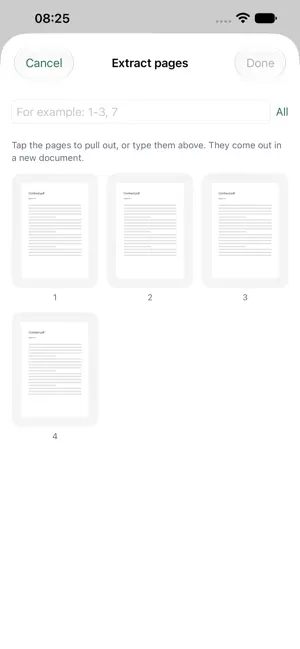
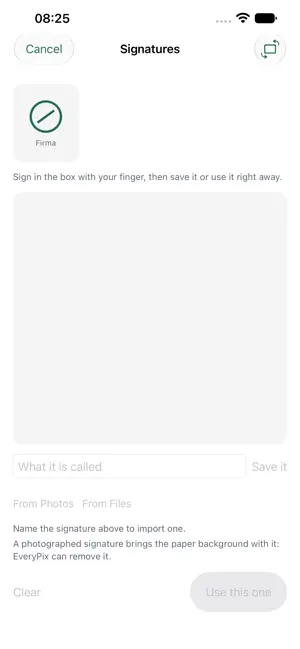
EveryPDF is a toolbox for PDF files. It is not a reader, though it works as one when you need it to: it is where a document comes in, gets worked on and goes out. TWENTY-SIX TOOLS Pages: merge several documents, split, reorder with your finger, extract the ones you need, remove, rotate, crop, add a blank page, number. Images: PDF to images in PNG, JPEG, HEIC or TIFF; images to PDF; compress at three levels, from the lightest to the one that redraws every page. Markup: sign freehand or with a saved signature, draw on the document with the pen and the highlighter, highlight text by running your finger over it, add a watermark, flatten what you added. Security: protect with a password, remove a protection you know, decide who may print and who may copy, redact with your finger what must not be read again. Text: OCR on scans, extract the text, turn the document into Markdown, Word or RTF, read and change the document details, convert text, Markdown or an office document to PDF. And two documents can be compared side by side, with a summary of what changes that you can take away. And scanning: photograph a sheet, the edges are found for you, the background turns white, the text is recognised. ONE THING AFTER ANOTHER A result does not have to be saved before you work on it again: in the result screen you tap "Apply another tool" and the document you have just made goes back among the ones in hand. Split then number, unlock then compress, sign then protect: no saving, closing and reopening. TWO ROADS, NOT ONE Everything the app does can be done from the iOS share sheet, without opening anything. From Mail, from Files, from Safari: share with EveryPDF, choose, the result goes on its way. What does not fit in the share sheet, where memory is a sixth of the app's, opens in the app with one tap, and you are told beforehand. And a document also opens by long-pressing it in Files and choosing "Open with": EveryPDF is there in the list and the PDF arrives already in hand. PRESETS A combination you repeat can be saved with a name and used from four places: the pills at the top of the app, the share sheet, the items under a long press on the icon, Shortcuts and Siri. ON IPHONE AND IPAD On iPad there are two columns, documents can be dragged in from Files, Mail and Safari, the result can be dragged out, and there are fifteen keyboard shortcuts. And you can print, from both. WHAT IT DOES NOT DO It does not use the network. It collects nothing. It has no analytics. Documents stay on your phone and are not kept: what comes out lives in a temporary folder that is emptied at launch. The signatures and watermarks you save, and your presets, live in your own private iCloud. Whoever wrote the app cannot see them. Italian and English. iOS 18 or later. Free, with no in-app purchases and no advertising.
What’s new
Version 1.104 · Updated October 14, 2026
1.104: Fixed some bugs and updated the home page.
App privacy
The developer, Roberto Bonfa, reported these privacy practices to Apple.
Data Not Collected
The developer does not collect any data from this app.
Alternatives to EveryPDF & Scan
Looking for apps like EveryPDF & Scan? Here are 6 similar apps on the App Store. The highest rated is Days Left & Days Since: SoFar (4.0/5), and all 6 are free to download.
-
 PromptSense - Smart AI Library
-
 JoeNote
-
 Prompo: AI Prompt Library
-
 Days Left & Days Since: SoFar
4.0
Days Left & Days Since: SoFar
4.0
-
 Artigianoteca
-
 Genesys Connect
| App | Rating | Price | Last updated | Compare |
|---|---|---|---|---|
| EveryPDF & Scan | – | Free | October 14, 2026 | |
| PromptSense - Smart AI Library | – | Free | Sep 10, 2026 | Compare |
| JoeNote | – | Free | Oct 9, 2026 | Compare |
| Prompo: AI Prompt Library | – | Free | Jul 1, 2026 | Compare |
| Days Left & Days Since: SoFar | 4.0 / 5 (1) | Free | Oct 19, 2026 | Compare |
| Artigianoteca | – | Free | Jul 19, 2024 | Compare |
| Genesys Connect | – | Free | Apr 21, 2026 | Compare |
Compare EveryPDF & Scan with the top alternatives: ratings, updates, ASO score and keyword gaps →