

PassKeeper - Password Tool
东申 王 Utilities iPhoneiPadiPod touch
PassKeeper - Password Tool is a free Utilities app for iPhone and iPad by 东申 王. Requires iOS 13.0. Updated September 23, 2026.
- Price
- Free
- on the App Store
- Size
- 13 MB
- Age 4+
- Updated
- Sep 23
- 2026 · v1.0
Screenshots

About PassKeeper - Password Tool
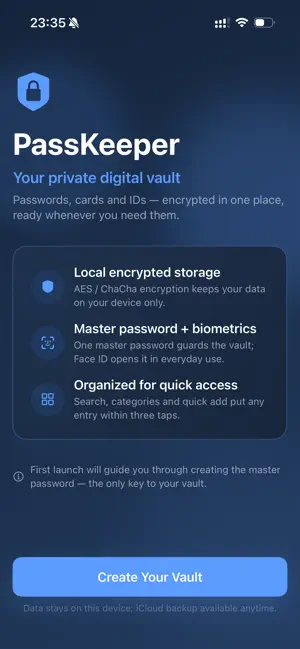
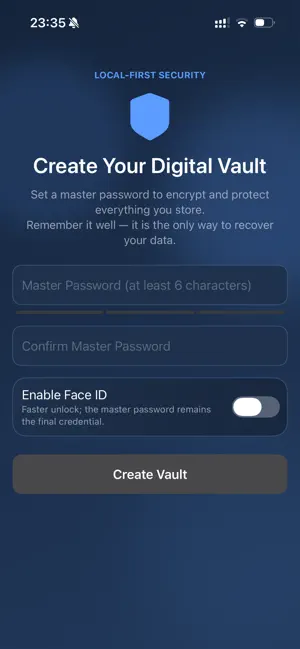
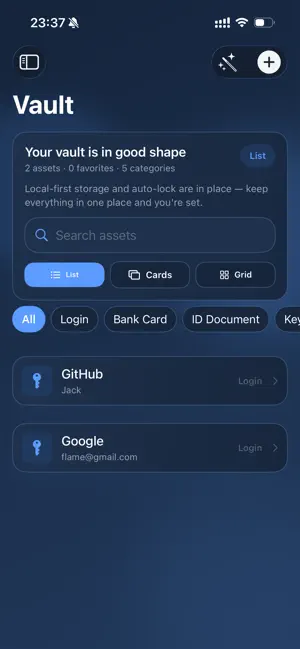
The more accounts you create, the messier your passwords get: plain text in Notes, forgotten browser logins, card numbers buried in chat history. One leak can cost far more than a single account. PassKeeper turns your phone into a personal vault for everything digital: logins, bank cards, IDs, two-factor codes and private notes, all encrypted and ready in a tap. KEY FEATURES 1. Every asset type: logins, bank cards, ID documents, keys and backup codes, private notes, Wi-Fi, servers, memberships, plus fully custom types and fields. 2. Built-in 2FA: one-time codes (TOTP) generated locally in real time, no separate authenticator needed. 3. Strong password generator: set length and character sets, get a strong random password, and spot weak or reused ones at a glance. 4. Multiple ways to unlock: master password, Face ID, Touch ID or a gesture pattern, with auto-lock you control. 5. Photo attachments: snap cards and receipts; they are encrypted together with each entry. 6. Backup and migration: encrypted backups and export keep your data safe across devices; optional iCloud sync uploads ciphertext only. 7. Thoughtful details: auto-clearing clipboard, privacy screen when you switch apps, and search by the last digits of a card or ID. WHEN YOU NEED IT Sign in to work email in the morning with one Face ID glance; pull up ID and card details at the counter; keep 2FA secrets handy and generate codes on the go; look up hotel Wi-Fi passwords instantly; hand your phone to someone else and lock everything in a second. WHY PASSKEEPER 1. Local first: your data stays on your device by default. No servers involved. 2. Ciphertext-only sync: anything synced via iCloud is encrypted on your device first; the cloud never sees plain text. 3. No account, no ads, no tracking: open the app and start, no sign-up required. 4. Fully customizable: more than a password tool, a personal digital asset manager. 5. Transparent cryptography: AES-256-GCM and ChaCha20-Poly1305 authenticated encryption, keys derived from your master password on device and wiped when locked. OUR PROMISE We cannot recover your master password, and that is exactly why nobody can peek at your data. Remember it well: it is the only key to your vault. The app speaks 23 languages including English, Chinese, Japanese, Korean, German, French, Spanish, Portuguese, Russian and Arabic. Download PassKeeper now and put your digital life in a vault only you can open.
App privacy
The developer, 东申 王, reported these privacy practices to Apple.
Data Not Collected
The developer does not collect any data from this app.
Alternatives to PassKeeper - Password Tool
Looking for apps like PassKeeper - Password Tool? Here are 6 similar apps on the App Store. The highest rated is Password Tool Help (5.0/5), and 5 of the 6 are free to download.
-
 密枢 Passkey - 密码安全管家
-
 兰台秘典 - 密码管理器
-
 keyPlex – Passwort-Manager
-
 My Passwords: Password Manager
-
 PassGuard: Password Vault
-
 Password Tool Help
5.0
Password Tool Help
5.0
| App | Rating | Price | Last updated | Compare |
|---|---|---|---|---|
| PassKeeper - Password Tool | – | Free | September 23, 2026 | |
| 密枢 Passkey - 密码安全管家 | – | 0.99 USD | May 13, 2026 | Compare |
| 兰台秘典 - 密码管理器 | – | Free | Jul 11, 2026 | Compare |
| keyPlex – Passwort-Manager | – | Free | Aug 1, 2026 | Compare |
| My Passwords: Password Manager | – | Free | Jun 29, 2026 | Compare |
| PassGuard: Password Vault | – | Free | Oct 11, 2026 | Compare |
| Password Tool Help | 5.0 / 5 (1) | Free | Jun 11, 2025 | Compare |