

RitLoop: Slow Downer & Loops
IGNACIO AMPURDANES RUZ Music iPhoneiPadiPod touchMac
RitLoop: Slow Downer & Loops is a free Music app for iPhone and iPad by IGNACIO AMPURDANES RUZ. Requires iOS 26.0. Updated October 27, 2026.
- Price
- Free
- on the App Store
- Size
- 31 MB
- Age 4+
- Updated
- Oct 27
- 2026 · v1.0.4
Screenshots

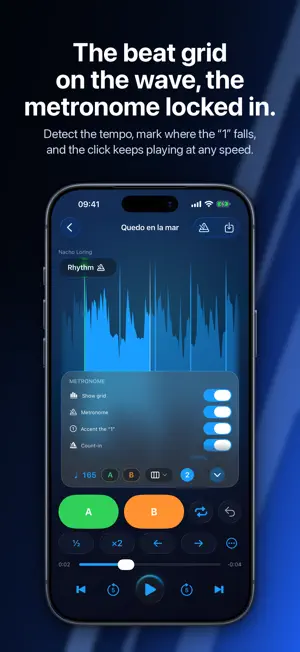


About RitLoop: Slow Downer & Loops
Study, practice, and transcribe music by ear. Without fighting your player. RitLoop slows down any song you own without the pitch going up or down, changes the pitch without touching the speed, and repeats the hard part as many times as it takes. It's built for the way you already practice: listening and playing along at different tempos, over and over, until you've got it. HOW YOU PRACTICE WITH RITLOOP 1. Import your own music from Files. No account, no connection needed. 2. Hit play and set A and B on the fly, while it plays. The loop starts repeating on its own. 3. Slow it down, repeat, and creep back up to the original tempo. A-B LOOPS SET BY EAR • Set A and B on the fly, as many times as you like, and undo if you overshoot. • Or drag on the waveform, if you'd rather see it before you set it. • Save a loop with a name ("chorus," "bridge," "solo") and come back to it whenever you want. • Every loop remembers the speed and pitch you left it at. • Group a song's loops into sections and reorder them. • Fine-tune A and B to the millisecond, with a mini waveform and onset detection. • Halve a loop, double its length, or shift the whole thing. TEMPO AND PITCH, SEPARATELY • Speed from 25% to 175%, the full range, uncapped. • Pitch from −12 to +12 semitones without touching the speed. • Zoom into the waveform to find the exact spot, up to 300×. THE METRONOME Standalone, from 40 to 300 BPM, with tap tempo, time signature, subdivisions, and accents. THE TUNER Chromatic, with reference A from 400 to 480 Hz and transposition for B-flat, E-flat, and F instruments. THE RHYTHM GRID (PRO) • Detects the song's tempo and time signature, with ½ and ×2 correction. • Mark where the "1" falls and the beat grid is drawn over the waveform. • With the tempo detected, snap A and B to the grid with one tap: to the bar, or to the quarter, eighth, or sixteenth note. • The metronome plays over the song and stays locked in when you change the tempo. • Count-in click, pickups included. YOUR LIBRARY • Nested folders, like in Files. Import a whole tree at once. • Rename, move, batch-select, search, and sort four ways. • Plays in the background, and you control it from the Lock Screen or your headphones. • Import a video and RitLoop keeps its audio. EXPORT WHAT YOU PRACTICE (PRO) • Export the loop as M4A, WAV, or FLAC, 1 to 50 repeats, with the tempo, pitch, and click already rendered in. • Or export the whole song at a different tempo and pitch. YOUR LOOPS ON ALL YOUR DEVICES (PRO) Your loops and folders sync through your own iCloud. Set a loop on your iPhone and it's on your Mac by the time you sit down to play. PRIVACY No accounts, no ads, no tracking, no data collection. Your audio stays on your device, and the rest travels through your own iCloud, never through a server of ours. FREE FOR 7 DAYS, THEN IT'S YOUR CALL RitLoop is free, and for the first 7 days everything is unlocked except iCloud sync, which is part of RitLoop Pro. When the trial ends, you switch to the free plan, and your music, loops, and folders are still there: nothing is deleted and everything still plays. The free plan includes 3 songs, 1 saved loop per song, unlimited on-the-fly A-B loops, the full 25% to 175% speed range, the whole standalone metronome, the tuner, unlimited folders and full library management, and zoom up to 10×. RitLoop Pro adds pitch shifting, the rhythm grid and the click over the song, export, A and B fine-tuning, loop operations (halve, double, shift), zoom up to 300×, video import, unlimited songs and loops, and iCloud sync. It unlocks forever with a one-time purchase, no subscription: Pro for iPhone and iPad, Pro for Mac, or the complete pack. I'm a professional drummer and a developer. I've spent years practicing with apps like this, and every one of them was missing something. So I built my own, native for iPhone, iPad, and Mac.
What’s new
Version 1.0.4 · Updated October 27, 2026
• New chromatic tuner, in the same sheet as the metronome and with its own button in the Library. You can set the reference A with presets from 415 to 465 Hz, transpose for B-flat, E-flat, and F instruments, and show note names as Do Re Mi or C D E. The microphone is used only for tuning and doesn't record anything. • The metronome in the Library now remembers its tempo, time signature, subdivision, and accents when you close it and when you reopen the app. • More reliable audio after pauses, calls, alarms, and headphone changes. The timer alert no longer plays over the audio when you resume playback. • "Restore Purchases" now lets you know when a purchase can't be verified. • Stability improvements to importing and iCloud sync.
App privacy
The developer, IGNACIO AMPURDANES RUZ, reported these privacy practices to Apple.
Data Not Collected
The developer does not collect any data from this app.
Alternatives to RitLoop: Slow Downer & Loops
Looking for apps like RitLoop: Slow Downer & Loops? Here are 6 similar apps on the App Store. The highest rated is Mister Montuno (5.0/5), and all 6 are free to download.
-
 B4CKBE4T: Metronome & Setlists
-
 Músicos profesionales
-
 Music Pitch & Speed Changer
-
 Mister Montuno
5.0
-
 スロー耳コピ
-
 Audelier
| App | Rating | Price | Last updated | Compare |
|---|---|---|---|---|
| RitLoop: Slow Downer & Loops | – | Free | October 27, 2026 | |
| B4CKBE4T: Metronome & Setlists | – | Free | Jun 14, 2026 | Compare |
| Músicos profesionales | – | Free | Oct 13, 2026 | Compare |
| Music Pitch & Speed Changer | – | Free | Oct 14, 2026 | Compare |
| Mister Montuno | 5.0 / 5 (2) | Free | Sep 10, 2026 | Compare |
| スロー耳コピ | – | Free | Sep 30, 2026 | Compare |
| Audelier | – | Free | May 28, 2026 | Compare |