

Secret Selfie: Photo Vault
MGK, KK Photo & Video iPhoneiPadiPod touch
Secret Selfie: Photo Vault is a free Photo & Video app for iPhone and iPad by MGK, KK. Requires iOS 16.0. Updated September 23, 2026.
- Price
- Free
- on the App Store
- Size
- 49 MB
- Age 4+
- Updated
- Sep 23
- 2026 · v0.1.2
Screenshots


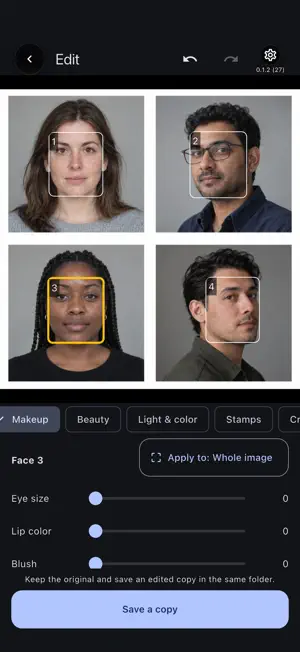
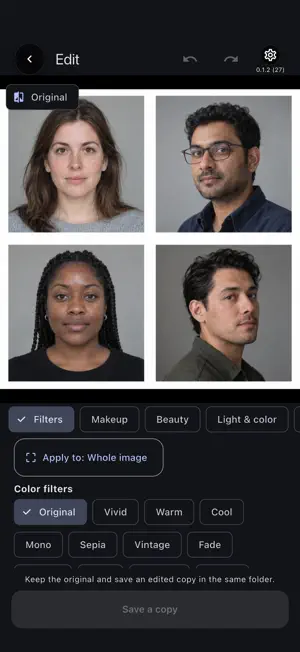
About Secret Selfie: Photo Vault
My selfies. My secret. Capture beautiful selfies, add makeup and filters, and keep them in private albums. Use two passwords to separate photos you show from selfies just for you. Password protection requires an active subscription. When it expires, both collections are viewable without a password. Previously Photos+. MAKEUP, RETOUCH AND FILTERS Adjust eye makeup, lip color and blush on the person you select in a photo. Makeup uses on-device face-position detection and does not identify anyone. Brightening and smoothing in the camera adjust the whole image. CAPTURE AND EDIT ON YOUR DEVICE Take photos and videos directly into the collection you have open. Combine color filters, brightening, smoothing and multiple stamps. Effects are included in your captures; a separate unedited capture is not kept. Edit saved photos and videos with filters, art effects, crop, rotation, text and stamps. Apply effects to selected areas. Trim or mute videos. For photos, Makeup uses on-device face-position detection for the person you select; it does not identify anyone. Save an edited copy while keeping the original. TWO PASSWORDS, TWO COLLECTIONS The decoy password opens your decoy folders. The real password or enabled Face ID opens your private folders. The decoy side cannot see the private collection or change its password or security settings. An active subscription is required for password protection. ORGANIZE AND BACK UP Create folders, choose colors and cover photos, search, mark favorites, share and export to the device photo library. Deleted items stay in the app's trash for 30 days unless permanently deleted. Optionally save encrypted backups of both collections to your own iCloud Drive, including photos, videos, folders, trash and restoration keys. Keep your separate 8-digit backup code safely outside the device. Restore before initial setup on a new device; existing app data is not overwritten. The latest three completed backups are kept. Available iCloud storage is required. 10 INTERFACE LANGUAGES English, Japanese, German, Spanish, French, Portuguese, Turkish, Korean, Simplified Chinese and Traditional Chinese. Choose a language during the introduction or from the gear menu. English is used when your device language is unsupported. English and Japanese help pages are available. PRIVACY AND PERMISSIONS Photos and videos are stored encrypted on your device. We do not send them to our servers or external AI services for storage or editing. Sharing, exporting and optional iCloud backups send the content you choose to your chosen destination. Full photo-library access is required for importing, deleting originals when you choose, and exporting. Keep your passwords, recovery key and backup code safe; we cannot recover them for you. PREMIUM MONTHLY PLAN • A monthly auto-renewable subscription is required. • Eligible customers receive 3 months free. After the trial, it renews each month at the price displayed in the app and App Store, until cancelled. Prices vary by country or region. • Tap the subscription button and confirm in the App Store to begin. Installing the app alone does not start a trial or subscription. • Cancel at least 24 hours before renewal through device Settings > your name > Subscriptions > this app’s monthly plan. Deleting the app does not cancel the subscription. Restore purchases with the Apple Account used to subscribe. • IMPORTANT: When the subscription expires, both collections can be viewed without a password. Maintain an active subscription to keep password protection. Existing items can still be exported, but new items cannot be added. Privacy: https://mgkinc.co.jp/photos/en/privacy.html Support: https://mgkinc.co.jp/photos/en/support.html Terms of use (Apple standard EULA): https://www.apple.com/legal/internet-services/itunes/dev/stdeula/
What’s new
Version 0.1.2 · Updated September 23, 2026
• Renamed the app to Secret Selfie. • Added a new icon and updated our introduction to focus on keeping selfies private. • The app icon now appears for two seconds at launch and when returning from the background.
App privacy
The developer, MGK, KK, reported these privacy practices to Apple.
Data Not Collected
The developer does not collect any data from this app.
Alternatives to Secret Selfie: Photo Vault
Looking for apps like Secret Selfie: Photo Vault? Here are 2 similar apps on the App Store. The highest rated is Stampa - Stamps Camera (4.3/5), and 1 of the 2 are free to download.


| App | Rating | Price | Last updated | Compare |
|---|---|---|---|---|
| Secret Selfie: Photo Vault | – | Free | September 23, 2026 | |
| Secret Photo+Folder | 1.7 / 5 (3) | 5.99 USD | Sep 29, 2026 | Compare |
| Stampa - Stamps Camera | 4.3 / 5 (81) | Free | Aug 26, 2026 | Compare |