

ReadLens: Magnifier Read Aloud
Techinn Solutions Utilities iPhoneiPadiPod touch
ReadLens: Magnifier Read Aloud is a free Utilities app for iPhone and iPad by Techinn Solutions. Requires iOS 18.0. Updated October 22, 2026.
- Price
- Free
- on the App Store
- Size
- 15 MB
- Age 4+
- Updated
- Oct 22
- 2026 · v1.1.1
Screenshots



About ReadLens: Magnifier Read Aloud
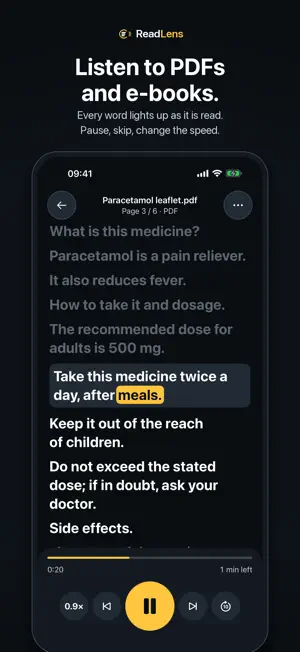
ReadLens is a magnifier that reads aloud. Point the camera at a letter, a label or a menu to make small print big and sharp, then tap Read and hear it in a natural voice. It reads your documents too: open a PDF or e-book, or share a web page, and every word lights up as it is spoken. MAGNIFIER THAT READS ALOUD • A magnifying glass with up to 15x zoom, a steady, sharp picture and a three-level light. • Freeze the frame, then zoom or read without holding still. • Six contrast filters, including white on black, yellow on black and black on yellow. • Tap Read and the text in front of the camera is read out loud, line by line. Menus, medicine boxes, bank letters, price labels. LISTEN TO YOUR DOCUMENTS • Open PDF, EPUB, Word (DOCX), RTF and text files from Files, Mail or any app. • Share an article from Safari and listen to it without the clutter. • Paste text from the clipboard, or pick a photo or screenshot and ReadLens reads the text in it. • Scanned PDFs work too: text recognition (OCR) runs on your iPhone. • Your library keeps every document in folders and remembers where you stopped. A READER BUILT FOR LISTENING • Word-by-word highlighting, so you can follow along or look away. • Speed from 0.5× to 2× (up to 3× with Pro), skip ahead 10 seconds, step back or forward a sentence at a time, jump between chapters. • Keeps reading with the screen locked. Control it from the lock screen, Control Center or your headphones. • Sleep timer for reading in bed. • Large, clear type and a warm Paper theme for tired eyes. MADE FOR LOW VISION • A big Read button that is always in the same place. • Text contrast of 7:1 or better, large type everywhere, full VoiceOver support. • Controls on the left or right side, whichever your thumb reaches. VOICES ReadLens uses the best voice installed on your iPhone and shows you how to download enhanced voices from Settings at no cost. Pick a separate voice for each language. English, Turkish, German, Spanish and French are tuned and tested. PRIVATE AND OFFLINE Text recognition and speech run on your iPhone. Your documents are never uploaded, there is no account, no tracking and no ads. Reading your own files needs no internet at all. FREE AND PRO Free, every day: the full magnifier with every filter and the light, five camera reads and two documents. ReadLens Pro removes the limits and adds continuous camera reading, your choice of voice, 3× speed, the sleep timer and chapters. Pro is an auto-renewing weekly or yearly subscription; the yearly plan starts with a 3-day free trial. Payment is charged to your Apple Account at confirmation of purchase. The subscription renews automatically unless it is cancelled at least 24 hours before the end of the current period, and you can manage or cancel it any time in your Apple Account settings. If you bought the lifetime Pro in version 1.0, you keep it. WHO IT IS FOR People with low vision, macular degeneration, cataracts or tired eyes. Students and readers with dyslexia who follow better by ear. Anyone who would rather listen to a long PDF, report or article on a walk or with the lights off. ReadLens reads what is written, word for word, and tells you when it cannot read something. It is a reading aid, not a medical device. Terms of Use: https://readlens.techinn.solutions/terms/ Privacy: https://readlens.techinn.solutions/privacy/ Support: [email protected]
What’s new
Version 1.1.1 · Updated October 22, 2026
• Smoother first read • Fixes and reliability improvements
App privacy
The developer, Techinn Solutions, reported these privacy practices to Apple.
Data Not Linked to You
The following data, which may be collected but is not linked to your identity, may be used for the following purposes:
- Usage Data: Advertising Data, Product Interaction
- Purchases: Purchase History
- Identifiers: User ID
Used for: Developer’s Advertising or Marketing, Analytics, App Functionality
Alternatives to ReadLens: Magnifier Read Aloud
Looking for apps like ReadLens: Magnifier Read Aloud? Here are 6 similar apps on the App Store. The highest rated is Live Reads (2.3/5), and all 6 are free to download.
-
 Wolpz - AI Text to Speech
-
 Magnifier: Read Aloud & Zoom
-
 Bri Vision
-
 Lensly — Magnifier & Zoom
-
 Color Tell - Color Identifier
-
 Live Reads
2.3
| App | Rating | Price | Last updated | Compare |
|---|---|---|---|---|
| ReadLens: Magnifier Read Aloud | – | Free | October 22, 2026 | |
| Wolpz - AI Text to Speech | – | Free | Sep 17, 2026 | Compare |
| Magnifier: Read Aloud & Zoom | – | Free | Sep 3, 2026 | Compare |
| Bri Vision | – | Free | Aug 28, 2026 | Compare |
| Lensly — Magnifier & Zoom | – | Free | Jul 23, 2026 | Compare |
| Color Tell - Color Identifier | – | Free | Oct 2, 2026 | Compare |
| Live Reads | 2.3 / 5 (3) | Free | Jun 11, 2025 | Compare |