

FitMyFile
Mustafa Aljuhani Utilities iPhoneiPadiPod touch
FitMyFile is a free Utilities app for iPhone and iPad by Mustafa Aljuhani. Requires iOS 17.0. Updated September 21, 2026.
- Price
- Free
- on the App Store
- Size
- 2 MB
- Age 4+
- Updated
- Sep 21
- 2026 · v1.0
Screenshots

About FitMyFile
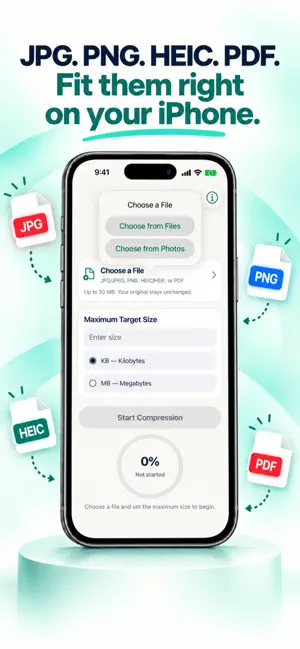
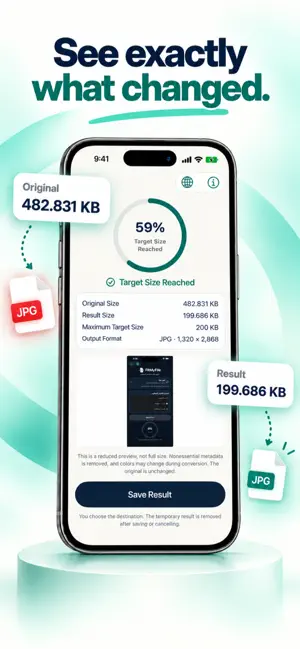
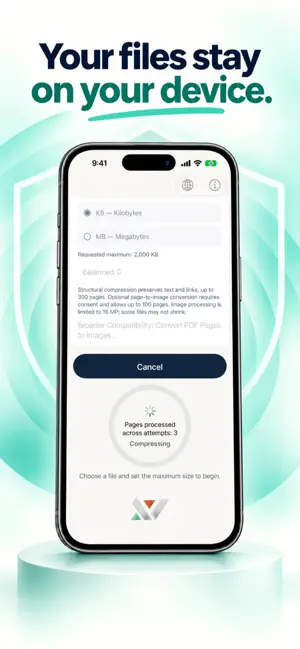
Make your file fit with FitMyFile. Prepare supported images and PDFs for attachment and upload size limits. Choose your file, set a maximum size in kilobytes or megabytes, and review the result before saving. SIMPLE TO USE • Choose an image from Photos or a document from Files. • Set your target size and choose Higher Quality, Balanced, or Smaller Size. • Review the original size, result size, and reduction percentage. • Save the result to your chosen destination or share it using iOS sharing options. SUPPORTED FILES Supports JPG/JPEG, PNG, HEIC/HEIF, and PDF, up to 50 MB per input file, with additional limits to protect device resources. FitMyFile supports image-based and scanned PDFs and attempts to optimize eligible text, mixed-content, and form PDFs while checking content preservation. Some files may require your permission to convert pages into images, which removes features such as selectable text and links. Some protected or complex files are unsupported. Opening a password-protected file requires appropriate permissions, and the resulting output is unencrypted. YOUR FILES STAY UNDER YOUR CONTROL Files are processed on your device, with no FitMyFile account, no uploads to FitMyFile servers, no advertising, and no tracking. Your original file remains unchanged. Cloud destinations and sharing services may require an internet connection. FREE USE AND PRO The app includes three free results. Each result is counted once when iOS reports that saving or sharing completed successfully. Failed or cancelled exports do not count. To continue without an operation-count limit, choose a monthly Pro subscription or a one-time Lifetime purchase. File-size, compatibility, and device-resource limits still apply. The monthly subscription renews automatically unless you cancel renewal through your Apple account subscription settings. Lifetime is a one-time purchase, not a recurring subscription. Current prices are shown before purchase confirmation. Restore Purchases is available using the same Apple account. CLEAR RESULTS, REALISTIC EXPECTATIONS Not every target size can be reached. Reducing file size may require lower quality or smaller dimensions. FitMyFile tells you when the target cannot be reached so you can decide before saving. Supports English and ten other languages, and follows your device's Light or Dark appearance. Privacy Policy: https://fitmyfile.net/privacy?lang=en Terms of Use: https://fitmyfile.net/terms?lang=en Apple Standard License Agreement: https://www.apple.com/legal/internet-services/itunes/dev/stdeula/
App privacy
The developer, Mustafa Aljuhani, reported these privacy practices to Apple.
Data Not Collected
The developer does not collect any data from this app.
Alternatives to FitMyFile
Looking for apps like FitMyFile? Here are 6 similar apps on the App Store. The highest rated is Meter | متر (4.3/5), and all 6 are free to download.
-
 UnderLimit: PDF Compressor
-
 ghasselha | غسلها
-
 GoldshellZone
4.2
GoldshellZone
4.2
-
 تأجير ستشين
-
 Meter | متر
4.3
Meter | متر
4.3
-
 سمنان | Samnan
2.0
سمنان | Samnan
2.0
| App | Rating | Price | Last updated | Compare |
|---|---|---|---|---|
| FitMyFile | – | Free | September 21, 2026 | |
| UnderLimit: PDF Compressor | – | Free | Oct 3, 2026 | Compare |
| ghasselha | غسلها | – | Free | Mar 2, 2026 | Compare |
| GoldshellZone | 4.2 / 5 (10) | Free | Apr 1, 2026 | Compare |
| تأجير ستشين | – | Free | Jun 29, 2026 | Compare |
| Meter | متر | 4.3 / 5 (127) | Free | Feb 28, 2026 | Compare |
| سمنان | Samnan | 2.0 / 5 (4) | Free | Aug 6, 2026 | Compare |
Compare FitMyFile with the top alternatives: ratings, updates, ASO score and keyword gaps →