

Redact PDF - Black Out Text
KHOTSO PRINCE MOFOKENG Utilities iPhoneiPadiPod touch
Redact PDF - Black Out Text is a free Utilities app for iPhone and iPad by KHOTSO PRINCE MOFOKENG. Requires iOS 15.1. Updated October 10, 2026.
- Price
- Free
- on the App Store
- Size
- 40 MB
- Age 4+
- Updated
- Oct 10
- 2026 · v1.0.1
Screenshots

About Redact PDF - Black Out Text
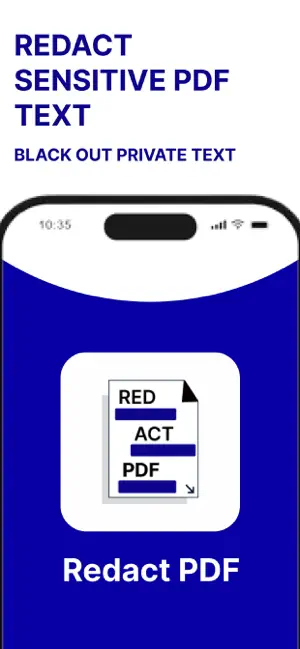
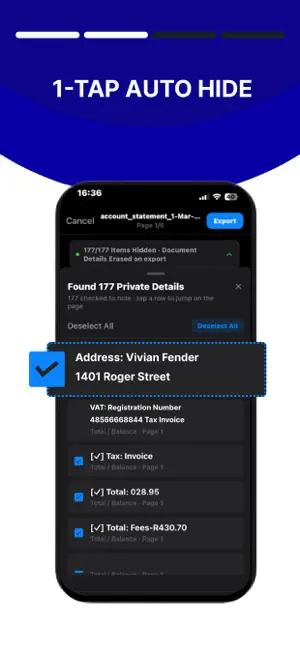
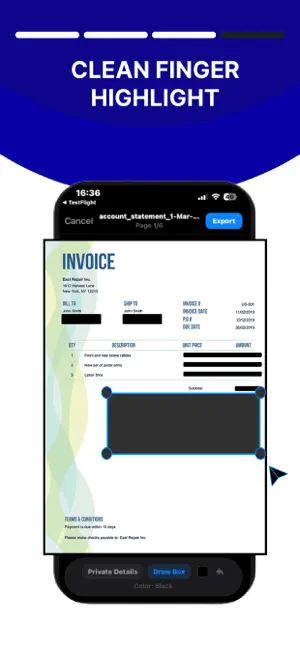
Safely black out sensitive text, account numbers, and personal data on any document before sharing. Most markup tools only draw semi-transparent highlighters that can be easily uncovered by turning image brightness and exposure to 100%. Redact PDF permanently destroys underlying pixels and flattens your document, ensuring hidden information is completely unrecoverable. KEY FEATURES: • 100% On-Device Privacy: Your files never leave your iPhone. Documents are processed entirely offline with zero cloud uploads or third-party servers. • Smart Auto-Detection: Automatically identifies and organizes balances, account numbers, addresses, phone numbers, and emails into an easy checklist. • Touch-to-Snap Brush: Draw straight, clean blackout bars with touch snapping that aligns directly to document text lines. • Exposure-Proof Pixel Burning: Redacted sections are permanently flattened into the export file so they cannot be inspected, reversed, or revealed. • Universal Document Support: Import and redact multi-page PDFs, scans, photos, and receipts directly from the Files app or Camera Roll. • Secure Export: Instantly share sanitized files via AirDrop, Mail, Messages, or cloud storage. PERFECT FOR: • Bank and credit card statements • W-2s, 1099s, and tax filings • Passports, driver's licenses, and IDs • Legal contracts, leases, and invoices • Medical records and private receipts Take control of your personal privacy before you hit send. Terms of Use (EULA): https://www.apple.com/legal/internet-services/itunes/dev/stdeula/ Privacy Policy: https://app.notion.com/p/Privacy-Policy-for-Redact-PDF-3d6d442b3e17807b9bf5d502338deb18?source=copy_link
What’s new
Version 1.0.1 · Updated October 10, 2026
- Universal Auto-Redact: Detect and obscure sensitive info on scanned PDFs, camera photos, receipts, invoices, and IDs using on-device Apple Vision OCR. - Aspect-Fit Canvas: True-to-life preview rendering matches the flattened export exactly, eliminating letterbox distortion. - Pinch-to-Zoom & Pan: Smooth zoom up to 4x for high-density documents and small print. - Smart Threat Filters: One-tap redaction with deduplicated detection across Financial, Personal, Contact, and Tax/ID data. - Refined Redaction Tools: Precision manual box drawing, tap-to-remove adjustments, and permanent CoreGraphics pixel flattening. - Updated visual styling and official app splash branding.
Alternatives to Redact PDF - Black Out Text
Looking for apps like Redact PDF - Black Out Text? Here are 6 similar apps on the App Store. The highest rated is Cachera: Redact ID to PDF (5.0/5), and all 6 are free to download.
-
 RedactIR
-
 Birthday Candle
-
 Cachera: Redact ID to PDF
5.0
-
 Convert WAV - MP3: Audio Files
-
 StripPii
-
 5G Control
| App | Rating | Price | Last updated | Compare |
|---|---|---|---|---|
| Redact PDF - Black Out Text | – | Free | October 10, 2026 | |
| RedactIR | – | Free | Jul 23, 2026 | Compare |
| Birthday Candle | – | Free | Apr 2, 2026 | Compare |
| Cachera: Redact ID to PDF | 5.0 / 5 (1) | Free | Jul 6, 2026 | Compare |
| Convert WAV - MP3: Audio Files | – | Free | Sep 4, 2026 | Compare |
| StripPii | – | Free | Oct 6, 2026 | Compare |
| 5G Control | – | Free | Oct 13, 2026 | Compare |