

Wakebound
OPTIMUMTECH FUSION SRL Lifestyle iPhoneiPadiPod touch
Wakebound is a free Lifestyle app for iPhone and iPad by OPTIMUMTECH FUSION SRL. Requires iOS 16.0. Updated October 24, 2026.
- Price
- Free
- on the App Store
- Size
- 116 MB
- Age 12+
- Updated
- Oct 24
- 2026 · v1.4.0
Screenshots

About Wakebound
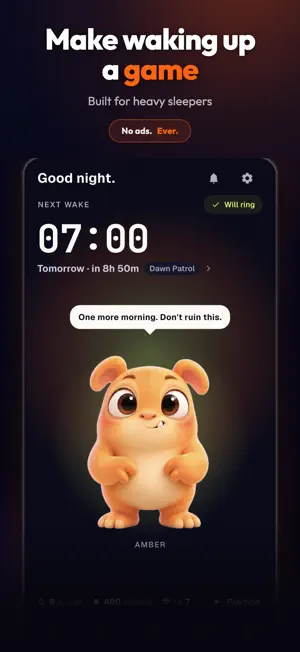
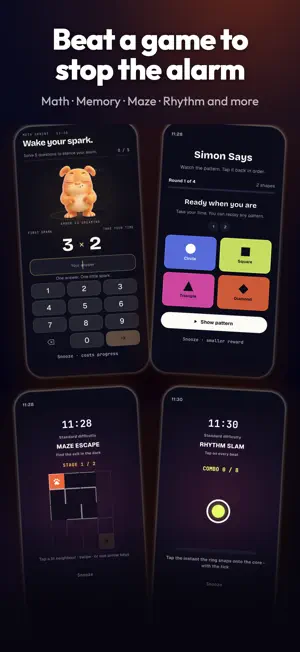
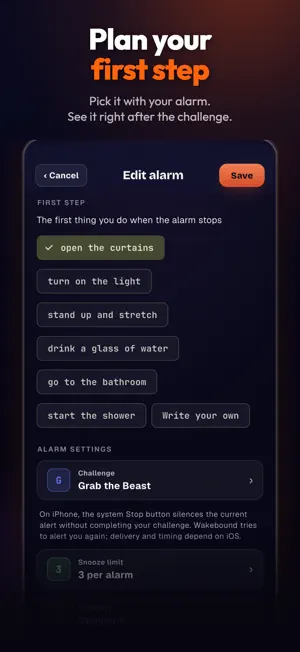
Wakebound turns your alarm into a morning challenge. Set an alarm, choose a wake-up challenge, and build your streak with a cast of beasts. Solve a problem, tap targets, remember a sequence, type a phrase, trace a rune, or take on another challenge before you move on with your day. Make your own morning run: • Set one-time or recurring alarms with your chosen challenge and sound. • Choose challenges including math, memory, typing, trivia, mazes, rhythm, and more. • Follow your wake-up in a visual notification inbox, with your selected character, confirmed snooze times, and a history of alarm events. • Customize optional reminders, notification previews, character animation, and opt-in rival alerts. • Earn progress after a completed wake-up and grow your collection of beasts. • Take on boss battles as you progress. Premium boss gates still require you to earn each battle through play. An unfinished wake-up challenge stays available when you return to Wakebound. On iPhone, alarms and alerts use the system features available on your version of iOS. Allow the relevant permissions and review your device settings. Alert delivery and sound behavior depend on iOS and your settings; Wakebound does not prevent you from leaving the app or using your phone. PREMIUM Premium is optional. Waking up reliably stays free. Free keeps 3 alarms on at once and a set of wake-up challenges. Premium unlocks every wake-up challenge, Brutal difficulty, Premium sounds, Premium boss gates and as many alarms as you like. Choose a monthly or yearly subscription, or Lifetime, a one-time purchase that does not renew. New subscribers can start Yearly with a 2-week free trial. Subscriptions renew automatically until you cancel. Cancel at least 24 hours before the renewal date in your Apple Account settings. Apple shows the local price before you confirm. Restore a prior purchase with the Apple Account that made it. Terms of Use: https://support.wakebound.app/terms Privacy Policy: https://support.wakebound.app/privacy
What’s new
Version 1.4.0 · Updated October 24, 2026
Your first alarm keeps going, and Wakebound now sounds like itself. • Your first alarm now repeats on weekdays, with a first ring on the weekend too, instead of ringing once and switching off. • Fixed: on some older iPhones, an alarm set for certain weekdays (like Monday to Friday) could fail to set. • Saving an alarm twice in a row no longer makes a copy, and if a save fails, Wakebound tells you. One-time alarms now read "Once". • Setup no longer sends you to Settings when your permissions are already fine. • New interface sounds for taps, sheets and errors. You can turn them off in Settings. • Rivals: a new Friends tab shows your requests, your record with each rival and a quick challenge button. Other players no longer see the time you woke up. • Before Rivals, player names and invites, Wakebound asks once for your birth month and year. Your answer stays on your phone. • If a player name is removed, you now see why and how to challenge it. • After a few good mornings, Wakebound may ask once for a rating. • Clearer notes on what the iPhone Stop button does, when the wake-up check ends and what a stuck challenge switches to. • More reliable sign-in when an alarm opens the app, and no more Apple sign-in prompt at launch on some older iPhones.
App privacy
The developer, OPTIMUMTECH FUSION SRL, reported these privacy practices to Apple.
Data Linked to You
The following data, which may be collected and linked to your identity, may be used for the following purposes:
- Purchases: Purchase History
- Usage Data: Product Interaction
- Other Data: Other Data Types
- Contacts: Contacts
- User Content: Emails or Text Messages, Gameplay Content, Other User Content
- Identifiers: User ID, Device ID
Used for: Analytics, App Functionality
Data Not Linked to You
The following data, which may be collected but is not linked to your identity, may be used for the following purposes:
- Identifiers: Device ID
- Diagnostics: Other Diagnostic Data, Crash Data
Used for: Analytics, App Functionality
Alternatives to Wakebound
Looking for apps like Wakebound? Here are 6 similar apps on the App Store. The highest rated is Nua: Numerology & Astrology (4.9/5), and all 6 are free to download.
-
 Morning Winner: You vs Bed
-
 WakeUpLa: Mission Alarm Clock
-
 Heavy Sleeper Loud Alarm Clock
-
 Floofers Pet Care Tracker
-
 Nua: Numerology & Astrology
4.9
Nua: Numerology & Astrology
4.9
-
 Eye Makeup Artistry - Tutorial
4.5
Eye Makeup Artistry - Tutorial
4.5
| App | Rating | Price | Last updated | Compare |
|---|---|---|---|---|
| Wakebound | – | Free | October 24, 2026 | |
| Morning Winner: You vs Bed | – | Free | Oct 4, 2026 | Compare |
| WakeUpLa: Mission Alarm Clock | – | Free | Oct 23, 2026 | Compare |
| Heavy Sleeper Loud Alarm Clock | – | Free | Oct 9, 2026 | Compare |
| Floofers Pet Care Tracker | – | Free | Jun 21, 2026 | Compare |
| Nua: Numerology & Astrology | 4.9 / 5 (12) | Free | Oct 9, 2026 | Compare |
| Eye Makeup Artistry - Tutorial | 4.5 / 5 (74) | Free | May 27, 2026 | Compare |
Compare Wakebound with the top alternatives: ratings, updates, ASO score and keyword gaps →