

Auridora: Smart Alarm & Shifts
SALVATORE DANIELE SCALA Utilities iPhoneiPadiPod touch
Auridora: Smart Alarm & Shifts is a free Utilities app for iPhone and iPad by SALVATORE DANIELE SCALA. Requires iOS 17.0. Updated October 19, 2026.
- Price
- Free
- on the App Store
- Size
- 45 MB
- Age 4+
- Updated
- Oct 19
- 2026 · v0.7.25
Screenshots



About Auridora: Smart Alarm & Shifts
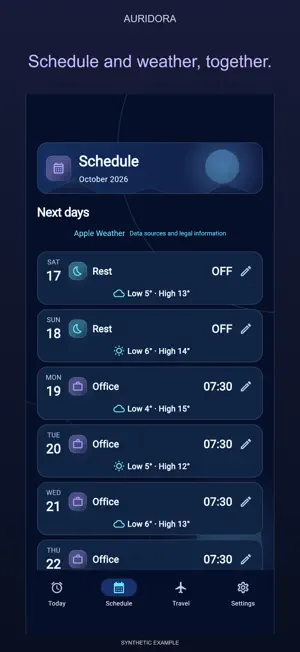
A wake-up plan for working days that do not all look alike. Auridora brings your next alarm, its reason and a countdown into one clear view. PLAN YOUR ROUTINE Regular hours lead straight to fixed workdays; shifts have their own setup. Tap a date to change only that day. The countdown and optional alarms on days off remain. Language and work country are proposed from the device, independently, and can be changed. Shift codes transfer a sequence and its start date, not alarm times. REVIEW CALENDAR COMMITMENTS Calendar access is optional. Review relevant proposals before confirming them. A changed commitment may need your approval again: a proposal is not a scheduled alarm. Corporate calendar visibility depends on your device and employer policies. PREPARE A TRIP With a usable saved origin, a resolved destination and Maps enabled, opening a journey calculates a proposed wake time, departure, duration and distance automatically. Home is reused after restart. Review or edit the proposal, then confirm once. A relevant stop can use two separate legs. Manual durations remain available. Estimates do not guarantee traffic or arrival. CHOOSE YOUR SOUND Four included Wake Sounds, supported local audio imports and five separate Rest environments. Rest has playback controls and a timer; it does not change your wake alarm. Weekly reminders are separate from alarms. IMPORT A SHIFT IMAGE Open Shifts and choose Photo or Manual without restarting setup. Take or select a photo, adjust crop corners and edges, then tap Read this roster once. The proposal opens automatically: check dates, shifts and uncertain cells, correct and explicitly save. Reading never activates alarms. On-device recognition does not support every roster layout. No mandatory Auridora account. No advertising. Core plans stay on your device; optional Maps and support use their respective services; supported holiday data is bundled locally. Interface languages: English, Italian, Spanish, French, German, Simplified Chinese and Hindi. Language does not determine holiday country or time zone. Requires iOS 17 or later. On iOS 26 and later, wake alarms use AlarmKit. On iOS 17–25, the app schedules sound notifications, subject to Silent, Focus and notification settings. These are not equivalent to AlarmKit. Reopen the app periodically to renew the finite schedule. Invalid local audio or sounds at least 30 seconds long use the default notification sound. FOUR NEW SKINS AND WEATHER IN YOUR DAYS Choose Aurora Glow, Alba Chiara, Pulse Motion or Neo Calm while keeping the existing skins. A compact Home centers your alarm time and shows the next three days. Enable optional weather to see a symbol, low and high for each day at the device location. Weather never changes alarms and requires a network, location while using the app and Apple Weather availability. Configure Home and Work directly from Settings. Routine opens your active configuration; profile switching remains available. Shifts appears only for a shift-work profile. Clearer calendar-source status, contextual location controls and confirmation before deletion. More robust saving of individual dates and leave periods, with handling for write errors and partial data. Start with a full seven-day trial. When it ends, nothing is charged automatically. Continue only if you choose the optional one-time Full Unlock shown by the App Store. No subscription.
What’s new
Version 0.7.25 · Updated October 19, 2026
Fixed an issue that could require tapping Retry after granting location access for weather. Loading now continues after permission is granted, without that extra step. Actual network or location errors may still require another attempt.
App privacy
The developer, SALVATORE DANIELE SCALA, reported these privacy practices to Apple.
Data Linked to You
The following data, which may be collected and linked to your identity, may be used for the following purposes:
- Contact Info: Email Address
- User Content: Customer Support
Used for: App Functionality