

Tarjetas: Spanish Flashcards
Vladyslav Pysarenko Education iPhoneiPadiPod touch
Tarjetas: Spanish Flashcards is a free Education app for iPhone and iPad by Vladyslav Pysarenko. Requires iOS 15.0. Updated October 13, 2026.
- Price
- Free
- on the App Store
- Size
- 69 MB
- Age 12+
- Updated
- Oct 13
- 2026 · v1.7
Screenshots


About Tarjetas: Spanish Flashcards
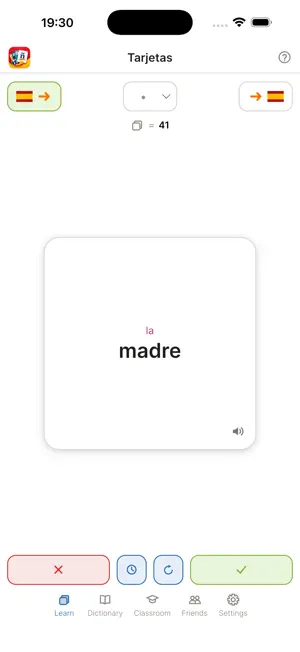
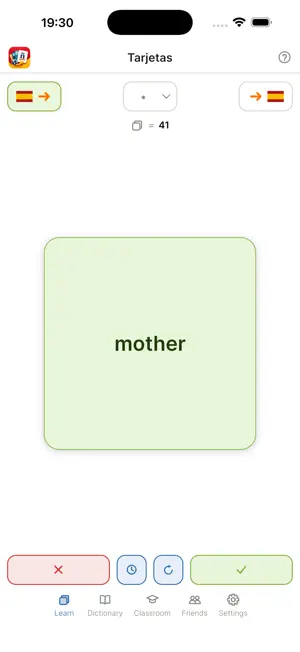
'Tarjetas' is a flashcard app for learning Spanish from your own word list. You add the words you actually meet — in a lesson, a book, a conversation — and drill them until they stick. It works with no connection at all, and stays that way unless you choose otherwise. WHAT IT DOES • Your own dictionary. Add nouns with their article and verbs with their conjugation — one at a time, or a whole list at once by photographing it, picking a picture, opening a file or saying the words aloud. Search it, edit it, tick words to file or delete together. • Articles that teach themselves. El and la are colored by gender everywhere a word appears, so the gender is learned along with the word rather than after it. • Verbs, six forms at a time. Type a regular verb and the present tense fills itself in: hablo, hablas, habla, hablamos, habláis, hablan. An irregular verb is typed once and kept. Drills ask one person at a time, not just the infinitive. • Topics you choose. File a word under any emoji — a house, a paw, an apple — and drill one topic at a time, all at once, or verbs alone. • On all your devices. Link a tablet, another phone or a browser with a code and it arrives with your words, then send new ones across. Or move to a new phone, and export your words to a file and back. • Both directions. Ask Spanish to your language, or your language to Spanish. • Type or say the answer. Write the word instead of only turning the card over — spelling and accents count — or speak it in Spanish, where your phone's own speech recognition listens and only the text reaches the app. • Numbers. A drill of generated numbers, for the part of a language no word list covers. • Spaced repetition. A clock deals what is due: a word you know comes back in a day, then three, then a week, three weeks, two months; one you miss, at once. • It speaks. A button on the card says the Spanish aloud, in the voice your phone already has. FOR A CLASS • A teacher makes a class and reads out its code. Students type it and the lessons arrive. A class can also have a key, so the code alone is not enough. • A lesson is its own small dictionary. Drill just this week's words, or all of them. • Nothing is taken over your head. When a lesson brings a word you already have, you are asked which wording to keep. • Homework. A teacher sets it on a lesson, you hand in an answer, and it comes back marked. • Quizzes. True-or-false, multiple-choice and typed questions, run live with the class, with medals for the top three. • The teacher sees who has joined, the day you were last there — not the time — and the homework you hand in. The class sees each other's names and a quiz's results. Nobody sees your dictionary or your drills. FRIENDS • Add somebody by their eight-character code. No email address, no search, no suggestions. • Send a friend your dictionary. They choose what to take, word by word, and their wording wins unless they say otherwise. PRIVACY There is no sign-up. No email address, no password, no phone number, no real name — the name you type is whatever you want to be called. Nothing you type leaves your phone until you use the part that needs somebody else's device, or move or link your own. What leaves then is the name and emoji you chose, the code people find you by, and what you hand over on purpose — a class, a request, words sent to a friend or your other device, homework and quiz answers, a report. A move or a link adds the rest, sealed with a code the server never sees, and a link each device's kind and model. A photographed list is read on your phone, unless you set Recognition to the cloud: then OCR.space reads it, with no name or code attached. No advertising, no tracking, no analytics of the app's own. Nothing is sold. Everything held about you can be deleted from inside the app, in one place. Schools that would rather hold their own data can run the server themselves. Full policy: https://elzianor.github.io/Tarjetas/privacy.html
What’s new
Version 1.7 · Updated October 13, 2026
Linked devices, ticking words, longer groups, and a clock for the words that are due. Your account can now be on more than one device at once. On the Friends page, the blue chain beside the field shows a code to type on your other device, or asks for the one it shows. The device you link arrives as a full copy, words and all, and nobody is signed out. Your other devices head the friends list, each by its kind and model. Each row sends this device's words to that one, takes the words it sent you, or unlinks it. While another device holds your account, the bin in Settings unlinks only this one. Tarjetas also runs in a web browser, at tarjetas.elzianor.com, and a browser links like any other device. Hold a word in the dictionary to tick it, then tap others to tick them too. The blue pencil puts every ticked word in one group, and the bin deletes them all after asking. A group can now be up to five letters or emoji. A round now deals every word in its group. A clock beside the refill button deals only what is due in the group you picked: new words, words you missed, and the rest when their day comes. The hourglass is gone from the group picker, since the clock does its work. A new word you know at first sight waits a day before it comes back. A quick flick grades the card, which flies off the side you swiped it to. Text too long for the card shrinks to fit it, a long word stays whole, and a long typed answer wraps. A number card keeps its whole spelling, so the whole number typed or said is right. A verb can leave some of its forms empty, as llover has to, after a warning that shows which. A long press on any field offers Paste, and a teacher can copy a class's code from beside the class picker. Fixed: the el / la beside a noun's button on the add form could go blank after an edit, and a friend's dictionary or a class lesson holding an empty entry could close the app as it arrived.
App privacy
The developer, Vladyslav Pysarenko, reported these privacy practices to Apple.
Data Linked to You
The following data, which may be collected and linked to your identity, may be used for the following purposes:
- Contact Info: Name
- User Content: Photos or Videos, Other User Content
- Identifiers: User ID
- Usage Data: Product Interaction
Used for: App Functionality
Alternatives to Tarjetas: Spanish Flashcards
Looking for apps like Tarjetas: Spanish Flashcards? Here are 6 similar apps on the App Store. The highest rated is Spanish Flashcards Quest (5.0/5), and all 6 are free to download.
-
 Spanish Flashcards: Morrowseed
-
 Spanish Flashcards Quest
5.0
-
 (Open Source) Learn Languages
-
 Learn Spanish Word Daily: Lael
5.0
-
 MiiChat Learn English Speaking
-
 Speakbolt - Practice English
| App | Rating | Price | Last updated | Compare |
|---|---|---|---|---|
| Tarjetas: Spanish Flashcards | – | Free | October 13, 2026 | |
| Spanish Flashcards: Morrowseed | – | Free | Sep 3, 2026 | Compare |
| Spanish Flashcards Quest | 5.0 / 5 (1) | Free | Oct 22, 2026 | Compare |
| (Open Source) Learn Languages | – | Free | Oct 15, 2026 | Compare |
| Learn Spanish Word Daily: Lael | 5.0 / 5 (1) | Free | Jun 13, 2026 | Compare |
| MiiChat Learn English Speaking | – | Free | Oct 21, 2026 | Compare |
| Speakbolt - Practice English | – | Free | Aug 31, 2026 | Compare |